

This article concerns API Gateways with public APIs defined with a Regional API Endpoint type.
TL;DR — Step-by-Step Implementation
APIs are fundamental for enabling communication between services in today’s cloud-centric architecture. Amazon Web Services (AWS) offers a powerful API Gateway service, which allows developers to create, publish, maintain, and secure APIs at any scale.
A typical scenario involves services within a VPC needing access to both public and private APIs. The Public APIs have two formats for their URLs:
1. The default URL generated by the API Gateway service: api-id.execute-api.REGION.amazonaws.com
2. A custom domain name (e.g., api.mydomain.com) allowing you to use your user-friendly domain name and certificate.
I’ll first describe and solve the issue of a custom domain name, and then explain how to work with the API Gateway-generated URL.
The issue is hosting your custom domain name outside Route 53 and using a CNAME record.
This article aims to provide seamless access to private and public APIs within the VPC, ensuring efficient and secure service communications.
Using public and private APIs from the same VPC is no problem if your public custom domain names are hosted in Route 53 and use Alias records to point to the API Gateway Domain Name.
As we’ll see below, additional steps are needed to ensure correct DNS resolution and SSL certificate validation when using external DNS providers (which force us to use CNAME records).
Terminology
API Gateway Domain Name
The API Gateway Domain Name is an AWS-managed endpoint created by AWS when configuring your API’s custom domain name. It is an alias for your API’s default endpoint apiID.execute-api.REGION.amazonaws.com, enabling TLS termination and user-friendly URLs.
Here’s how it works:
1. API Gateway Domain Name Structure for the two types of public API endpoints
- Edge-Optimized:
Uses a CloudFront distribution (e.g., d123.cloudfront.net) for global low-latency access.
- Regional:
Uses a region-specific endpoint (e.g., d-abc123.execute-api.us-east-1.amazonaws.com).
2. DNS Configuration
- Your DNS Provider (e.g., GoDaddy):
You create a CNAME record pointing your custom domain name (api.mydomain.com) to the API Gateway domain name (e.g., d-abc123.execute-api.us-east-1.amazonaws.com).
- Example GoDaddy DNS record:
Name: api.mydomain.com
Type: CNAME
Value: d-abc123.execute-api.us-east-1.amazonaws.com
- This record ensures traffic to
api.mydomain.comroutes to the API Gateway’s endpoint.
3. Certificate Association
- AWS Certificate Manager (ACM) Certificate:
When you define a custom domain name in API Gateway, you link it with an ACM certificate (e.g., *.mydomain.com).
- The certificate’s Subject Alternative Name (SAN) must include your custom domain name (e.g.,
api.mydomain.com, or the top-level wildcard*.mydomain.com). - API Gateway uses this certificate for TLS termination at its edge layer.
4. How It Works Together —The Request Flow
- A client requests https://api.mydomain.com.
- DNS resolves to the API Gateway domain name (e.g.,
d-abc123.execute-api.us-east-1.amazonaws.com). - AWS’s DNS resolves the API Gateway domain name to the public IPs of the AWS Gateway service, which provides TLS termination (using your ACM certificate) and load balancing for your traffic.
- API Gateway Service calls the API and Stage to which you mapped your custom domain name.
The Problem
The heart of the problem is an API Gateway VPC Endpoint needed to access private APIs. When the VPC Endpoint has Private DNS enabled, it can lead to complications when accessing public APIs. Specifically, calls to public APIs may fail due to SSL certificate issues. Understanding this requires understanding how DNS resolution operates within this architectural setup (see Appendix A).
A public API without a custom domain name has only a public endpoint URL that anyone from the Internet can access.
Since public APIs can only be invoked from the Internet, calling this URL from within a VPC with an API Gateway VPC Endpoint that has Private DNS enabled will try to invoke the API from the VPC and not the Internet, and will return an HTTP 403 (forbidden) error.
Public APIs require a certificate when mapped to a custom domain name.
When you create an Alias type A record in Route 53 to invoke your public API using your custom domain name, you can call private and public APIs from your VPC even when an API Gateway VPC Endpoint with Private DNS is configured.
If you are hosting your domain in an external provider, you can create a CNAME record in the external DNS.
This CNAME record is the source of the problem.
When you call a public API with a custom domain name, it generates a DNS lookup to find the record that maps it to the API Gateway domain name. This will, in turn, require a second DNS lookup to get the IP address of the API Gateway domain name returned from the first lookup.
Without an enabled Private DNS, the lookup will return the public IP of your public API, which is what we want.
This public IP belongs to the AWS Gateway Service, which will search for your custom domain name in a Subject Alternative Name (SAN) in the certificate associated with your custom domain name. Since your custom domain name’s certificate ( e.g.,mydomain.com) has been associated with the API Gateway domain name, it will succeed in its SSL handshake and invoke your public API.
When a VPC has an API Gateway VPC endpoint with private DNS enabled, this private DNS will catch the lookup for the API Gateway domain name (because it catches all the subdomains of execute-api.REGION.amazonaws.com ) and return the private IP assigned to the VPC endpoint’s Elastic Network Interface (ENI).
This private IP represents the address of the API Gateway Service, which will only accept internal URL endpoints belonging to the private API’s endpoint URL, with a format of apiID.execute-api.REGION.amazonaws.com .
The result will be something like this:
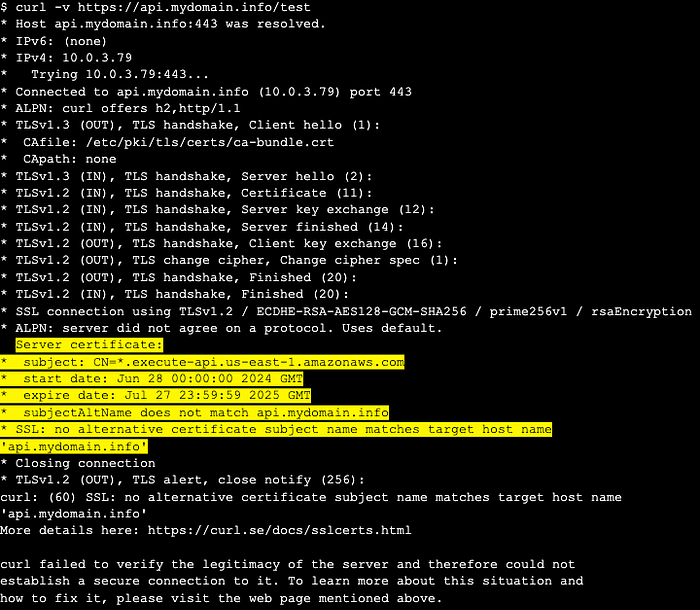
Result of calling a public API when there is an API Gateway VPC Endpoint with private DNS enabled
As a result, any attempt to invoke the public API from within the VPC will lead to SSL handshake failure, blocking the connection.
Solution Overview
As was just explained, when an API VPC Endpoint for API Gateway has Private DNS enabled, all execute-api.REGION.amazonaws.com DNS lookups resolve to private IPs, which causes public API calls (using custom domain names) to fail SSL validation. The solution involves DNS prioritization via Route 53 private hosted zones, also known as Split-Horizon / Split-View DNS.
The idea is that when using a private hosted zone (PHZ), DNS lookups from within the VPC will check the PHZ before searching any other public DNS servers.
Let’s say we have a GoDaddy DNS Server that hosts our domain at the top level: mydomain.com.
If we map api.mydomain.comto our public API, we will host this subdomain in our PHZ DNS to create the split-view DNS.
This allows lookups for api.mydomain.com that originate from within our VPC to be served from our PHZ, and calls to other subdomains not using API Gateway (e.g., pointing to some other service that a VPC Endpoint isn’t catching) will use the public DNS.
This solution uses three key concepts:
- VPC Endpoint: For private API access (enabled Private DNS)
- Private Hosted Zone: to create the split-view DNS
- An Alias type A record in the PHZ: Used to direct traffic to the public API Gateway domain name
Step-by-Step Implementation
Prerequisites
- A public API Gateway with a custom domain name hosted outside Route 53 that can be invoked from the Internet, or a public custom domain name hosted in Route 53 but uses a CNAME record instead of an Alias type A record to point to it.
- An API Gateway VPC Endpoint with Private DNS enabled, defined in the VPC from which we want to call our public API.
If you already have this VPC Endpoint, start from step 2 below.
Without this, you won’t be able to call private APIs.
1. Configure VPC Endpoint for API Gateway To Access Private APIs
If you have this endpoint, jump to step “2”
- In the AWS Console, navigate to the VPC Console > Endpoints.
- Create an interface endpoint for
com.amazonaws.REGION.execute-api. - Enable Private DNS (default setting).
- Attach a security group allowing inbound HTTPS (port 443) from the VPC (or from the IPs of the specific resources inside your VPC that you want to enable calling private API Gateway APIs).
2. Create a Private Hosted Zone
- Create a PHZ in the Route 53 Console matching your public custom domain name API path (e.g.,
api.mydomain.com).
Note that if you have URLs in your public domain that you want to call but are not mapped to an API Gateway (e.g., if dev.mydomain.com points to a Load Balancer and not API Gateway), you should use the full custom domain name of your API (such as api.mydomain.com), for the domain name of your private hosted zone.
If all subdomains in your domain are mapped to API Gateway APIs, use the top-level mydomain.com for your domain name.
- Associate the zone with your VPC.
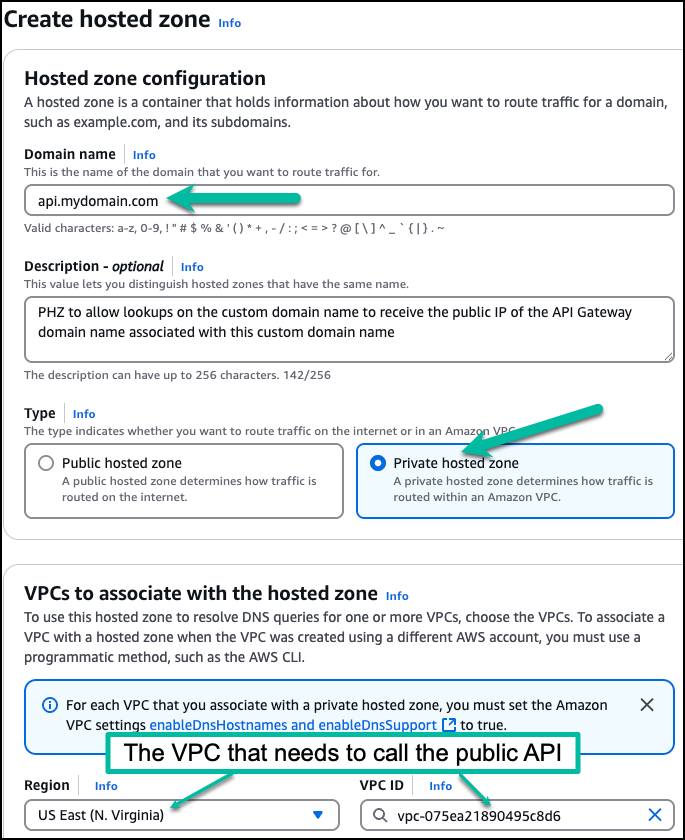
Create a PHZ for your custom domain name and associate it with the VPC that needs access to this domain
3. Set Up DNS Records
- You need to create an Alias type A for each domain used by an API.
For example, if you have api.mydomain.com andspecial-api.mydomain.com, you need to create a record for each. One for api and the other for special-api. So choose the type of record to be “A”.
- For the record name:
- If the name of your custom domain name is the same as the full domain name of your API, don’t type the subdomain (don’t type “api”) in the “Record Name” (leave it empty). E.g., if you created the PHZ for api.mydomain.com because it is the only subdomain used with API Gateway, leave the Record Name field empty.
- If you are using the top level — mydomain.com, because you have multiple subdomains mapped to API Gateway, enter the name of your api as the value for the “Record Name” for each record. E.g., enter “api” for one record and “special-api” for another
- Set it to be an Alias record by checking the ‘alias’ box
- Choose “Alias to API Gateway API”
- Select the regionof your API
- Select the regional endpoint (the API Gateway domain name created for your custom domain name) of your public API.
It has a name such as:
d-abc123.execute-api.REGION.amazonaws.com
- If you don’t see it there, copy it from the API Gateway console, under “custom domain names” -> API Gateway domain name.
- Save the record

It may take Route 53 some time before your newly private hosted zone is available to your VPC.
See Appendix B for the architecture of this solution.
Testing
You will need an EC2 running in your VPC with an internet connection for public APIs.
Connect to your EC2 instance and, after replacing the URL below with your own, run:
curl -v https://your-public-api.yourdomain.com/your-path
You should get an output similar to this:
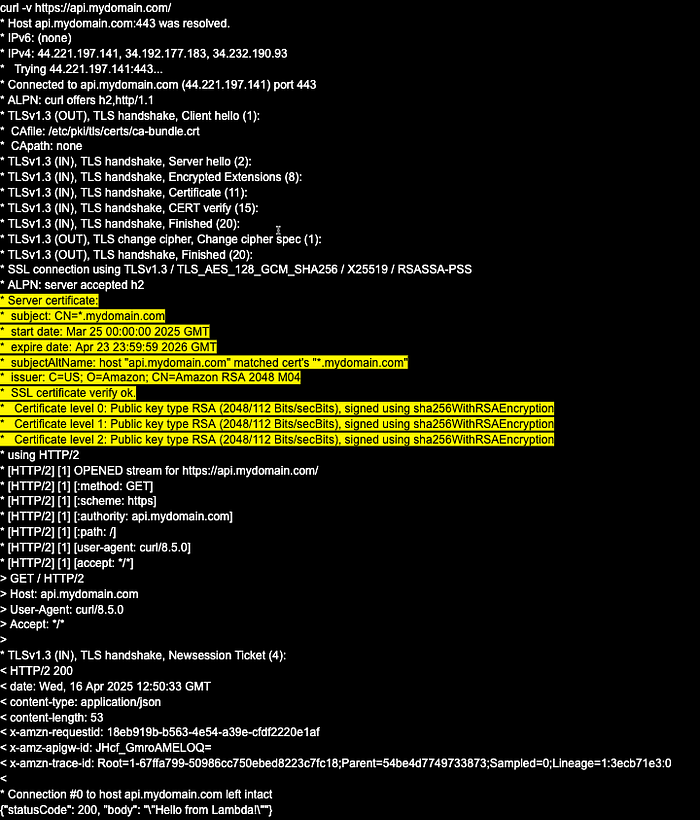
Note that before creating and configuring the PHZ, the IP that the Private DNS (the one associated with the API Gateway VPC Endpoint) returned a private IP for the custom domain name (it was 10.0.3.79), and this private IP belongs to the VPC Endpoint ENI. With a PHZ for the custom domain name, we now get the public IPs of the API Gateway domain name, which (in this example) are:
IPv4: 44.221.197.141, 34.192.177.183, 34.232.190.93
Working with the default public API Gateway URLs
To work with private and public APIs, disable the Private DNS associated with your API Gateway VPC Endpoint. Then, create a PHZ called execute-api.REGION.amazonaws.com and associate it with all the VPCs you plan to grant access to the VPC hosting your private APIs. (Note: associating it with a VPC in another region relates to this article’s “Bonus” part.)
You create a wildcard record to catch all API Gateway API-IDs, such as:
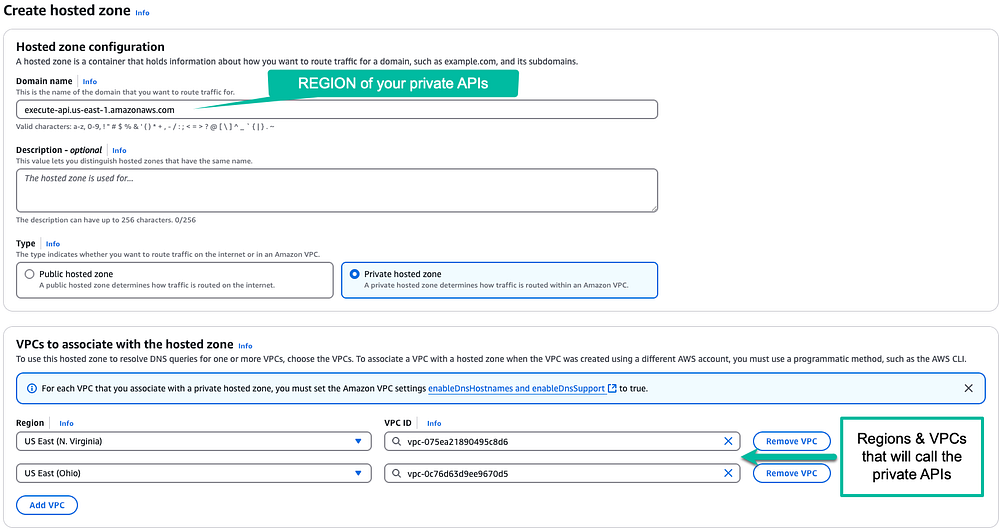
Create the hosted zone for private apis in this region
You will now create a “catch-all” record that will point to the DNS of the VPC Endpoint, such as:
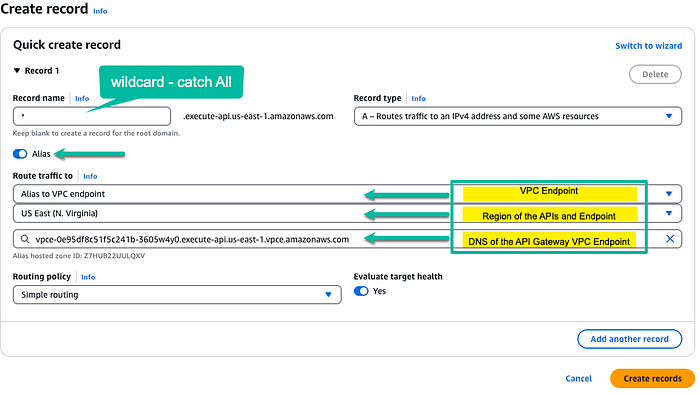
Create a catch-all record for all private APIs in this region
This will ensure that all URLs of a private API Gateway defined in us-east-1 will be caught by this PHZ and return the private IP address of the API Gateway VPC Endpoint.
For public APIs with a custom domain name, we saw how creating a PHZ for this custom domain name solves the problem.
For public APIs that don’t have a custom domain name, we need to add an Alias record using the API ID of the API and pointing it to the public URL.
As an example, let’s say that we have a public API in us-east-1 whose URL is: bmf11pk5je.execute-api.us-east-1.amazonaws.com
If we call it from within the VPC, it will return the “Forbidden (403)” as was explained above for the custom domain name scenario. To solve this, we add a record called “bmf11pk5je” and point it to the invoke URL like so:
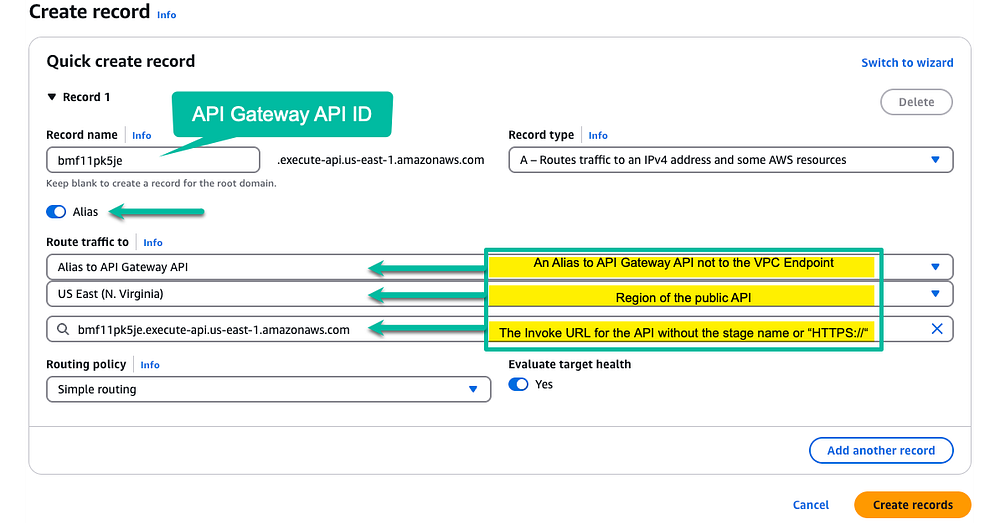
Now we’ll be able to call the public API defined in this record from within the VPC. Each additional public API we want to call in this region will require adding an Alias record, as was done for this one.
Bonus
Calling a private API located in one region from a VPC in a different AWS region.
The Problem
Private APIs can be easily shared among multiple VPCs within the same region. You only need to have API Gateway VPC Endpoints in each VPC, have a resource policy for your Private API allowing access from these VPCs, and add the VPC Endpoints to the Private API (via its API Settings).
This doesn’t work if your VPC is in a different region from the one hosting the private API.
In this case, you would need to do the following:
- Peer the two VPCs, the one hosting the private API and the one you wish to give access to.
For VPC peering, you must ensure that both VPCs do not have overlapping CIDR blocks. 2. If you don’t have a Private Hosted Zone for the API Gateway region hosting your private API, you must create one. 3. The name of the private hosted zone (PHZ) should be:
execute-api.REGION.amazonaws.com
4. You need to associate this PHZ with the API Gateway VPC Endpoint in the region and the VPC to which you want to grant access.
5. Add an Alias record of type A to the PHZ (set it as an alias by checking its ‘alias’ box), and then select “Alias to VPC Endpoint” from the dropdown.
6. Select the region of the VPC you want to give access to
7. Choose the VPC Endpoint for the API Gateway in this VPC
8. Add the CIDR block of the peered VPC to the Security Group of the VPC Endpoint. Without this, it will block communication from the Peered VPC.
9. Save the record
Once you complete the above, you can invoke the private API from the VPC in the other region.
Note that since you are using VPC Peering, the Resource Policy of your Private API Gateway doesn’t need to approve traffic from the peered VPC; it only needs to be from the main VPC in which it is deployed. This is so because the communication to the API Gateway will come from the VPC Endpoint inside its own VPC, even though it originated from the peered VPC.
This cross-region peering will produce the same problem of SSL Certification failure if you try to access a public API defined in the same VPC as the private API. While it is in another region, it is still associated with a PHZ for execute-api.REGION (REGION where the API is deployed) and, as such, will try to call the VPC Endpoint’s private IP unless a PHZ for your public API is defined.
If you want to call both private and public APIs, whether cross-region or not, you must follow the instructions in the first part of this article.
Appendix A
The diagram below shows what happens when an EC2 instance calls a public API Gateway with an API Gateway VPC Endpoint with Private DNS enabled.
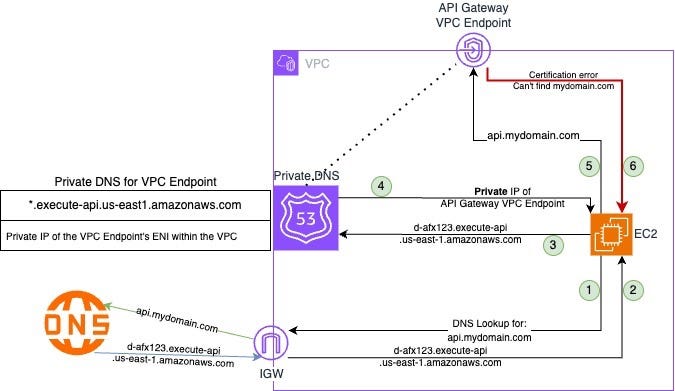
Calling a public API from a VPC without a PHZ in place
- EC2 is trying to call
https://api.mydomain.com, so a DNS lookup is made - The response from the DNS is the API Gateway domain name
- The second DNS lookup is made, and is caught by the Private DNS associated with the API Gateway VPC Endpoint.
- It returns the private IP address of the VPC Endpoint
- EC2 is trying to invoke the API through the private IP address
- The API Gateway Service, reachable via the private IP address, provides a certificate valid for
*.execute-api.REGION.amazonaws.com, notapi.mydomain.com, so a certificate error is returned
Appendix B
The diagram below shows what happens when an EC2 instance calls a public API Gateway with an API Gateway VPC Endpoint with Private DNS enabled. This time, a private hosted zone is also defined for the custom domain name.
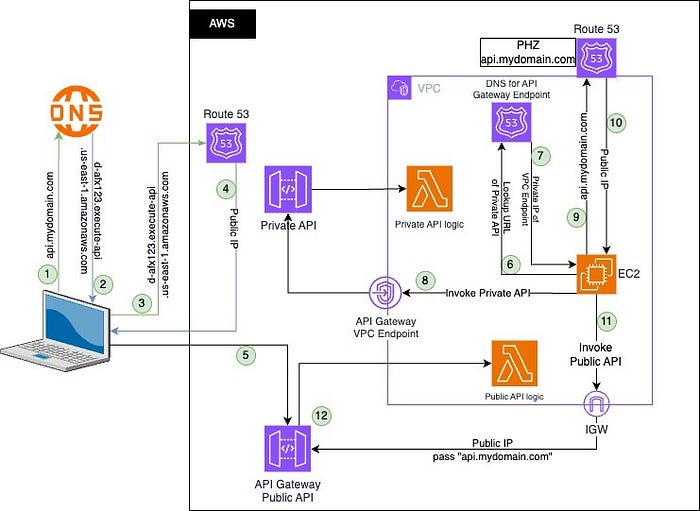
Calling public APIs from a VPC with a PHZ in place
Calling the public API from the Internet
- A DNS lookup is made to the external domain hosting service (e.g., GoDaddy) for the API’s custom domain name (e.g.,
api.mydomain.com) - The query returns the API Gateway domain name for this custom domain name
- The API Gateway domain name is queried in AWS’s Route 53
- It returns a public IP address for the public API Gateway service
- The public IP is used to call the API Gateway Service, and since it is associated with the
api.mydomain.comcertificates, it terminates the SSL and calls the relevant target of the state of the API Gateway
Calling a private API from within the VPC
6. Private APIs have a URL in the format of apiID.execute-api.REGION.amazonaws.com. When such a URL is called from a VPC with a VPC Endpoint for API Gateway that has private DNS active, the request is handled by this private DNS.
7. The private DNS returns the private IP of the ENI of the API Gateway VPC Endpoint.
8. The API Gateway service that is reachable via this private IP has a certificate for *.execute-api.REGION.amazonaws.com, so the private API call that used this URL is authenticated and forwarded to the private API’s target.
Calling a public API Gateway API from within the VPC
9. The Private Hosted Zone DNS created for the custom domain name captures and handles queries that fall under its domain name.
10. The PHZ, having an Alias type A record, returns the public IP of the API Gateway domain name associated with the custom domain name.
11. The public IP is called via the Internet Gateway, reaching the address of the API Gateway’s service. Since the service reachable from the public IP does have the certificate association between the custom domain name and the API Domain name, the SSL handshake succeeds, and the TLS is terminated. The request is forwarded to the target of the relevant stage of the API Gateway public API.
Call to Action
I trust this article has provided valuable insights. If you’d like to know more or are interested in our services, don’t hesitate to get in touch. You can contact us here.
References
- API Gateway Custom Domain Names
- API endpoint types for REST APIs in API Gateway
- Working with private hosted zones
- AWS Route 53 Split View DNS
- Choosing between alias and non-alias records
Contains a good explanation of alias records in Route 53
The simplest solution is to host your public custom domain name in Route 53 and use an alias type A record. This will let you call public and private APIs with an API Gateway VPC Endpoint with Private DNS.
If you can’t / won’t do so, you can use the method described in this article.
Several things to note
- Having an API Gateway VPC Endpoint with Private DNS will cause all the calls to any API Gateway public API in this region to fail with the Certification mismatch error. The fact that I only discussed
api.mydomain.comwas arbitrary. If you have (for example)api.mydomain.comandapi.example.comandmyapi.myspecialdomain.comthey will all need PHZs for them, as there is no relation between one domain and the others. - Though I’m referring to a REST API, it also works for HTTP APIs (tested) and WebSocket APIS (though not tested) because it isn’t about the protocol. It is about the network and DNS.