


A practical guide to understanding why cross-region S3 access requires more than VPC Interface Endpoints with private DNS
Background
What AWS doesn’t tell us is that this won’t work without a small addition of connectivity to S3 in the region that doesn’t have the bucket (e.g., in my exampleus-west-2.) I’ll address this later on in step 6 of the implementation.
Scenario
This limitation exists because AWS VPC endpoints are designed to provide private connectivity to services within the same region.
The Solution Architecture
Components:
- VPC B: A new or existing VPC in
us-east-1where we’ll place our S3 Interface Endpoint - VPC Peering Connection: The bridge between our two VPCs
- Private Hosted Zone: Route53 DNS to resolve S3 Endpoints correctly
- S3 VPC Interface Endpoint: an Endpoint is just an Elastic Network Interface (ENI) in a target VPC that provides private, secure connectivity to S3 using the AWS backbone network (in our case, in
us-east-1)
Step-by-Step Implementation
Prerequisites
Step 1: Secure Your S3 Endpoint
Step 2: Create the S3 VPC Interface Endpoint
- Disable private DNS
- Attach the
VPC_B_S3_SGsecurity group you previously created
Step 3: Establish VPC Peering
Step 4: Configure DNS Resolution with PHZ
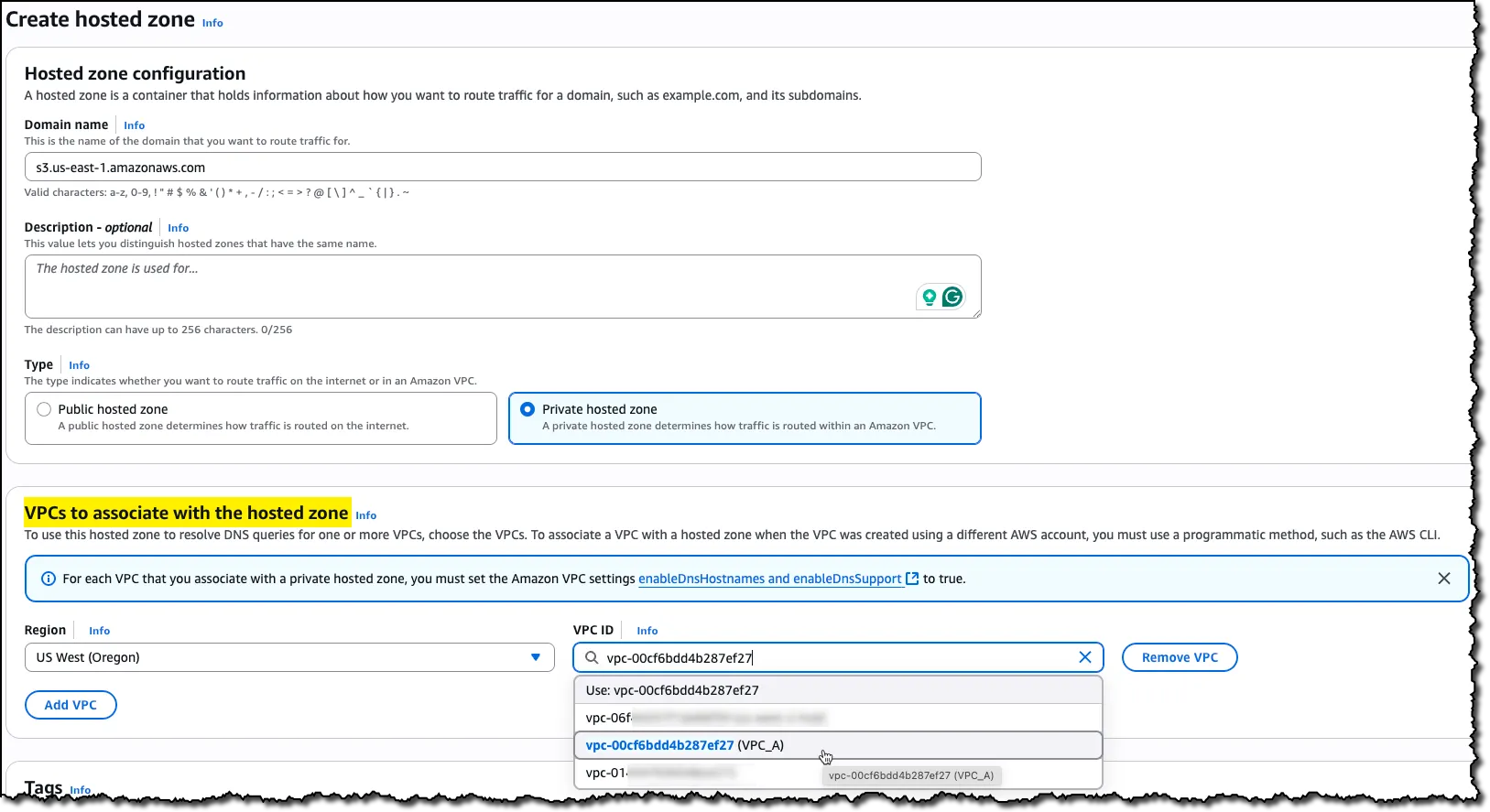 Associate VPC A from us-west-2 with the new PHZ
Within this PHZ, create two Alias A records that point to your S3 VPC Interface Endpoint’s Regional DNS name*:
1. Root record: Leave the record name blank to create a record for
s3.us-east-1.amazonaws.com
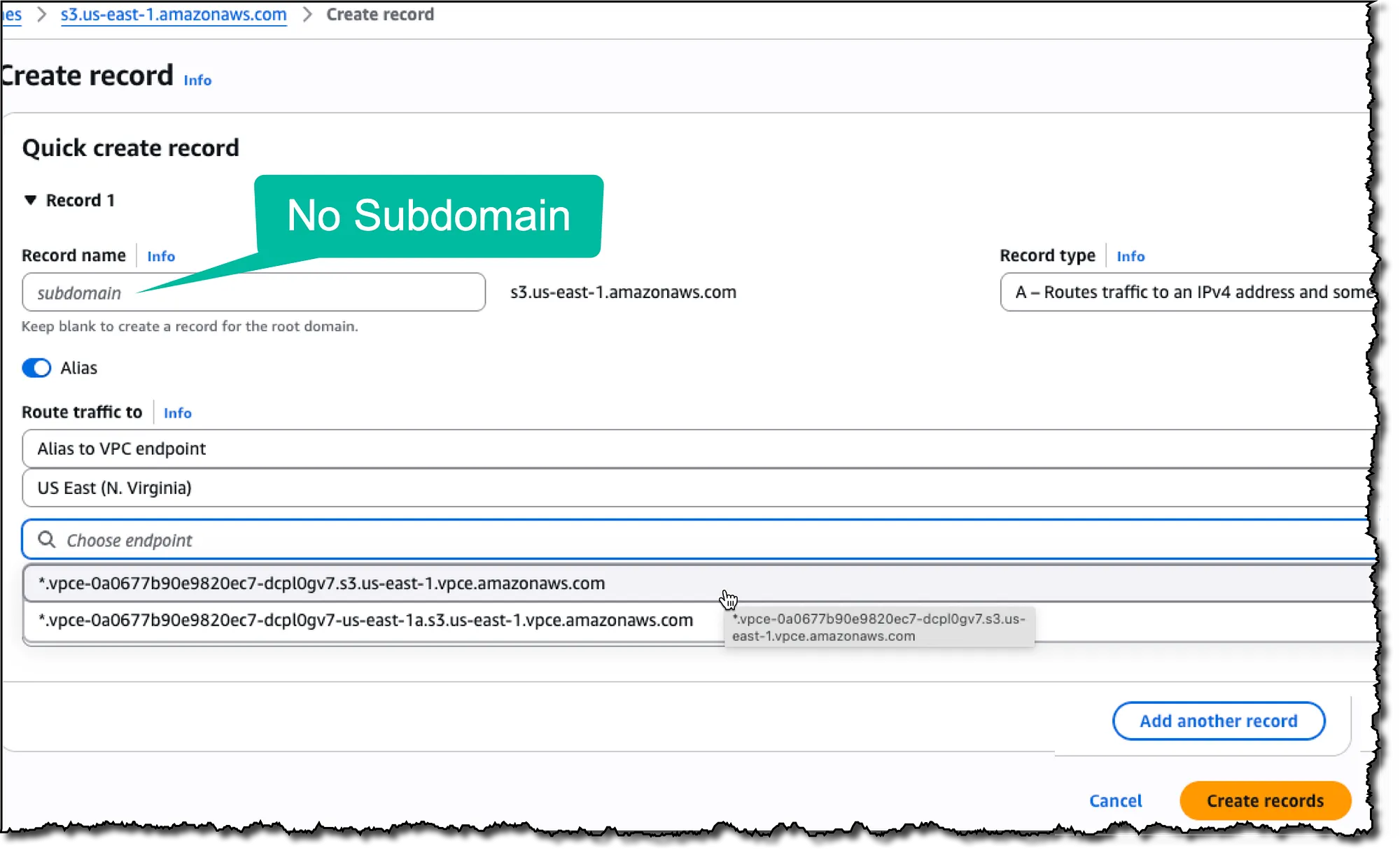 Root record — leave the Record name empty
2. Wildcard record: Use * as the record name to handle
*.s3.us-east-1.amazonaws.com
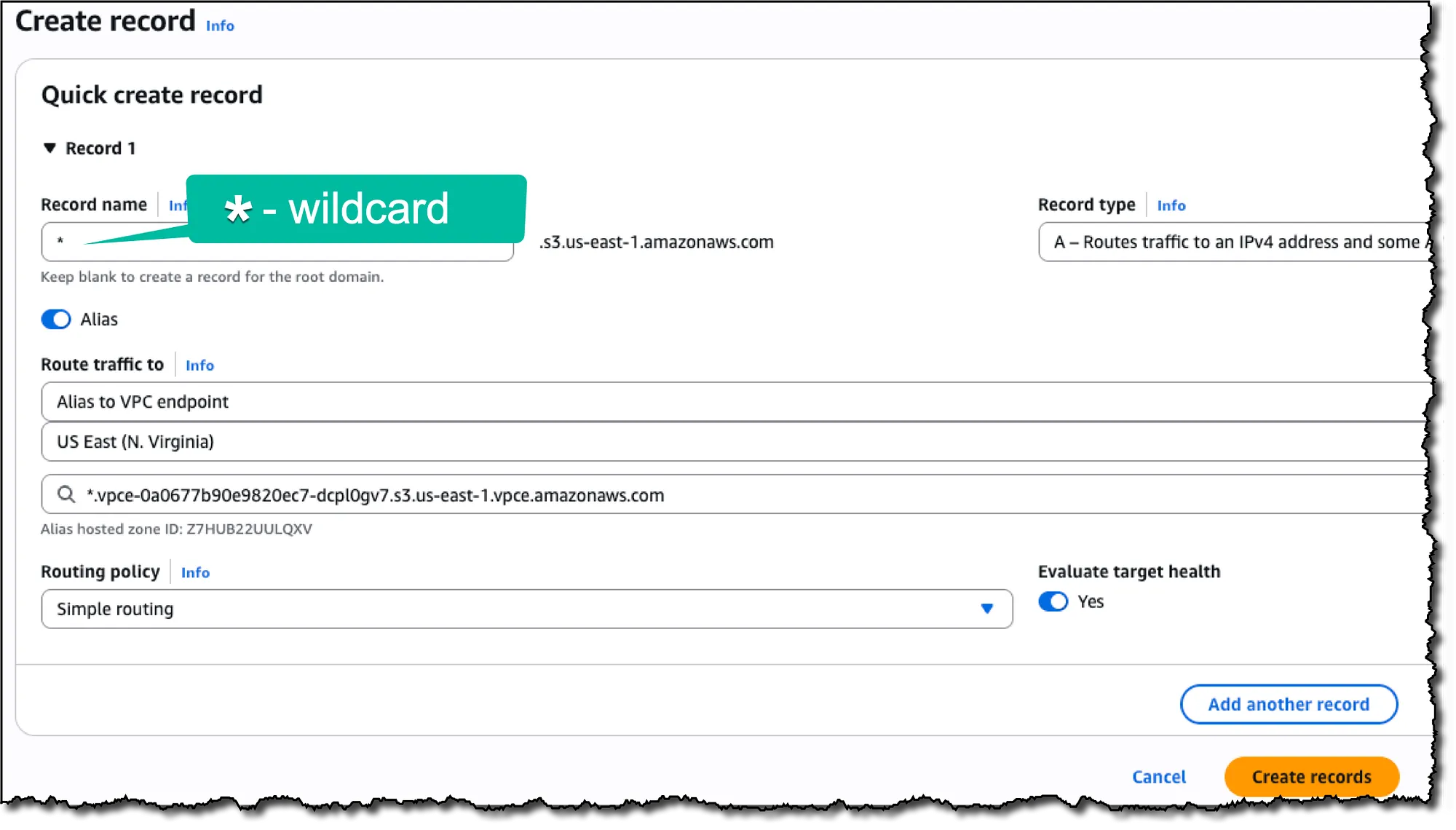 Catch All — enter “*” in the Record name
\* A Regional DNS name is the name without an availability zone specification.
It looks like:
`*.vpce-0123456789abcdefg-dawd972fe.s3.us-east-1.vpce.amazonaws.com
And not us-east-1` a(which is a Zonal DNS name).
A Zonal DNS name is useful in architectures that isolate workloads by Availability Zone. For instance, it can help reduce regional data transfer costs by ensuring traffic stays within the same AZ and Region as the Interface Endpoint’s ENI. However, this benefit applies only to same-Region, same-AZ access, which doesn’t apply in a cross-Region scenario.
Resulting records:
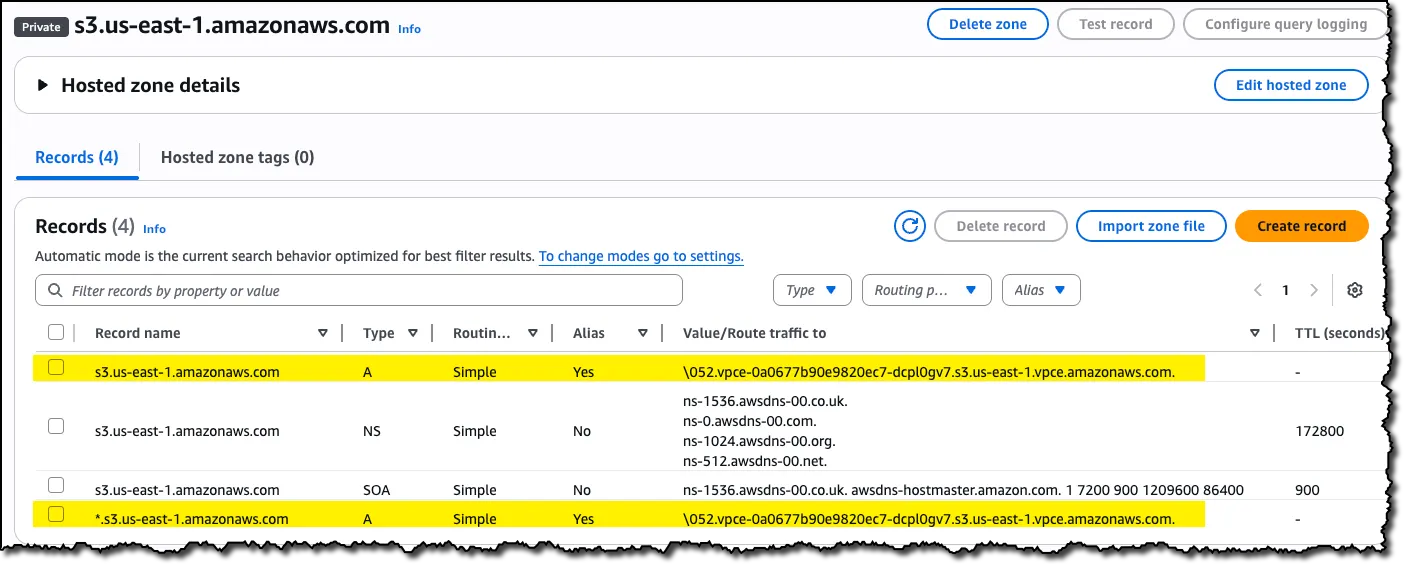 Resulting records in the new PHZ
Step 5: Configure Routing
- VPC A: In the routing table of the subnet in which your EC2 instance is running, add a rule redirecting the traffic for VPC B’s CIDR block through the peering connection
- VPC B: In the route table of the subnet(s) you set your VPC Interface Endpoint in, add a rule redirecting the traffic for VPC A’s CIDR block through the same peering connection
Step 6: Enable Regional S3 Access for local DNS
You can achieve this by using one of the following methods:
- An Internet Gateway or NAT Gateway for internet access
- An S3 Gateway Endpoint in VPC A (recommended for cost)
- An S3 VPC Interface Endpoint in VPC A with private DNS enabled
The recommended approach is to have an S3 Gateway Endpoint in each VPC/Region where you need to access S3, as it is free of charge — both in terms of the hourly rate and traffic processing — unlike the alternatives.
AWS SDK Configuration for Cross-Region S3 Access
Option 1: Specify Regional Endpoints
Example for JavaScript SDK V2:

Option 2: Enable Cross-Region Access
- JavaScript SDK v3: Set
followRegionRedirects: truein your S3 client configuration [8]
JavaScript SDK v3 Example:
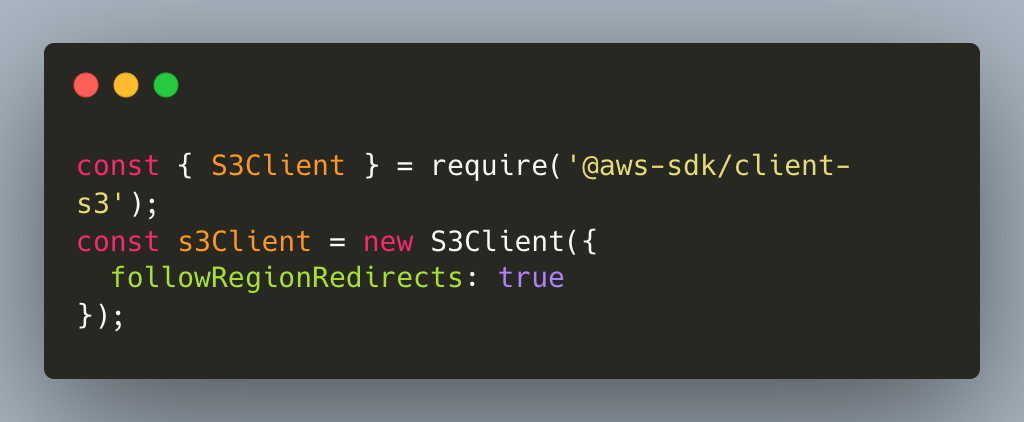
Note: Using Java SDK V2, the first request to a bucket in a different region may have increased latency, but subsequent requests benefit from cached region information.
This is not true for the JavaScript SDK V3, which does not cache region information. Each cross-region request may incur redirect latency. For better performance with known cross-region access patterns, consider specifying the exact regional endpoint URL instead.
AWS CLI knows how to handle such redirects automatically and doesn’t need the region or endpoint URL for a bucket, assuming you followed step 6 above.
How It All Works Together
- The instance queries its regional S3 service to determine the bucket’s location
- Once it knows the bucket is in
us-east-1, it queries a DNS for its IPs inus-east-1 - Your Private Hosted Zone intercepts this DNS query and resolves it to the private IP of your S3 Interface Endpoint in VPC B
- The private IP of your S3 Interface Endpoint is returned to the EC2
- The rule you added to the routing table of EC2’s subnet in VPC A will redirect the traffic of the private IPs through the VPC peering connection to VPC B, and from there to the S3 VPC Interface Endpoint
- The endpoint provides secure, private access to S3 buckets in
us-east-1
Any response from S3 (such as if you requested an object) will travel back through the VPC Peering connection to the EC2 instance in VPC A.
 Conceptual architectural diagram
Why This Approach Works
- Leveraging VPC peering to create cross-region connectivity
- Using private PHZ DNS resolution to get the private IP of the correct regional S3 endpoint
- Maintaining security through VPC endpoints instead of internet routing
- No changes to your client apps— your applications don’t need any changes (you don’t need to add a region or an endpoint URL) and can simply use the bucket’s name
Things to Keep in Mind
Latency impact: Cross-region traffic will have higher latency than same-region access. If performance is critical, consider bucket replication strategies instead [6].
Complexity trade-off: This setup adds architectural complexity. Evaluate whether the benefits (cost and intra-VPC security) justify the additional operational overhead.
Call to Action
References
- https://docs.aws.amazon.com/vpc/latest/privatelink/create-interface-endpoint.html#create-interface-endpoint-aws
- https://docs.aws.amazon.com/vpc/latest/peering/create-vpc-peering-connection.html
- https://aws.amazon.com/vpc/pricing/
- https://aws.amazon.com/privatelink/pricing/
- https://docs.aws.amazon.com/AmazonS3/latest/userguide/replication.html
- https://docs.aws.amazon.com/sdk-for-java/latest/developer-guide/s3-cross-region.html
- https://docs.aws.amazon.com/AWSJavaScriptSDK/v3/latest/Package/-aws-sdk-middleware-sdk-s3/Interface/S3InputConfig/
- What is VPC Peering
- Gateway endpoints for Amazon S3
- Working with Private Hosted Zones
Have you implemented cross-region VPC connectivity in your AWS environment? I’d love to hear about your experiences and any variations on this approach you’ve discovered.