

Amazon Bedrock generated image of a Kubernetes Starter Kit
Embedding a Large Language Model (LLM) into an application can make your application more powerful and easier to use, doing this in a way that integrates with an existing code base and in a scalable manner however can present challenges.
This article presents a starter project that you can use to get started quickly.
Why base a starter kit on Go?
Most of the Generative AI examples you come across are running in Python, this makes sense as Python is the lingua franca of Machine Learning and Data Science. But what if you have an existing application that you just want to enhance with Machine Learning models via common API calls and your not building your own models or other dedicated Machine Learning tasks.
Go is an ideal language to leverage in making calls to Web Services including Machine Learning API’s such as Amazon Bedrock or ChatGPT.
The Starter Kit outlined in this article is focused on Amazon Bedrock and can be found here:
https://github.com/p-obrien/bedrock-microservice-starter
Prerequisite — Enable Amazon Bedrock Models
In order to use Amazon Bedrock you need to enable the relevant Foundational Models, unfortunately this can only be done via the AWS Console at this point in time (July 2024).
To enable the foundational model follow these steps:
1. Login to your AWS Console, Navigate to the Amazon Bedrock
2. Expand the navigation pane on the left hand side and scroll down to “Model access”
3. In the “Find model” dialog search for the model you would like to enable, for the starter project we are using “Claude 3 Sonnet”. If it is not enabled for your project you’ll need to request access. Click the “request model access” link and select the models you would like to enable and click through the following screens.
Once enabled it should look like this:

AWS Bedrock Base Models
Note: Model availability varies by region, you may need to consider running the model in a region that’s different to your normal workloads.
**Starter Kit Overview**
The starter kit is designed to give you a reference point you can use in your own solution, it does the following:
- Deploys a Graviton based EKS Cluster with a managed node group
- Deploys the AWS Load Balancer Controller
- Deploys EKS Pod Identity and service account
The Go code deploys a Microservice which:
- Requires an API Key to authenticate callers
- Uses EKS Pod Identity to communicate with Amazon Bedrock
- Returns a conversation with Amazon Bedrock, specifically the Claude Sonnet foundational model however you can easily customise this
If you already have a EKS Cluster you can run the code in an existing cluster but you will need to ensure the Pod Identities Agent and Service Account has been deployed.
**Infrastructure**
The starter kit uses Terraform or OpenTofu to deploy a brand new AWS EKS Cluster, the README.md in the Infrastructure folder has details on how to use this.
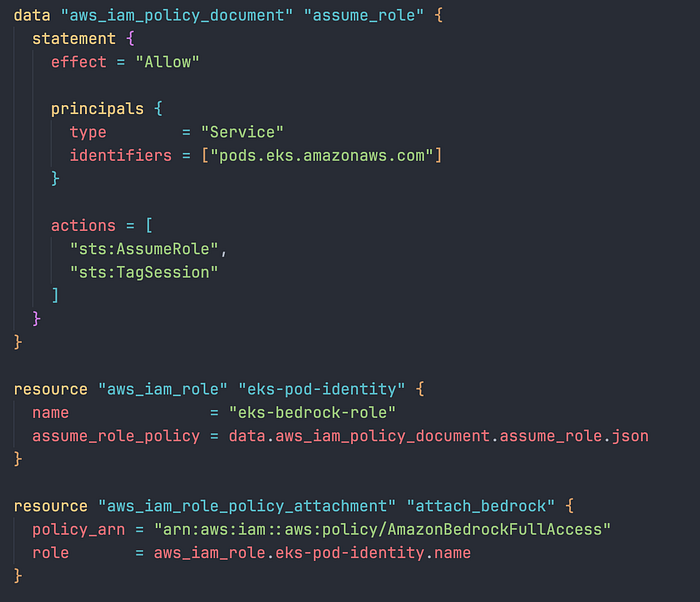
Instead of using Access Keys in a container, secrets or other authentication methods we will use a AWS EKS feature known as Pod Identities to grant access to Bedrock.
Until recently EKS IRSA (IAM Roles for Service Accounts) was used for this purpose however it was quite complex to setup and had limitations, EKS Pod Identities works around these limitations and implements a simple to use solution. Details are HERE for the curious.
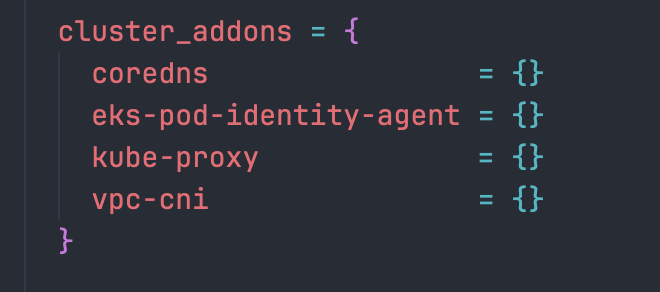
EKS Pod Identity
Step 1 — Deploy the EKS Pod Identity Add-on
Step 2— Define a role and allow the Pod Identity Add-on to assume it
Step 3 — Associate a Kubernetes Service Account with the role
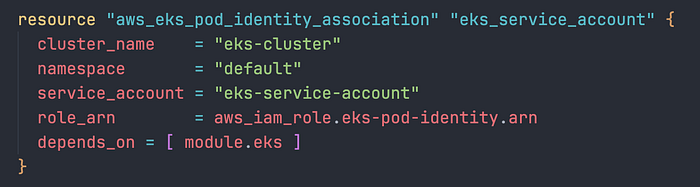
Step 4 — Ensure EKS has a matching service account

Code
Communication with Amazon Bedrock from within the Microservice is handled via the Amazon Bedrock Go API.
Note: Much more complex interactions are possible than what is presented in this starter project.
Authentication the easy way
The benefit of using EKS Pod Identities is that it is largely transparent to your application. For example the below code uses the Go Bedrock API to create a client and use EKS Pod Identities authentication:
func init() {
 cfg, err := config.LoadDefaultConfig(context.TODO())
 if err != nil {
  log.Fatalf("unable to load SDK config, %v", err)
 }

 brc = bedrockruntime.NewFromConfig(cfg)
}
Instead of having to worry about loading a secret, the pod has the environment variables for the AWS Profile set automatically so you can just initialise the Bedrock client with the defaults.
Rest Server
We use the Echo Framework to create a authenticated Rest endpoint to accept a request from the caller, for the starter project we are using a simple API key:
// Sample API Key please don't use this in production and consider something more robust
var apiKey string = "test-api-key"
var brc *bedrockruntime.Client

const modelID = "anthropic.claude-3-sonnet-20240229-v1:0"

func main() {

 cfg, err := config.LoadDefaultConfig(context.TODO())
 if err != nil {
  log.Fatal(err)
 }

 brc = bedrockruntime.NewFromConfig(cfg)

 e := echo.New()
 e.Use(middleware.Logger())
 e.Use(middleware.Recover())

 e.Use(middleware.KeyAuth(func(key string, c echo.Context) (bool, error) {
  return key == apiKey, nil
 }))

 e.POST("/converse", converseHandler)

 if err := e.Start(":8080"); err != http.ErrServerClosed {
  log.Fatal(err)
 }
}
From there we take the prompt from the Multipart Form input and pass it to Bedrock before returning back to the client.
func converseHandler(c echo.Context) error {
 // Initialize the Bedrock ConverseInput with the model ID
 converseInput := &bedrockruntime.ConverseInput{
  ModelId: aws.String(modelID),
 }

 // Get the user input from the form value
 input := c.FormValue("message")

 // Create the user's message
 userMsg := types.Message{
  Role: types.ConversationRoleUser,
  Content: []types.ContentBlock{
   &types.ContentBlockMemberText{
    Value: input,
   },
  },
 }

 // Append the user's message to the conversation input
 converseInput.Messages = append(converseInput.Messages, userMsg)

 // Call the Bedrock Converse API
 output, err := brc.Converse(context.Background(), converseInput)
 if err != nil {
  log.Fatal("Error calling Converse API:", err)
  return c.String(http.StatusInternalServerError, "Internal Server Error")
 }

 // Extract the response from the assistant
 response, ok := output.Output.(*types.ConverseOutputMemberMessage)
 if !ok {
  return c.String(http.StatusInternalServerError, "Failed to parse response")
 }

 responseContentBlock := response.Value.Content[0]
 text, ok := responseContentBlock.(*types.ContentBlockMemberText)
 if !ok {
  return c.String(http.StatusInternalServerError, "Failed to parse response content")
 }

 // Create the assistant's message
 assistantMsg := types.Message{
  Role:    types.ConversationRoleAssistant,
  Content: response.Value.Content,
 }

 // Append the assistant's message to the conversation input
 converseInput.Messages = append(converseInput.Messages, assistantMsg)

 // Return the assistant's response to the client
 return c.JSON(http.StatusOK, text.Value)
}
Enhancements
Improvements that are left as an exercise for the reader could be:
- Streaming responses — Echo Framework supports streaming responses and it would be nice to get a streaming response from Bedrock
- System Prompt — Adding a system prompt to initialise Amazon Bedrock with a particular prompt prior to handling client interactions
Closing thoughts…
Thanks for reading, if you have any questions or feedback please feel free to submit an issue on my Github repository.
If you don’t know DoiT International yet you should definitely check us out. Here, our team is ready to learn more about you and your cloud engineering needs. Staffed exclusively with senior engineering talent, we specialise in providing advanced cloud consulting architectural design and debugging advice. Get in touch, and let’s chat!