

The post shows how to assign an Elastic IP to EKS Nodes in a Local Zone with KubeIP v2.
Introduction
AWS customers leverage Amazon EKS in AWS Local Zones for low-latency access and data localization compliance. Certain use cases require static public IP addresses for workloads communicating with regulated partners. However, Kubernetes (k8s) resources, like worker nodes, are ephemeral, causing IP address changes during events like version upgrades. KubeIP assigns static IP addresses by utilizing cloud provider capabilities, ensuring consistent IP addressing despite node lifecycle changes.
Solution overview
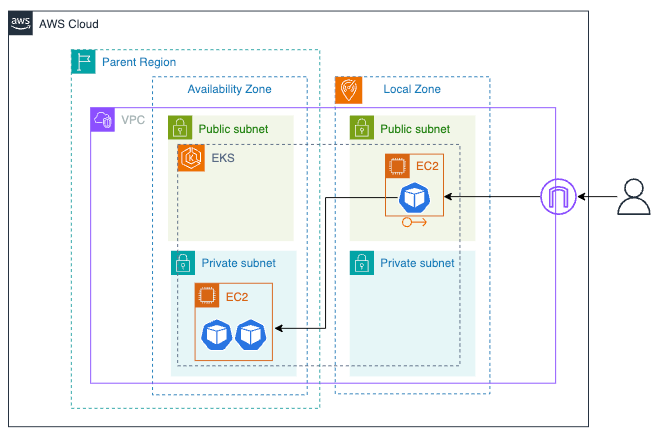
This post shows how to set up an Amazon EKS cluster with a managed-node group in a region and a self-managed node group in the local zone. The objective is to provide an idea on assigning an Elastic IP Address to an EKS node in the local zone using KubeIP v2.
The following architecture diagram shows an edge service running in the local zone and two backend services running in the region.
Prerequisite
- Opt-in to the Local Zone where the workload runs
- An AWS account with the required permissions is used for the AWS CLI
- Installation of CLI tools that are used to provision resources in this example: AWS CLI, Terraform, and kubectl
Walkthrough
- The example artifact contains 4 folders; 01-vpc, 02-eks, 03-kubeip, and 04-app. We apply it in order, starting from 01-vpc to 04-app.
Clone the example artifact on github to your working directory.
git clone https://github.com/duoh/kubeip-eks-localzone
cd kubeip-eks-localzone
- First, we provision a VPC and subnets in the region and local zone. In the main.tf file, we use the vpc module to create public and private subnets in a region. For subnets in a local zone, they are defined in aws_subnet resources.
module "vpc" {
  source = "terraform-aws-modules/vpc/aws"
  name            = var.name
  cidr            = var.vpc_cidr
  azs             = local.azs
  public_subnets  = [for k, v in local.azs : cidrsubnet(var.vpc_cidr, 8, k)]
  private_subnets = [for k, v in local.azs : cidrsubnet(var.vpc_cidr, 8, k + 10)]

  ...

  public_subnet_tags = {
    "kubernetes.io/cluster/${var.cluster_name}" = "shared"
    "kubernetes.io/role/elb"                    = "1"
  }
  private_subnet_tags = {
    "kubernetes.io/cluster/${var.cluster_name}" = "shared"
    "kubernetes.io/role/internal-elb"           = "1"
  }
}

resource "aws_subnet" "public-subnet-lz" {
  vpc_id                  = module.vpc.vpc_id
  cidr_block              = cidrsubnet(var.vpc_cidr, 8, 5)
  availability_zone       = local.lzs[0]
  map_public_ip_on_launch = true
}

resource "aws_subnet" "private-subnet-lz" {
  ...
}

...
Define the input variables. In the example: the VPC name is `kubeip-lz-eks-vpc`, where the region is `ap-southeast-1`, and the Local Zone is `ap-southeast-1-bkk-1a`.
cd 01-vpc
vi example.auto.tfvars
region          = "ap-southeast-1"
lzs             = ["ap-southeast-1-bkk-1a"]
name            = "kubeip-eks-lz-vpc"
vpc_cidr        = "10.0.0.0/16"
cluster_name    = "kubeip-eks-lz-cluster"
Deploy the VPC, subnets, and route tables using terraform.
terraform init
terraform apply -auto-approve
Take note the output.
Outputs:
private_subnets = [\
  "subnet-09139a5ea9dcd335d",\
  "subnet-0d7cc25e5066687be",\
  "subnet-04bb1e787c9b6e28f",\
]
public_subnets_local_zone = "subnet-0edd1b731c48fb7d7"
vpc_id = "vpc-061f434818a666d8b"
- Next, we create an EKS cluster with a managed node group in the region. We also create a self-managed node group in the local zone. For the self-managed node group, the nodes have the labels ‘eks.amazonaws.com/nodegroup=public-lz-ng’ and ‘kubeip=use’ defined. Additionally, we use the kubeip_role module to create an IRSA (IAM Role for Service Accounts) for the KubeIP daemonSet.
module "eks" {
  source  = "terraform-aws-modules/eks/aws"
  cluster_name    = var.cluster_name
  cluster_version = "1.30"

  vpc_id                         = var.vpc_id
  subnet_ids                     = var.private_subnets
  cluster_endpoint_public_access = true
  enable_irsa = true
  ...

  eks_managed_node_groups = {
    region-ng = {
      ...
      subnet_ids    = var.private_subnets
      labels = {
        region  = "true"
      }
      ...
    }
  }

  self_managed_node_groups = {
    local-ng = {
      ...
      subnet_ids    = [var.public_subnets_local_zone]
      bootstrap_extra_args = "--kubelet-extra-args '--node-labels=eks.amazonaws.com/nodegroup=public-lz-ng,kubeip=use'"
      ...
    }
  }
  enable_cluster_creator_admin_permissions = true
}

resource "aws_iam_policy" "kubeip-policy" {
  name        = "kubeip-policy"
  description = "KubeIP required permissions"
  policy = jsonencode({
    ...
  })
}

module "kubeip_role" {
  source    = "terraform-aws-modules/iam/aws//modules/iam-role-for-service-accounts-eks"
  role_name = var.kubeip_role_name
  role_policy_arns = {
    "kubeip-policy" = aws_iam_policy.kubeip-policy.arn
  }
  ...
}

...
Define the input variables. For vpc_id, private_subnets and public_subnets_local_zone, copy the values from the previous output.
cd ../02-eks
vi example.auto.tfvars
region                     = "ap-southeast-1"
vpc_id                     = "vpc-061f434818a666d8b"
private_subnets            = [\
                              "subnet-09139a5ea9dcd335d",\
                              "subnet-0d7cc25e5066687be",\
                              "subnet-04bb1e787c9b6e28f",\
                             ]
public_subnets_local_zone  = "subnet-0edd1b731c48fb7d7"
cluster_name               = "kubeip-eks-lz-cluster"
kubeip_role_name           = "kubeip-agent-role"
kubeip_sa_name             = "kubeip-agent-sa"
Deploy the resources using terraform.
terraform init
terraform apply -auto-approve
Take note the outputs.
Outputs:
eks_cluster_name = "kubeip-eks-lz-cluster"
kubeip_role_arn = "arn:aws:iam::xxxxxxxxxxxx:role/kubeip-agent-role"
- Then, we provision an Elastic IP address and k8s resources such as a DaemonSet and service account. An Elastic IP address defined in the aws_eip resource is provisioned within the local zone via the network_border_group argument. We also assign the KubeIP DaemonSet on the node in the local zone using the node_selector field. The useful feature of KubeIP is that it can select filtered EIPs using AWS tags. Importantly, the service account for KubeIP must be assigned with the IRSA and an RBAC role.
resource "aws_eip" "kubeip" {
  count = 1
  tags = {
    Name        = "kubeip-${count.index}"
    environment = "demo"
    kubeip      = "reserved"
  }
  network_border_group = var.network_border_group
}

resource "kubernetes_daemonset" "kubeip_daemonset" {
  metadata {
    name      = "kubeip-agent"
    ...
  }
  spec {
    ...

    template {
      ...
      spec {
        service_account_name             = var.kubeip_sa_name
        ...
        container {
          name  = "kubeip-agent"
          image = "doitintl/kubeip-agent"
          env {
            name  = "FILTER"
            value = "Name=tag:kubeip,Values=reserved;Name=tag:environment,Values=demo"
          }
          ...
        }
        node_selector = {
          "eks.amazonaws.com/nodegroup" = "public-lz-ng"
          kubeip = "use"
        }
      }
    }
  }
  depends_on = [kubernetes_service_account.kubeip_service_account]
}

resource "kubernetes_service_account" "kubeip_service_account" {
  metadata {
    name        = var.kubeip_sa_name
    namespace   = "kube-system"
    annotations = {
      "eks.amazonaws.com/role-arn" = var.kubeip_role_arn
    }
  }
}

resource "kubernetes_cluster_role" "kubeip_cluster_role" {
  ...
}

resource "kubernetes_cluster_role_binding" "kubeip_cluster_role_binding" {
  ...
}
Define the input variables. For kubeip_role_arn, copy the values from the previous output.
cd ../03-kubeip
vi example.auto.tfvars
region                  = "ap-southeast-1"
network_border_group    = "ap-southeast-1-bkk-1"
cluster_name            = "kubeip-eks-lz-cluster"
kubeip_role_arn         = "arn:aws:iam::xxxxxxxxxxxx:role/kubeip-agent-role"
kubeip_sa_name          = "kubeip-agent-sa"
Deploy an Elastic IP (EIP) and Kubernetes (k8s) resources using Terraform.
terraform init
terraform apply -auto-approve
Take note of the IP address output for testing later.
elastic_ips = [\
  "15.220.243.225",\
]
- Last, we demonstrate a scenario where two applications run on a regional node and one application runs on a local zone node. The application in the local zone functions as an edge service for serving web traffic from end users and routing the traffic to the applications in the region.
The files, named app_a.yaml and app_b.yaml, define back-end apps running in the region.
apiVersion: apps/v1
kind: Deployment
metadata:
  name: app-a-deployment
  ...
spec:
  ...
    spec:
      containers:
      - name: app-a
        image: hashicorp/http-echo
        ports:
        - containerPort: 5678
        args: ["-text=<h1>I'm APP <em>A</em></h1>"]
      nodeSelector:
        region: "true"
---
apiVersion: v1
kind: Service
metadata:
  name: app-a-service
spec:
  type: ClusterIP
  ...
The file, named edge_svc.yaml, defines an edge app in the local zone.
apiVersion: apps/v1
kind: Deployment
metadata:
  name: edge-deployment
  ...
spec:
  ...
    spec:
      containers:
      - name: edge-svc
        image: nginx
        ports:
        - containerPort: 80
        volumeMounts:
        - name: indexfile
          mountPath: /usr/share/nginx/html/
          readOnly: true
        - name: nginx-conf
          mountPath: /etc/nginx/conf.d/
      nodeSelector:
        kubeip: use
      volumes:
      ...

---
apiVersion: v1
kind: ConfigMap
metadata:
  name: nginx-indexfile-configmap
data:
  index.html: |
    <h1>I am EDGE SERVICE</h1>
---
apiVersion: v1
kind: ConfigMap
metadata:
  name: nginx-conf-configmap
data:
  default.conf: |
    server {
      resolver kube-dns.kube-system.svc.cluster.local valid=1s
      ...
    }
---
apiVersion: v1
kind: Service
metadata:
  name: edge-service
spec:
  type: NodePort
  ...
Locate the current directory to 04-app and run aws cli according to your region to update a kubeconfig file for authenticating with the EKS cluster.
cd ../04-app
aws eks update-kubeconfig --name kubeip-lz-cluster --region ap-southeast-1
Run kubectl to confirm whether the access is successful.
kubectl get no
NAME                                             STATUS   ROLES    AGE     VERSION
ip-10-0-10-213.ap-southeast-1.compute.internal   Ready    <none>   4m      v1.30.0-eks-036c24b
ip-10-0-5-76.ap-southeast-1.compute.internal     Ready    <none>   3m11s   v1.30.0-eks-036c24b
Deploy the applications and check if they are running.
kubectl apply -f edge_svc.yaml
kubectl apply -f app_a.yaml
kubectl apply -f app_b.yaml

kubectl get po
NAME                                READY   STATUS    RESTARTS   AGE
app-a-deployment-587b484997-k6f8q   1/1     Running   0          12s
app-b-deployment-78bc6675db-2mk2s   1/1     Running   0          12s
edge-deployment-f6b9f4d5f-5j6f7     1/1     Running   0          13s
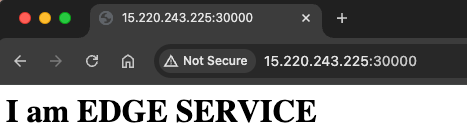
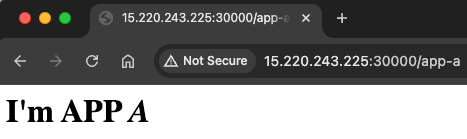
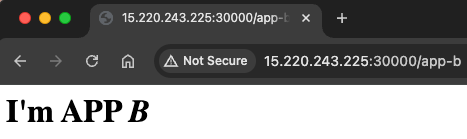
Verify the results if the application is working by using a public IP address in the previous step.
Test via curl.
% curl 15.220.243.225:30000
<h1>I am EDGE SERVICE</h1>

% curl 15.220.243.225:30000/app-a
<h1>I'm APP <em>A</em></h1>

% curl 15.220.243.225:30000/app-b
<h1>I'm APP <em>B</em></h1>
Or, test via a browser.
Conclusion
Local Zones in AWS are limited to using Application Load Balancers (ALBs) from the Elastic Load Balancing (ELB) service. Additionally, the public IP addresses assigned to ALBs can change over time. EKS clusters running in Local Zones require a custom automation solution to maintain static public IP addresses for worker nodes. In such cases, KubeIP can be leveraged to address this requirement.
DoiT provides intelligent technology and multi-cloud expertise to help organizations understand and harness public clouds such as Amazon Web Services (AWS), Google Cloud (GCP) and Microsoft Azure to drive business growth. You can check DoiT offerings at doit.com.