

Photo by Alexander+Supertramp from Shutterstock
In this blog post, we will be fully automating the installation and configuration of the CloudWatch agent on the EC2 instance(Linux) for custom memory metrics using the Systems Manager automation runbook. We will use a custom runbook to automate the installation and configuration of the CloudWatch agent and AWS EventBridge to trigger the automation without human intervention.
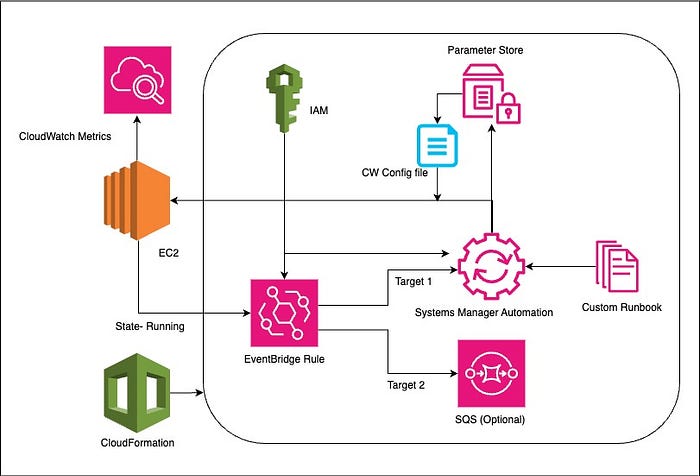
Basic Architecture Diagram
Automation Overview:
For this automation, we will be using the AWS CloudFormation template to deploy resources for automation that performs the following steps:
- Create an IAM role for the AWS Systems Manager to execute automation document — An execution role is required for the Systems Manager to execute the runbook on your behalf on the target EC2 instances and add permissions to the EC2 instances to write metrics to CloudWatch.
- Upload the CloudWatch agent configuration file to the Systems Manager Parameter Store — TheCloudFormation template will upload the custom CloudWatch configuration file to the Systems Manager Parameter store. Instances will fetch this configuration file to configure the CloudWatch agent
- Create Systems Manager’s automation document— With CloudFormation, we will build a custom runback to install and configure the CloudWatch agent.
- Create IAM role for EventBridge rule to invoke Systems Manager Automation — An invoke role is required for EventBridge to trigger the Systems Manager automation workflow to install and configure the cloudWatch agent.
- Create EventBridge Rule— CloudFormation will create an EventBridge rule that will filter EC2 instance “running” events and trigger SSM automation.
- Optional (Create SQS Dead Letter Queue)— This is a standard SQS Queue acting as SQS Dead Letter Queue for EventBridge rule, to capture any error details in EventBridge triggers.
CloudFormation Template:
AWSTemplateFormatVersion: '2010-09-09'
Description: A template to create an AWS Systems Manager Automation Document that installs Amazon CloudWatch agent, sets up necessary permissions, and configures CloudWatch agent to publish memory metrics to CloudWatch and trigger SSM automation with eventbridge rule
Resources:
  SsmAutomationRole:
    Type: AWS::IAM::Role
    Properties:
      Description: IAM role for AWS Systems Manager to execute automation document
      AssumeRolePolicyDocument:
        Version: '2012-10-17'
        Statement:
          - Effect: Allow
            Principal:
              Service: ssm.amazonaws.com
            Action: sts:AssumeRole
            Condition:
              StringEquals:
                aws:SourceAccount: !Sub ${AWS::AccountId}
              ArnLike:
                aws:SourceArn: !Sub arn:${AWS::Partition}:ssm:*:${AWS::AccountId}:automation-execution/*
      ManagedPolicyArns:
        - !Sub arn:${AWS::Partition}:iam::aws:policy/service-role/AmazonSSMAutomationRole
      Path: /
      Policies:
        - PolicyName: SsmMemMetricIamPolicy
          PolicyDocument:
            Version: '2012-10-17'
            Statement:
              - Effect: Allow
                Action:
                  - iam:GetRole
                  - iam:GetInstanceProfile
                  - iam:GetPolicy
                  - iam:AttachRolePolicy
                  - iam:ListInstanceProfiles
                  - ec2:DescribeInstances
                Resource: '*'
  CloudWatchAgentConfigFile:
    Type: AWS::SSM::Parameter
    Properties:
      Name: CloudwatchAgentConfigForMemoryMetricsLinux.json
      Description: Store CloudWatch Agent configuration file as AWS Systems Manager Parameter
      Type: String
      Value: |
        {
            "agent": {
                    "metrics_collection_interval": 60,
                    "run_as_user": "cwagent"
            },
            "metrics": {
                    "append_dimensions": {
                        "InstanceId": "${aws:InstanceId}"
                    },
                    "metrics_collected": {
                    "mem": {
                            "measurement": [\
                                "mem_used_percent"\
                            ],
                            "metrics_collection_interval": 60
                    }
                }
            }
        }
  SystemManagersMemoryMetricsRunbook:
    Type: AWS::SSM::Document
    Properties:
      DocumentFormat: YAML
      DocumentType: Automation
      Name: CloudwatchAgent_Install_Configure_MemoryMetrics_OnEC2Linux
      Content:
        description: Install CloudWatch Agent, Add permissions to target instances and configure CloudWatch agent to publish metrics
        schemaVersion: '0.3'
        assumeRole: !Sub ${SsmAutomationRole.Arn}
        parameters:
          InstanceId:
            type: String
            description: Select instances
        mainSteps:
          - name: Attach_CloudWatchAgent_ServerPolicy_to_instance_role
            action: aws:executeScript
            onFailure: Abort
            isCritical: true
            timeoutSeconds: 600
            description: |
              ## Find the attached role, attach CloudWatchAgentServer managed policy to the role
            inputs:
              Runtime: python3.8
              Handler: attach_cloudwatch_agent_managed_policy
              InputPayload:
                InstanceIds: '{{InstanceId}}'
              Script: |
                import boto3
                ec2_client = boto3.client('ec2')
                iam_client = boto3.client('iam')
                current_session = boto3.session.Session()
                current_region = current_session.region_name
                partition = current_session.get_partition_for_region(current_region)
                cloudwatchagent_policy_arn = f'arn:{partition}:iam::aws:policy/CloudWatchAgentServerPolicy'
                def attach_cloudwatch_agent_managed_policy(event,context):
                  instance_id = event['InstanceIds']
                  response = ec2_client.describe_instances(InstanceIds=[instance_id])
                  iam_role = response['Reservations'][0]['Instances'][0]['IamInstanceProfile']['Arn']
                  role_name=iam_role.split('/')[-1]
                  iam_client.attach_role_policy(RoleName=role_name, PolicyArn=cloudwatchagent_policy_arn)
          - name: Install_cloudWatchAgent_onTargetInstance
            action: aws:runCommand
            onFailure: Abort
            inputs:
              Parameters:
                action:
                  - Install
                installationType:
                  - Uninstall and reinstall
                name:
                  - AmazonCloudWatchAgent
              DocumentName: AWS-ConfigureAWSPackage
              InstanceIds:
                - '{{InstanceId}}'
          - name: Configure_CloudWatchAgen_onTargetInstance
            action: aws:runCommand
            inputs:
              DocumentName: AmazonCloudWatch-ManageAgent
              InstanceIds:
                - '{{InstanceId}}'
              Parameters:
                action: configure
                mode: ec2
                optionalConfigurationSource: ssm
                optionalConfigurationLocation: CloudwatchAgentConfigForMemoryMetricsLinux.json
                optionalRestart: 'yes'
  AutomationIAMRole:
    Type: AWS::IAM::Role
    Properties:
      RoleName: Amazon_EventBridge_Invoke_Start_Automation_Execution
      AssumeRolePolicyDocument:
        Version: '2012-10-17'
        Statement:
          - Effect: Allow
            Principal:
              Service: events.amazonaws.com
            Action: sts:AssumeRole
      ManagedPolicyArns:
        - arn:aws:iam::aws:policy/service-role/AmazonSSMAutomationRole  # AmazonSSMAutomationRole managed policy
  EventRule:
     Type: AWS::Events::Rule
     Properties:
       EventBusName: default
       EventPattern:
         source:
           - aws.ec2
         detail-type:
           - EC2 Instance State-change Notification
         detail:
           state:
             - running
       Name: cloudwatch-install-configure-rule
       State: ENABLED
       Targets:
         - Id: cloudwatch-ssm-document
           #Arn: >-
            # arn:aws:ssm:us-east-1:XXXXXXXXXXX:automation-definition/CloudwatchAgent_Install_Configure_MemoryMetrics_OnEC2Linux
            #arn:${Partition}:ssm:${Region}:${Account}:document/${DocumentName}
           Arn: !Sub arn:${AWS::Partition}:ssm:${AWS::Region}:${AWS::AccountId}:automation-definition/CloudwatchAgent_Install_Configure_MemoryMetrics_OnEC2Linux
           RoleArn: !Sub ${AutomationIAMRole.Arn}
           InputTransformer:
             InputPathsMap:
               instance: $.detail.instance-id
             InputTemplate: '{"InstanceId":[<instance>]}'
           DeadLetterConfig:
             Arn: !Sub ${SQSQueue.Arn}
  SQSQueue:
    Type: AWS::SQS::Queue
    Properties:
      MaximumMessageSize: 262144 #integer value from 1,024 bytes (1 KiB) to 262,144 bytes (256 KiB). The default value is 262,144 (256 KiB).
      MessageRetentionPeriod: 345600 # 4 Days
      QueueName: DLQ-for-event-bridge

Outputs:
  SsmAutomationRoleName:
    Description: Name of the SSM Automation IAM Role
    Value: !Ref SsmAutomationRole
  IAMRoleArn:
    Description: ARN of the created IAM role
    Value: !GetAtt AutomationIAMRole.Arn
  IAMRoleName:
    Description: Name of the created IAM role
    Value: !Ref AutomationIAMRole
  AutomationIAMRoleArn:
    Description: EventBridge Invokation role name to Start Automation Execution
    Value: !GetAtt AutomationIAMRole.Arn
  SQSQueueArn:
    Description: SQS Queue to capture EventBridge execution errors
    Value: SQSQueue.Arn
Steps:-
1. Create the above CloudFormation stack via CLI or console:-
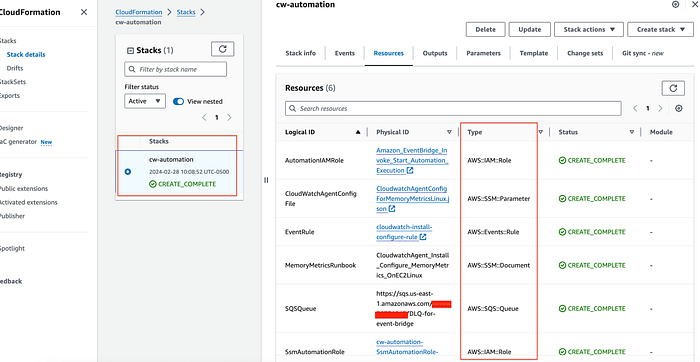
Step 1
2. Verify deployed Systems Manager Automation Document:- This custom document has 3 steps:
- Find the attached role on the target instance, and attach the CloudWatchAgentServer managed policy to the instance role.
- Install CloudWatch Agent on the target instance.
- Configure CloudWatch Agent to push metrics to CloudWatch.
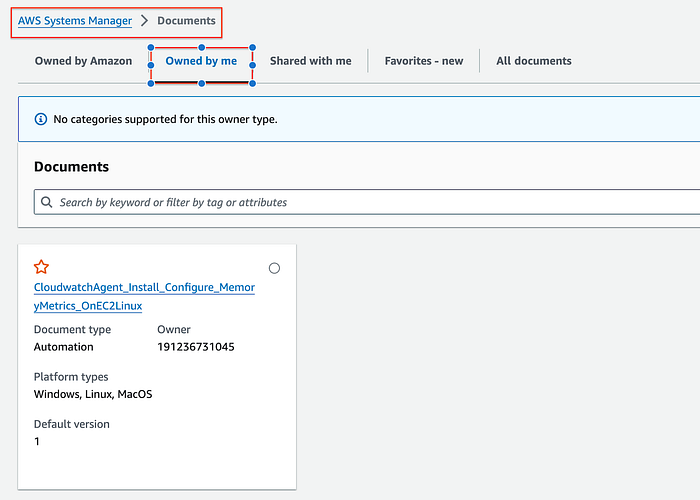
Step 2
3. Verify the Amazon EventBridge rule:-
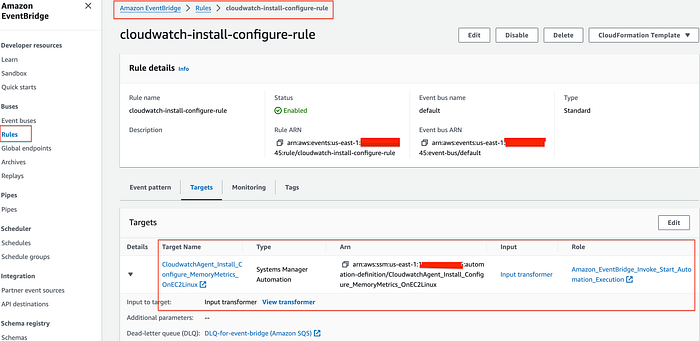
Step 3
Event Pattern — The below event pattern is used to filter “running” status events as they occur.
Event
{
  "detail-type": ["EC2 Instance State-change Notification"],
  "source": ["aws.ec2"],
  "detail": {
    "state": ["running"]
  }
}
and the E ventBridge Input transformation using the Input Transformer below to filter to get the Target Instance ID.
Input transformer

Input path
 {
   "instance": "$.detail.instance-id"
 }

Input template
 {
   "InstanceId":[<instance>]
 }
4. Create a new instance:-
- A test EC2 instance must have the AWS Systems Manager Agent ( SSM Agent) installed for the System Manager to communicate. Additionally, EC2 instances must have network connectivity to the public Systems Manager service endpoints or to AWS PrivateLink VPC endpoints for Systems Manager. (Note- I have used Amazon Linux 2023 AMI and launched in default VPC)
- Create a role “ EC2ssmCoreRole” with “ AmazonSSMManagedInstanceCore” AWS managed policy to allow the Systems Manager to manage the EC2 instance. Create an instance profile and add the role to the instance profile. Finally, launch a test instance (t2.micro) instance. I have used the below sample Cloudformation template to launch the test instance.
AWSTemplateFormatVersion: 2010-09-09
Description: CloudFormation template to create EC2 instance with SSM role

Parameters:
  LatestAmiId:
    Type: 'AWS::SSM::Parameter::Value<AWS::EC2::Image::Id>'
    Default: '/aws/service/ami-amazon-linux-latest/amzn2-ami-hvm-x86_64-gp2'

Resources:
  EC2Role:
    Type: AWS::IAM::Role
    Properties:
      RoleName: EC2ssmCoreRole
      Description: IAM role to allow Systems Manager to manage the EC2 instance
      AssumeRolePolicyDocument:
        Version: 2012-10-17
        Statement:
          - Effect: Allow
            Principal:
              Service: ec2.amazonaws.com
            Action: sts:AssumeRole
      ManagedPolicyArns:
        - arn:aws:iam::aws:policy/AmazonSSMManagedInstanceCore

  EC2InstanceProfile:
    Type: AWS::IAM::InstanceProfile
    Properties:
      Roles:
        - !Ref EC2Role
      InstanceProfileName: EC2ssmCoreRole

  EC2Instance:
    Type: AWS::EC2::Instance
    Properties:
      ImageId: !Ref LatestAmiId
      InstanceType: t2.micro
      IamInstanceProfile: !Ref EC2InstanceProfile
      Tags:
        - Key: Name
          Value: "Test-instance"
        - Key: Env
          Value: "test-environment"

Outputs:
  EC2ssmCoreRoleName:
    Description: Name of the SSM Automation IAM Role
    Value: !Ref EC2Role

  EC2ssmCoreRoleArn:
    Description: ARN of the created IAM role
    Value: !GetAtt EC2Role.Arn

  EC2InstanceId:
    Description: Instance Id
    Value: !Ref EC2Instance
5. Confirm EventBridge rule was triggered when the instance came into a “ running” state and the Systems Manager executed the automation and installed and configured Cloudwatch agent on the EC2 instance to push memory metrics.
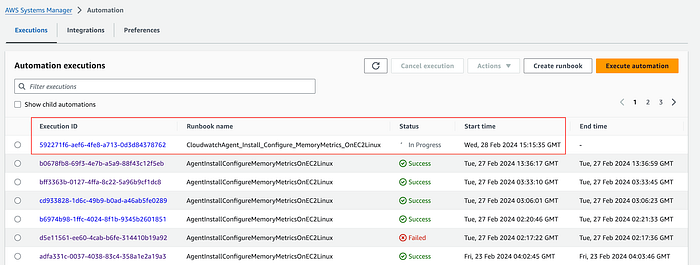
6. Check Systems Manager Automation execution — As soon as the instance comes into a “ running” state, it will trigger the event bridge rule to execute the Systems Manager Automation Document.
Step 6
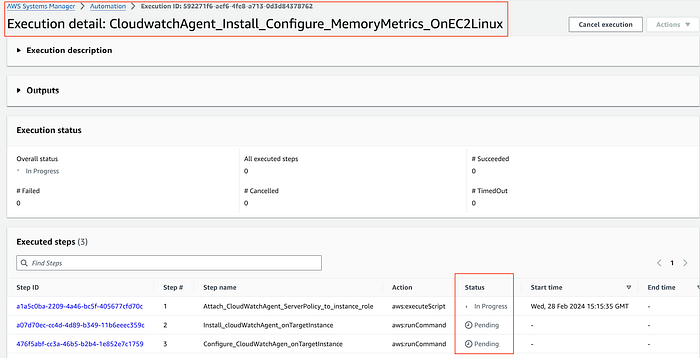
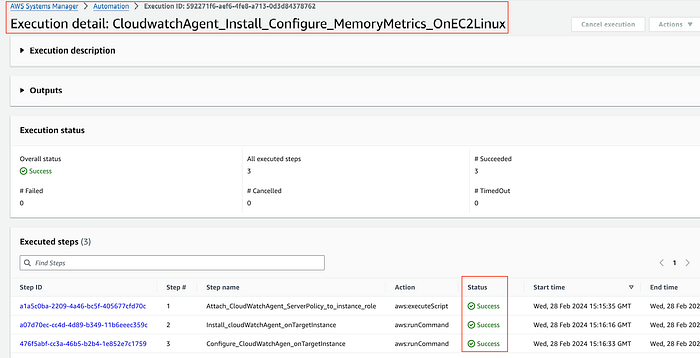
7. Check the status and progress of automation execution — it will perform 3 steps:
- Attaching the CloudWatch Agent Server policy to the instance role
- Install Cloudwatch Agent on the target Instance
- Configure CloudWatch Agent by pulling configuration file from the Systems Manager Parameter Store to push custom memory metrics.
Step 7
Step 7
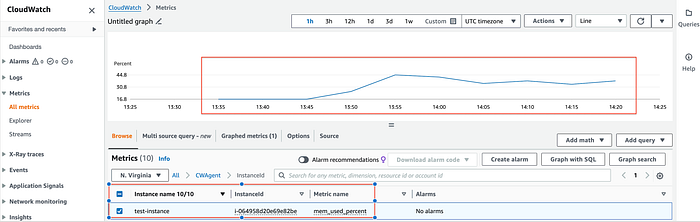
8. Verify that CloudWatch Agent is installed and configured to push custom memory metrics in Cloudwatch.
Step 8
Conclusion — To conclude, we learned, how we can fully automate the installation and configuration of CloudWatch Agent and push custom memory metrics to CloudWatch using Systems Manager Automation and AWS EventBridge without any manual step for newly created EC2 instances.