

OpenID Connect (OIDC) is an identity layer built on top of the OAuth 2.0 protocol that enables applications to authenticate users without managing and storing user credentials. AWS Application Load Balancer (ALB) integrates with the most common social identity providers (IdPs), corporate identities and any IdP that is OIDC compliant. This integration simplifies the authentication process and enhances security by offloading the management of user sessions and authentication tokens to a trusted third-party provider.
While the sign-in process is seamless for end users, pinpointing issues can be challenging if authentication breaks due to additional hops between the end user and the application they are trying to access.
This article focuses on providing visibility into how the HTTP transactions look from different perspectives during the authorisation code flow.
If you’re interested in learning how to configure user authentication on your ALB, I recommend reading the official AWS documentation. AWS also provides a demo site where you can try out the authentication functionality.
**Let’s break the authentication flow step by step —**
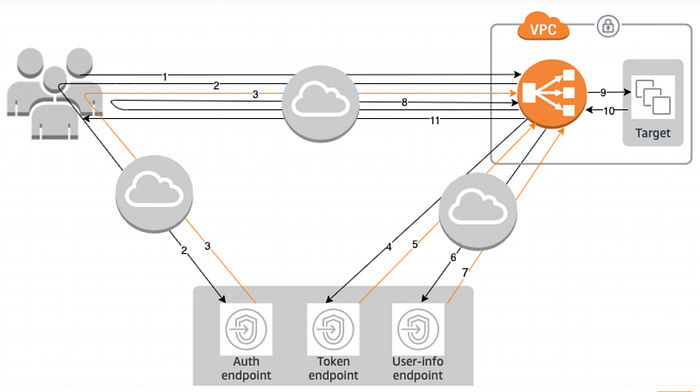
Logging is critical for maintaining the health, security, and efficiency of cloud-based applications. It provides the necessary insights to monitor and troubleshoot applications, ensuring they run smoothly and securely.
To dive deep into the authentication flow, I have collected the following logs:
- HAR file on the user’s web browser.
- Access logs from the IdP endpoints (Auth, Token, User-Info), ALB and the target application.
Before examining the HTTP transactions, I recommend familiarising yourself with the different OIDC components and their purposes.
Prerequisites —
- The IdP is configured to perform the Authorisation code grant flow with the intended scopes. A Client ID and client secret have also been generated.
- The ALB is configured with a listener rule to trigger the “authenticate” action when the HTTP path is
/auth*. Define the authentication request parameters, including the client ID, client secret, authorisation endpoint, token endpoint, and user info endpoint. These parameters are used by the ALB to communicate with the IdP.
Step 1 — The user sends an HTTP request to your application behind Authentication enabled ALB.
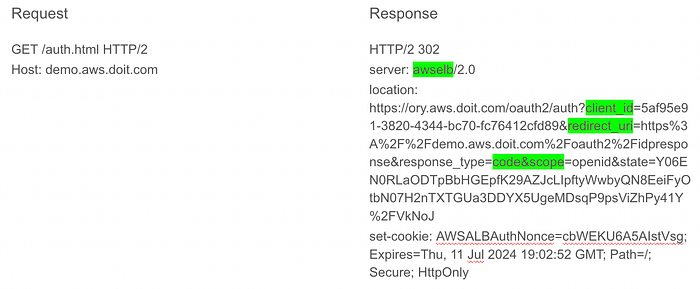
Browser redirected to IdP’s Auth endpoint.
ALB access logs for the same transaction —
h2 2024–07–11T18:47:52.382721Z app/demo/25be909a3f190764 109.78.96.82:54871 - -1 -1 -1 302–359 657 "GET https://demo.aws.doit.com:443/auth.html HTTP/2.0" arn:aws:elasticloadbalancing:eu-west-1:21112316:targetgroup/TG/1a24c5faad770fb2 "Root=1–669028d8–653487fd74af592f498329f8" "authenticate"
- The authentication action is triggered when the user sends an HTTP GET request to the ALB.
- If no authentication session cookie is present in the HTTP request headers, the ALB generates an HTTP 302 response, and the user is redirected to the URL specified in the location header (the IdP’s authorisation endpoint).
- The
redirect_uriis the location where the browser is redirected after the authorisation code is granted by the IdP.
Step 2 — The user gets redirected to IdP’s authorisation endpoint.
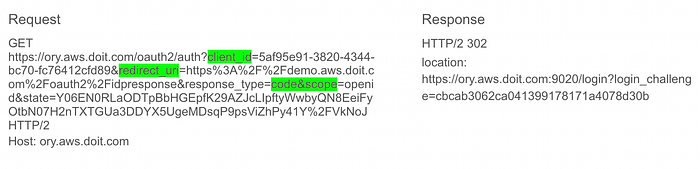
HTTP request to auth endpoint.
- The user sends an HTTP request to the IdP’s authorisation endpoint.
- The IdP’s authorisation endpoint then redirects the user to the IdP’s login endpoint (
/login). - The login endpoint handles the authentication of the user.
Step 3 — The user accesses the login endpoint.
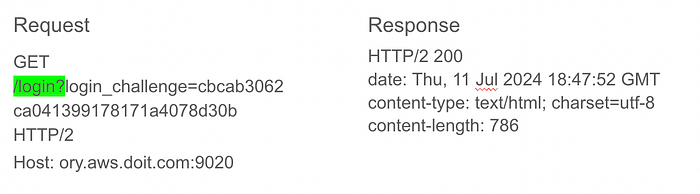
HTTP request to login endpoint.
- The user sends an HTTP request to the login endpoint.
- Login page is loaded with the username and the password field.
Step 4 — The user authenticates.
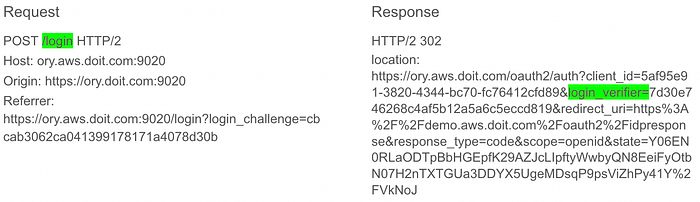
User enters username and password.
- The user enters their credentials on the IdP’s login page.
- After successful authentication, the user is redirected back to the IdP’s authorisation endpoint.
Sample POST request payload —
csrf=izvsVKMB-GxnSvAK6McnPw6uNcZVCqqWxjeU&challenge=cbcab3062ca041399178171a4078d30b&email=user%40name.com&password=complex&submit=Log+in
Step 5 — The user gets the Authorisation code from IdP.
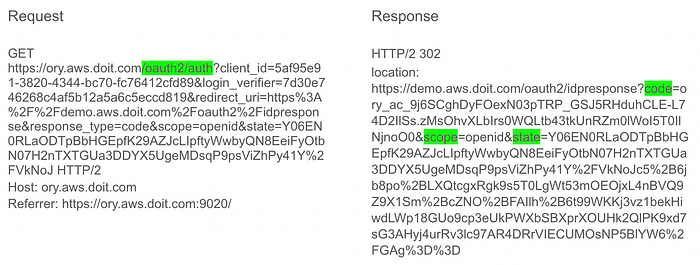
Auth code granted.
- The IdP’s authorisation endpoint redirects the user back to the client application with an authorisation code.
- The original values of the
stateparameter are preserved to maintain a 1:1 relationship between the request and the callback.
Step 6 — The user returns to ALB with Authorisation code.
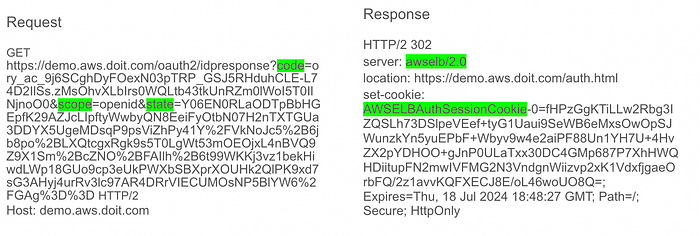
User redirected back to /auth with authentication cookie.
ALB access logs for the same transaction —
h2 2024-07-11T18:48:27.805659Z app/demo/25be909a3f190764 109.78.96.82:54871 - -1 -1 -1 302 - 423 847 "GET https://demo.aws.doit.com:443/oauth2/idpresponse?code=ory_ac_9j6SCghDyFOexN03pTRP_GSJ5RHduhCLE-L74D2IlSs.zMsOhvXLbIrs0WQLtb43tkUnRZm0lWoI5T0IlNjnoO0&scope=openid&state=Y06EN0RLaODTpBbHGEpfK29AZJcLIpftyWwbyQN8EeiFyOtbN07H2nTXTGUa3DDYX5UgeMDsqP9psViZhPy41Y%2FVkNoJc5%2B6jb8po%2BLXQtcgxRgk9s5T0LgWt53mOEOjxL4nBVQ9Z9X1Sm%2BcZNO%2BFAIlh%2B6t99WKKj3vz1bekHiwdLWp18GUo9cp3eUkPWXbSBXprXOUHk2QlPK9xd7sG3AHyj4urRv3lc97AR4DRrVIECUMOsNP5BlYW6%2FGAg%3D%3D HTTP/2.0" "Root=1-669028fb-6e750f6c5c7fdde45853b7f6" "authenticate"
- The user presents the authorisation code to the ALB.
- The ALB responds with an HTTP 302 response code and redirects the user back to the original URI:
https://demo.aws.doit.com/auth.html. - Before the response is generated, the ALB makes backchannel requests to the following endpoints:
IdP’s Token endpoint and exchange the code for an IdToken.
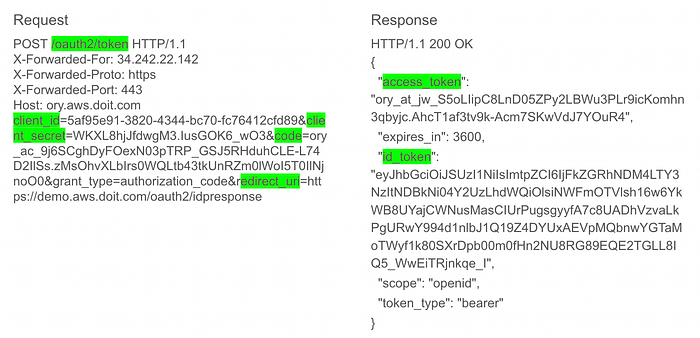
POST request to Token endpoint.
UserInfo endpoint and exchange access token for User claims.

Request to UserInfo endpoint.
User claims, the access token, and the refresh token are base64 encoded and encrypted into theAWSELBAuthSessionCookie cookie.
Step 7 — The user requests original URI with AWSELBAuthSessionCookie set.
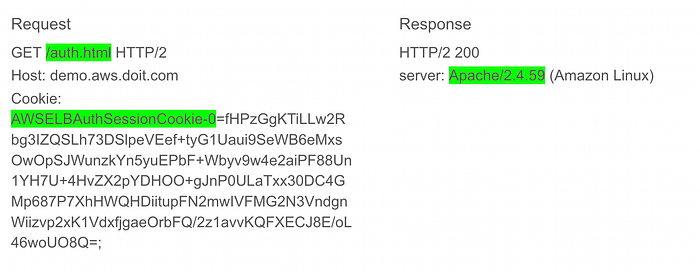
User is authenticated by the ALB and the request reaches the backend.
ALB access logs for the same transaction —
h2 2024-07-11T18:48:27.824183Z app/demo/25be909a3f190764 109.78.96.82:54871 172.31.11.119:80 0.007 0.001 0.000 200 200 596 3307 "GET https://demo.aws.doit.com:443/auth.html HTTP/2.0" "arn:aws:elasticloadbalancing:eu-west-1:211125377316:targetgroup/healthyTG/1a24c5faad770fb2 "Root=1-669028fb-156c503c2fe1fcdb60e4a5ad" 2024-07-11T18:48:27.815000Z "authenticate,forward" "172.31.11.119:80" "200"
- The rule conditions on the ALB for the “authenticate” action are met, and the authentication cookie is also present.
- The ALB validates the cookie and forwards the user information to the targets in the
X-AMZN-OIDC-*HTTP headers.
X-AMZN_OIDC* headers seen on the target —
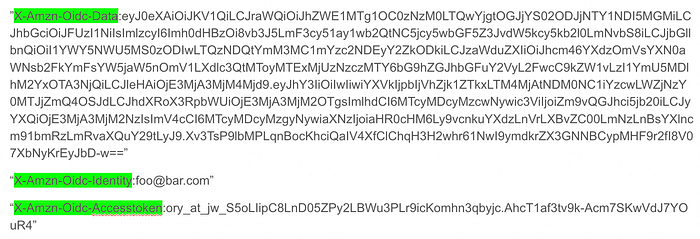
X-AMZN_OIDC* headers.
x-amzn-oidc-accesstoken- The access token from the token endpoint.
x-amzn-oidc-identity- The subject field (sub) from the user info endpoint.
x-amzn-oidc-data- The user claims, in JSON web tokens (JWT) format.
User claims in the JWT format includes a header, payload, and signature that are base64 URL encoded. ALB uses ES256 (ECDSA using P-256 and SHA256) to generate the JWT signature.
Decoded JWT —

The JWT header is a JSON object that includes the issuer, signer details, and the key ID. The JWT payload is a JSON object containing the user claims received from the IdP UserInfo endpoint.
The target (Apache) successfully authorises the user based on the claims and sends an HTTP 200 OK response back to the user via the ALB.
Conclusion —
This article provides an in-depth look at how HTTP transactions occur during the OIDC authorisation code flow when using AWS Application Load Balancer (ALB). It breaks down each step, from the user’s initial HTTP request through to the final authentication and authorization, highlighting the key HTTP interactions and logging details essential for troubleshooting and understanding the process.
If you’d like to know more or are interested in our services, don’t hesitate to get in touch. You can contact us here.