

AWS Database Migration Service (DMS) is a widely used tool for database migration and replication, supporting both homogeneous and heterogeneous database environments. When utilizing AWS Database Migration Service (DMS) to migrate data from sources like Amazon RDS MySQL and Amazon RDS PostgreSQL, implementing source filters can effectively limit the number and type of records transferred to your target database. However, it’s imporatant to be aware of certain limitations associated with these filters to ensure a smooth migration process.
AWS DMS Overview
AWS DMS enables data migration by continuously replicating changes from the source to the target database with minimal downtime. Some of its key features include:
- Full Load, CDC, and Ongoing Replication: Supports initial migration and continuous synchronization.
- Schema and Table Mapping: Allows flexible inclusion and transformation of objects.
- Filtering Capabilities: Provides row-level and column-level filtering to control which data is replicated.
- Support for Multiple Database Engines: Works with MySQL, PostgreSQL, SQL Server, Oracle, and other databases.
Despite these capabilities, column filtering in AWS DMS may not always work as expected, particularly when dealing with updates during CDC.
What is Column Filtering in AWS DMS?
Column filtering in AWS DMS enables you to include or exclude rows from replication based on conditions applied to specific columns. For example, you can configure a DMS task to replicate only those rows where a column like ‘status’ equals ‘active’ or where a ‘timestamp’ column is greater than a specific date. This is particularly useful when you want to migrate only a subset of your data or apply business logic during the migration process.
Here’s an example of a DMS column filter rule:
{
  "rules": [\
    {\
      "rule-type": "selection",\
      "rule-id": "1",\
      "rule-name": "FilterActiveUsers",\
      "object-locator": {\
        "schema-name": "public",\
        "table-name": "users"\
      },\
      "rule-action": "include",\
      "filters": [\
        {\
          "filter-type": "source",\
          "column-name": "status",\
          "filter-conditions": [\
            {\
              "filter-operator": "eq",\
              "value": "active"\
            }\
          ]\
        }\
      ]\
    }\
  ]
Use Case: Column Filtering during Data Migration
To test how DMS handles column filtering, we conducted a proof of concept (POC) for migrating data from an RDS MySQL 8.0 instance to another RDS MySQL 8.0 instance using AWS Database Migration Service (DMS). The requirement was straightforward: replicate rows from the source table to the target table only when a specific column, named “name,” meets a certain condition (i.e., when name = “b”). To achieve this, we utilized DMS’s source column filtering feature, which allows you to include or exclude rows based on specific values.
Setup
- Source: RDS MySQL 8.0.36
- Target: RDS MySQL 8.0.36
- DMS Version: Engine 3.5.4
- Migration Mode: Full Load with CDC
A sample table was created on the source database:
CREATE TABLE `Sample` (
`id` varchar(255) NOT NULL,
`name` varchar(255) NOT NULL,
PRIMARY KEY (`id`)
);
A DMS migration task was configured with a column-level filter to replicate only rows where name = ‘b’.
DMS Mapping Rule:
{
"rules": [\
{\
"rule-type": "selection",\
"rule-id": "098947021",\
"rule-name": "098947021",\
"object-locator": {\
"schema-name": "Test",\
"table-name": "Sample"\
},\
"rule-action": "include",\
"filters": [\
{\
"filter-type": "source",\
"column-name": "name",\
"filter-conditions": [\
{\
"filter-operator": "eq",\
"value": "b"\
}\
]\
}\
]\
}\
]
}
selection rule with source filter
Observations and Findings :
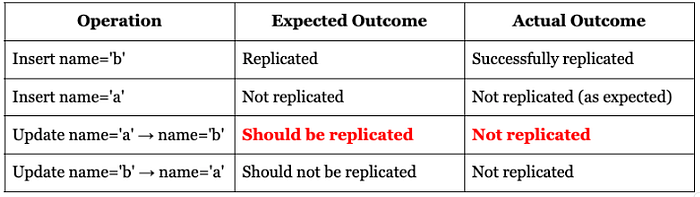
When a row with name = ‘b’ was inserted, it was correctly replicated. Similarly, an insert with name = ‘a’ was correctly ignored. However, updates present inconsistencies:
- Updating name=’a’ to name=’b’ was ignored, even though CDC captured the event.
If DMS validation is enabled, this behavior will result in mismatched records between the source and target databases as the validation will flag discrepancies.
This further highlights how AWS DMS applies filters based on the pre-update state, potentially leading to data integrity issues when column filtering is used.
Root Cause - How AWS DMS Applies Filters
AWS DMS evaluates column filters based on the row’s state before an update occurs. This means:
- Insert Events: The filter applies to the inserted row’s values.
- Update Events: The filter is evaluated before the update is applied.
- Delete Events: The filter checks against the row’s state before deletion.
Since updates are filtered based on the row’s original state, an update that modifies name = ‘a’ to name = ‘b’ is ignored. The row did not meet the filter condition before the update, so it is never replicated.
This behavior can lead to data inconsistencies. If an application relies on filtering rows after an update, expected data might never be replicated.
Workaround: Filtering at the Target Database
Since AWS DMS does not provide an option to apply filters after an update is processed, a workaround is required:
Step 1: Remove Column Filters from the DMS Task
Modify the DMS task to replicate all data without filtering.
Step 2: Implement Filtering on the Target Database
Instead of directly replicating to the Sample table in the target database, you can replicate to a staging table and then use a trigger or stored procedure to move valid rows to the Sample table.
Create a staging table (sample_staging) in the target RDS MySQL database. This table will temporarily hold the replicated data before it is moved to the Sample table.
For example, in MySQL:
CREATE TABLE sample_staging (
id INT PRIMARY KEY,
name VARCHAR(255)
);
Step 3: Create a Stored Procedure
Create a stored procedure to move valid rows (e.g., rows where name = ‘b’) from the staging table (sample_staging) to the target table (Sample). This procedure will handle both inserts and updates.
CREATE PROCEDURE MoveValidRowsToSample()
BEGIN
-- Insert or update valid rows in the Sample table
INSERT INTO Sample (id, name)
SELECT id, name
FROM sample_staging
WHERE name = 'b'
ON DUPLICATE KEY UPDATE
name = VALUES(name);
--Delete valid rows from the staging table
DELETE FROM sample_staging
WHERE name = 'b';
END
Step 4: Create a Trigger
Create a trigger on the staging table (sample_staging) to automatically call the stored procedure whenever a row is inserted or updated.
CREATE TRIGGER after_insert_sample_staging
AFTER INSERT ON sample_staging
FOR EACH ROW
BEGIN
CALL MoveValidRowsToSample();
END

CREATE TRIGGER after_update_sample_staging
AFTER UPDATE ON sample_staging
FOR EACH ROW
BEGIN
CALL MoveValidRowsToSample();
END
How This Works
- Source Database: Contains the original data.
- AWS DMS: Replicates data from the source to the sample_staging table in the target RDS MySQL database.
- Staging Table (sample_staging): Temporarily holds all replicated data.
- Trigger: Automatically calls a stored procedure whenever data is inserted or updated in the sample_staging table.
- Stored Procedure: Moves valid rows (where name = ‘b’) from sample_staging to the Sample table.
- Target Table (Sample): Contains only the valid rows after the trigger and stored procedure process the data.
For PostgreSQL, a similar function can be implemented using BEFORE INSERT OR UPDATE triggers.
Testing on RDS PostgreSQL
To ensure that this behavior was not specific to MySQL, we conducted the same test on RDS PostgreSQL. The results were identical:
- Updates that caused a row to meet the filter condition were not replicated to the target table.
- This confirms that the issue is not database-specific but rather a limitation of how DMS handles column filters during CDC.
Other Limitations of DMS Source Filters
- Right-to-Left (RTL) Language Columns: When using DMS source filters, you might assume that the tool can handle all types of data, regardless of the language or script. However, this is not the case. DMS source filters do not process columns containing RTL languages like Hebrew. If your filter conditions involve these columns, the filters may not function as expected, leading to incomplete or incorrect data replication.
Example: If you have a column containing Hebrew text (e.g., customer_name in Hebrew) and you apply a filter condition like customer_name = “דוד”, DMS may fail to evaluate the condition correctly.
- Large Object (LOB) Columns: Filters cannot be applied to LOB columns, such as BLOBs, CLOBs, or TEXT in MySQL and BYTEA or TEXT in PostgreSQL. Attempting to filter based on these columns will be ineffective.
Example: If a document’s table contains a content column of type TEXT, setting a filter like content LIKE ‘%AWS%’ will not work.
Recommendations for Effective Filtering
- Indexing Filtered Columns: To improve DMS task performance, create indexes on the filtered columns along with the primary key. This ensures efficient filtering and reduces the load on the source database.
- Use Target-Side Filtering When Necessary: If column filtering behavior does not meet your needs, consider applying filters on the target database instead.
- Avoid Filtering on LOB and RTL Columns: Since DMS does not support filtering on LOB columns or RTL text, plan alternative approaches for handling such data.
Key Learnings:
- DMS Evaluates Filters on Pre-Update State: Column filters only check the existing row values before an update is applied.
- Updates May Be Ignored: If an update changes a row to satisfy the filter condition, it will not be replicated unless the row previously met the condition.
- Workaround Requires Target-Side Filtering: To ensure correct replication, avoid using column filters in AWS DMS and instead apply filtering logic at the target database.
This behavior can cause unexpected data loss in replication setups that rely on column filtering. If filtering based on post-update values is required, AWS DMS alone is not enough — additional logic must be implemented on the target database to ensure accurate replication.
AWS DMS evaluates column filters on the pre-update state of a row during CDC. As a result, updates that modify a row to match the filter condition are not replicated, which can lead to unexpected data inconsistencies. This limitation may impact data inconsistency & replication strategies.
If your migration relies on post-update filtering, AWS DMS alone is not sufficient, and additional database-side logic is required. Future updates to AWS DMS or improved documentation may help clarify this behavior.
I trust this blog post has provided valuable insights. If you’d like to know more or are interested in our services, don’t hesitate to get in touch. You can contact us here.