

AWS Network Firewall is a stateful, managed network firewall and intrusion detection and prevention service for your Amazon virtual private cloud (VPC). AWS Network Firewall offers stateful inspection, allowing it to assess the context of network traffic for better decision-making. AWS Network Firewall’s intrusion prevention system (IPS) provides active traffic flow inspection with real-time network and application layer protections against vulnerability exploits and brute force attacks.
AWS is continuously expanding its capabilities and is likely to evolve by incorporating additional features to match the advanced capabilities of traditional NGFWs.
On December 19, AWS Network Firewall support for egress Transport Layer Security (TLS) inspection is generally available in all the AWS regions. This feature allows customers to decrypt, inspect, and re-encrypt outbound TLS traffic destined for the internet, another VPC, or another subnet. Please note that ingress TLS inspection on Network Firewall is already available in all the AWS regions.
Why do organisations need outbound SSL/TLS decryption
Outbound TLS inspection is a process that allows organisations to monitor and inspect outbound encrypted traffic. It can help detect and prevent data exfiltration, malware, and other security threats. TLS encryption is designed to deliver traffic over the internet securely, but it can also be used to encrypt malicious traffic. By inspecting outbound TLS connections, organisations can intercept and filter out risky traffic. This can be useful in detecting and preventing data breaches and ensuring compliance with regulatory requirements.
Reference architecture diagram and traffic flow
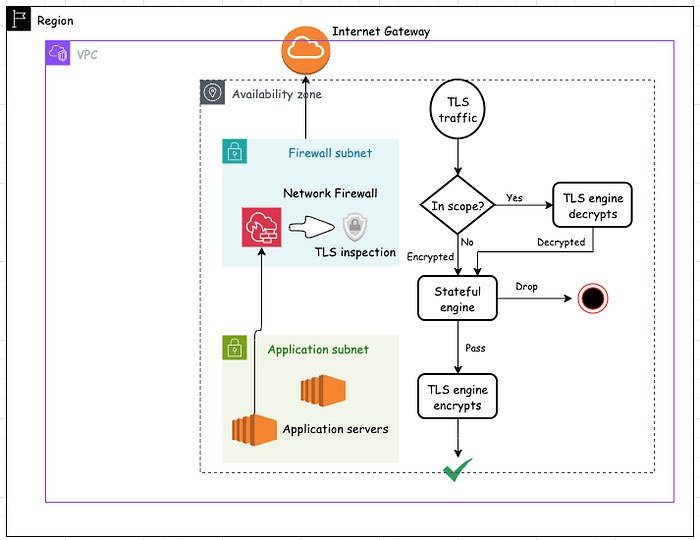
Without the Network Firewall, any SSL-encrypted request to the website is directly carried out between the client and the website’s server. After enabling TLS inspection on the firewall, it acts as a middlebox (SSL interception device) between your browser and the server.
Its worth pointing out that TLS inspection is available for not just HTTPS traffic but other TCP-based application protocols that use TLS as well, such as SMTP and POP3s.
Example traffic flow — [for HTTPS traffic]
- Client Request: The client initiates a secure connection to a server using HTTPS protocol.
- Server hello and certificate: The server responds by sending SSL ciphers and certificate to the client.
- Network Firewall SSL inspection: It intercepts and replaces it with new dynamically generated certificate. It establishes its own SSL connection with the client, acting as if it were the server. Network firewall then establishes a separate secure connection with the actual server on behalf of the client.
- Content Inspection: Encrypted data coming from client is decrypted by Network Firewall for potential security risks, such as malware, viruses, or unauthorised data according to firewall policy’s stateful rules. Firewall can either allow or drop the connection. If allowed, the data is re-encrypted and forwarded to server for processing.
- Server Response: The server responds to the client’s request with encrypted data, which follows the same path back through the SSL inspection device.
**Configuration steps**
Prerequisites
- Choose an architecture and deployment model that fits your use case.
- Check for considerations and limitations.
Create TLS inspection configuration —
Log in to AWS console and find TLS inspection configurations within the VPC service. Click on “Create TLS inspection configuration” —

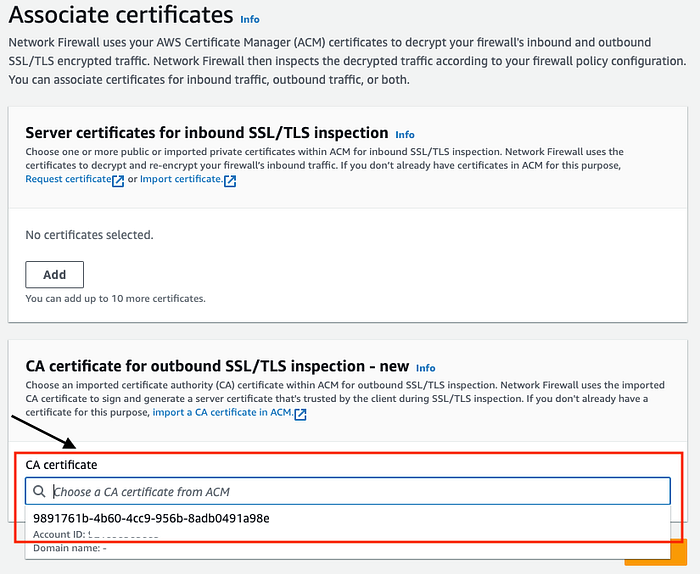
In the Associate certificates page, choose the CA certificate for outbound SSL inspection and click “Next”.
General requirements for the CA certificates that are used for outbound SSL/TLS inspection can be found here.
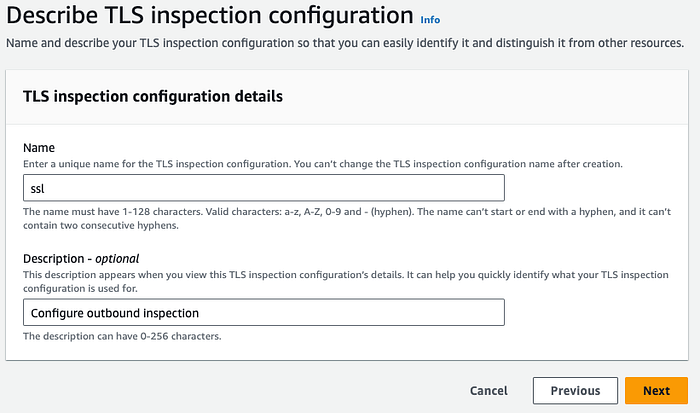
Provide “Name” and optionally “Description” —
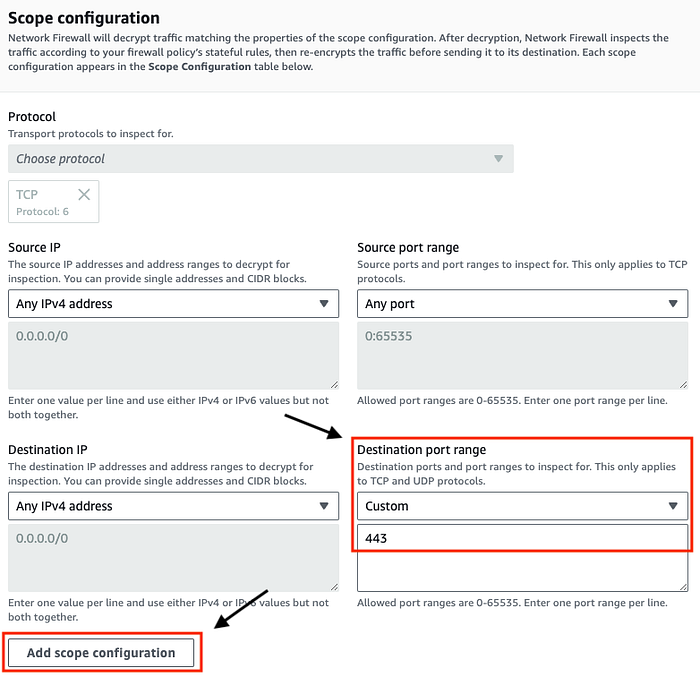
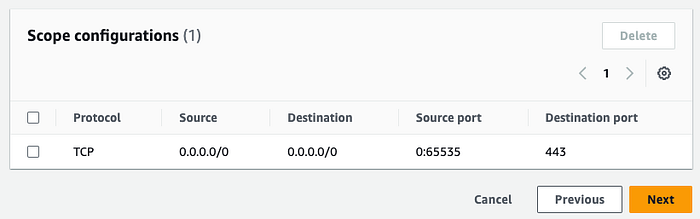
On the next page, define the scope of traffic you want Network Firewall to decrypt. Network Firewall decrypts traffic matching the 5 tuple defined in the scope configuration. Below is an example configuration to inspect all the traffic destined to port 443. Click on “Add scope configuration” —
Review the configuration and click “Next” —
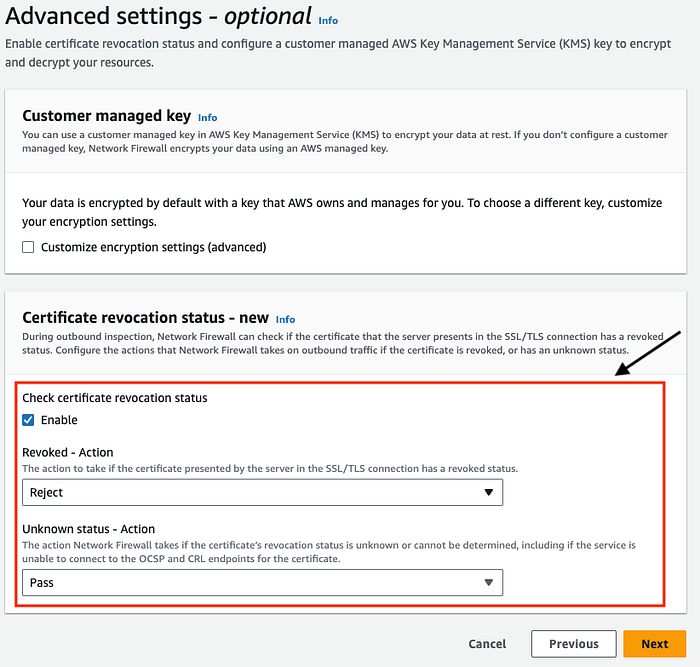
Optionally, you can define your own customer managed key to encrypt the data at rest. We keep it unchecked for now. However, It is recommended to to tick “Check certificate revocation status” to take actions on revoked and unknown server certificates.
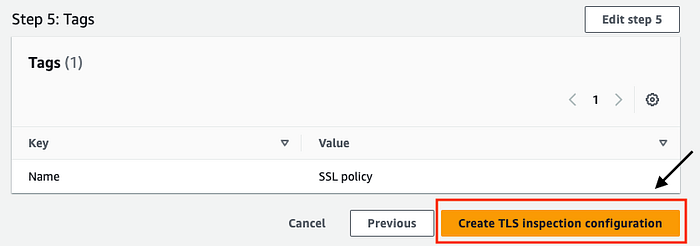
Add Tags and on “Review and create” page, revisit the configuration and click on “Create TLS inspection configuration” —
Next step would be to add the the TLS inspection configuration to a firewall policy.
Create a Firewall policy and add the TLS inspection configuration to a firewall policy in “Step 4”. Note that you can only add a TLS inspection configuration to a new policy, not to an existing policy.

It is however possible to replace an existing TLS inspection configuration with another TLS inspection configuration in a firewall policy via the “TLS inspection configuration” tab.

To complete the configuration, edit the firewall policy of your exiting Firewall —
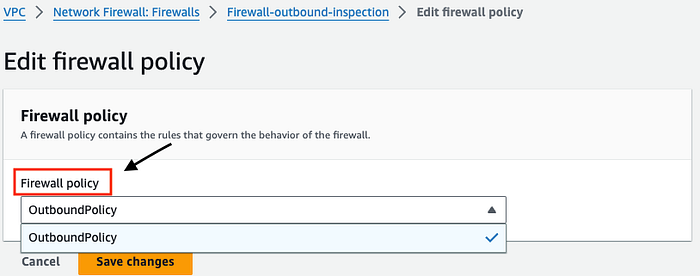
If you have not spun up the Network Firewall yet, you can follow the link here and “associate an existing firewall policy” from the drop down in “Step 4" as shown below —
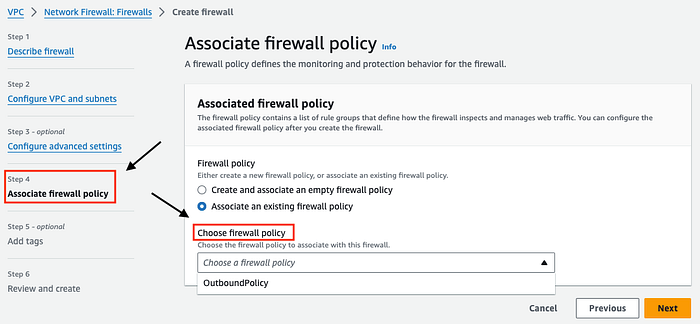
At this point “any” traffic destined to port 443 (scope) via the Network firewall is TLS inspected.
**Testing**
Now its time to test the setup. If you don’t have VPC routing in place, consider following the AWS documentation here for step by step instructions.
To prove that AWS Network Firewall SSL engine sees the decrypted HTTP traffic, I have created a STATEFUL suricata rule that blocks the URI content “download-anti-malware-testfile”
drop http $HOME_NET any -> $EXTERNAL_NET any (content:"download-anti-malware-testfile"; http_uri; msg:"Blocking bad domain"; flow:to_server, established; sid:2; rev:1;)
Login to the EC2 instance and run the below command to fetch the test malware file
curl -I https://www.eicar.org/download-anti-malware-testfile/ -v
The output of the curl command is a TLS alert, indicating a break in the communication process.
* using HTTP/1.x
> HEAD /download-anti-malware-testfile/ HTTP/1.1
> Host: www.eicar.org
> User-Agent: curl/8.5.0
> Accept: */*
>
TLS alert, close notify (256):
* Empty reply from server
* Closing connection
* TLS alert, close notify (256):
curl: (52) Empty reply from server
If you have Cloudwatch logs enabled, you can see decrypted HTTP headers along with the matched rule. The action was “blocked” because of the rule.
{
    "firewall_name": "Firewall-outbound-inspection",
    "availability_zone": "eu-west-1a",
    "event_timestamp": "1708512471",
    "event": {
        "tx_id": 0,
        "app_proto": "http",
        "src_ip": "172.31.88.172",
        "src_port": 41508,
        "event_type": "alert",
        "alert": {
            "severity": 3,
            "signature_id": 2,
            "rev": 1,
            "signature": "Blocking bad domain",
            "action": "blocked",
            "category": ""
        },
        "flow_id": 817400271818255,
        "dest_ip": "89.238.73.97",
        "proto": "TCP",
        "http": {
            "hostname": "www.eicar.org",
            "url": "/download-anti-malware-testfile/",
            "http_user_agent": "curl/8.5.0",
            "http_method": "HEAD",
            "protocol": "HTTP/1.1",
            "length": 0
        },
        "dest_port": 443,
        "timestamp": "2024-02-21T10:47:51.085575+0000"
    }
}
**Pricing**
When utilising the TLS inspection feature, an extra hourly fee is incurred for Advanced Inspection. In some regions you may also pay additional charges for the Advanced Inspection data processing.
For example, pricing structure for Ireland region has no additional charges for Advanced Inspection Traffic Processing

But, you pay $0.009/GB for traffic processing in Melbourne

More on pricing here.
**Conclusion**
To conclude, we saw how Network Firewall can be configured for organisations to inspect encrypted outbound traffic, enabling detection and prevention of threats hidden within SSL/TLS encrypted connections. This helps in mitigating risks associated with malicious activities such as malware, data exfiltration, and command and control communications.
Overall, outbound SSL inspection is a crucial security measure that helps organisations strengthen their security defenses, protect sensitive data, and maintain regulatory compliance in today’s threat landscape.