

An updated review of different ways to connect to private EC2 instances securely
Accessing private EC2 instances is a frequent requirement for specific users in organizations, typically administrators and some authorized developers. Traditionally, AWS users have used bastions (jump boxes), VPNs (Virtual Private Connections) or AWS Direct Connect to solve this need. Although AWS EC2 has provided modern alternatives to these “old-school” solutions for some time, a recent enhancement to one of these modern approaches introduced in June 2023 calls for a refresh. This article explains these alternative options for connecting to private EC2 instances, their advantages and disadvantages and how to use them.
Note: A private instance in this context is an EC2 instance with no public IPv4 address or not launched in a public VPC subnet. By definition, a public subnet is any subnet whose route table directs traffic to the Internet through an Internet Gateway.
A summary of the “traditional” SSH connection.
There are two typical “traditional” ways for connecting securely to a private EC2 instance: 1) Establishing a secure encrypted tunnel using a Client-VPN or Site-to-Site VPN (and let’s also include AWS Direct Connect in this group, although it’s not technically a tunnel) and 2) using a public EC2 instance as a “jump box” (commonly known as a “bastion” host) to create a new connection to the private instance. Both options involve a cost and (in certain cases) some non-trivial configuration work. Let’s take a close look:
- AWS Client-VPN, AWS Site-to-Site VPN (or similar VPN solutions) or AWS Direct Connect
This approach has been (and still is) a popular way of allowing connectivity through any network to a private network by establishing an encrypted tunnel (in the case of VPNs) or a dedicated private link (in the case of AWS Direct Connect). However, it comes with a cost, as you will need at least an instance or managed service as a termination for the VPN connection and, in some cases, connection time costs and a varied degree of complexity.
- Jump box or Bastion
An even more popular option, with lower cost and complexity than setting up VPN/Direct Connect, this approach involves using a public EC2 instance that will receive a connection from the client and then create a new connection to the private EC2 instance (see diagram below). You can use this option for SSH (typically using SSH Agent Forwarding) and RDP (using Remote Desktop Gateway). The disadvantage is that (besides paying for the bastion instance) you increase your attack surface by publicly exposing the bastion instance. Of course, you have to implement all available security measures to protect your bastion hosts, such as ensuring controlled access to the machine’s credentials (i.e., private keys), network restrictions through security groups and Network Access Control Lists (NACL), and frequent patching of the Operating System. All of this constitutes an operational overhead for your infrastructure.

Bastion-based Connection
While the above options are technically valid, AWS provides two modern, more manageable and cost-effective methods to provide the same access these two approaches offer to manage your private instances. Let’s review them.
ACCESS METHOD 1: Session Manager allows you to avoid SSH entirely (if you want).
AWS Session Manager, introduced in 2018, is a feature of AWS Systems Manager that enables you to interactively manage your EC2 instances, edge devices, and on-premise servers and virtual machines (VMs).
When using Session Manager, SSH or RDP are not required (they don’t have to be installed, configured and running) in the private EC2 instance you are connecting to. However, you can still use the SSH or RDP protocols to connect to the private EC2 instance through Session Manager (see below).
Configuring Session Manager:
- The private EC2 instance needs to be running Systems Manager Agent, which comes preinstalled in multiple AMIs, but you can also install it manually (and not only on EC2 instances).
- The subnet where the destination private EC2 instance is connected must have direct or indirect Internet connectivity using an Internet Gateway or NAT Gateway. Alternatively, you can configure VPC endpoints for Session Manager to manage private EC2 instances without outgoing Internet access. Let’s visualize these 2 options:
- Network Configuration Option 1: If you already have a NAT Gateway in a public subnet (and don’t mind paying for the additional Systems Manager agent’s traffic processed by the NAT Gateway), the following diagram shows that the Session Manager agent needs outgoing connectivity to the Session Manager endpoints to enable client sessions to be started.
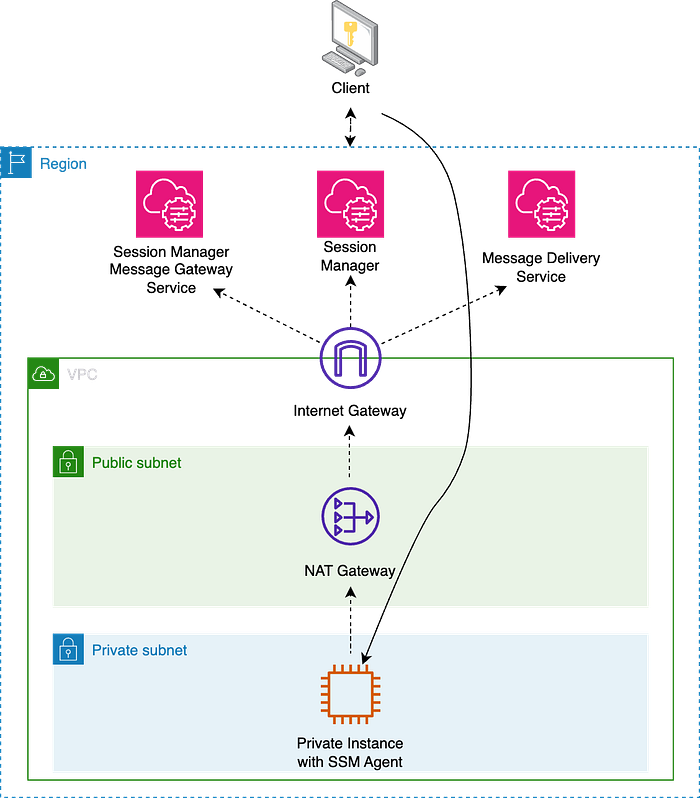
Session Manager with NAT Gateway
- Network Configuration Option 2: If you prefer not to use an Internet Gateway and NAT Gateway, you need a VPC Endpoint for each service: Systems Manager, Session Manager Message Gateway Service, and Message Delivery Service. For more details, read this and this. Notice that VPC Endpoints have their own Security Groups (and Resource Policies) that we can use for additional network and identity access control.
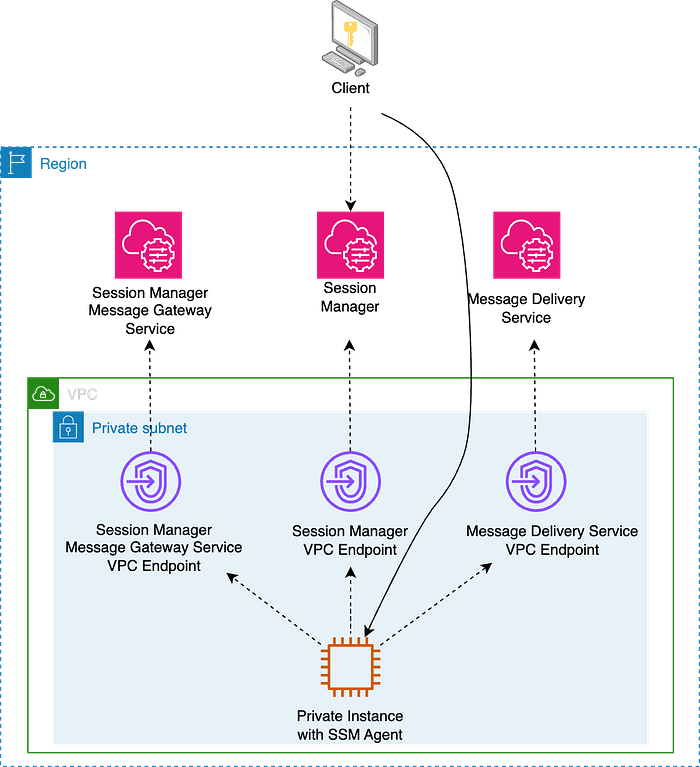
Session Manager with VPC Endpoints
Using Session Manager:
- You can use the AWS Management Console or the AWS Command Line Interface (AWS CLI) to start sessions to nodes your system administrator has granted access to using AWS Identity and Access Management (IAM) policies. Note that if you prefer using the AWS CLI, you’ll first need to install the Session Manager plugin for the AWS CLI.
- You have centralized access control to instances using IAM policies, both on the destination instance (the role you assign to the instance needs permissions allowing the Systems Manager Agent to interact with the Systems Manager/Session Manager APIs) and on the identity trying to access the EC2 instance (the IAM User or Role needs permissions to start a Session Manager connection to access the instance).
- You can provide instance permissions at the account level using an AWS Identity and Access Management (IAM) role or at the instance level using an instance profile. If your use case allows, AWS recommends granting access at the account level using the Default Host Management Configuration.
- You can still use the SSH or RDP protocols (in that case, you need a Credentials file on the client).
- You can even securely connect to an Amazon RDS or Amazon EC2 database instance with your preferred GUI using port forwarding and an EC2 “Bastion” in a private subnet.
Other Session Manager considerations:
- Session Manager supports logging and auditing capabilities. You can use AWS CloudTrail and Amazon CloudWatch Logs (and optionally also an S3 bucket) to maintain a record of all session activity. Logging isn’t available for Session Manager sessions that connect through port forwarding or SSH. This is because SSH encrypts all session data, and Session Manager only serves as a tunnel for SSH connections.
- There is no additional cost for accessing Amazon EC2 instances using Session Manager. Standard data transfer charges apply. However, using Session Manager to access on-premises instances interactively involves a cost.
ACCESS METHOD 2: EC2 Instance Connect Endpoint is the newest way to SSH/RDP into a machine.
EC2 Instance Connect Endpoint allows you to connect to an instance via SSH or RDP using ephemeral-key-based SSH without requiring the instance to have a public IPv4 address. Before June 2023, EC2 Instance Connect provided similar functionality but only allowed access to public EC2 instances (this option is still available to access this type of machine). EC2 Instance Connect was introduced in 2019.
Configuring EC2 Instance Connect Endpoint:
- No agent is needed on the destination instance. This approach allows access to instances that may not support agents, like third-party appliances.
- There is no need to have direct or indirect Internet connectivity using an Internet Gateway or NAT Gateway. However, you must configure an endpoint in one subnet in the VPC containing your destination instance. At the time of writing (November 2023), you can only create one EC2 Instance Connect Endpoint per VPC (see Quotas). It takes a few minutes for the Endpoint to be available.
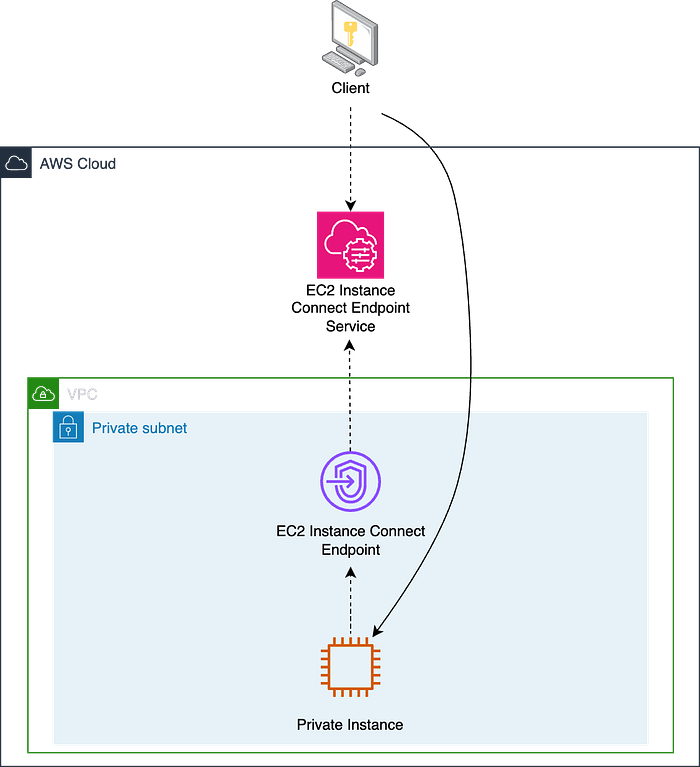
EC2 Instance Connect Endpoint
Using EC2 Instance Connect Endpoint:
- You can use the AWS Management Console, your own key and SSH client or the AWS Command Line Interface ( AWS CLI) to connect to your private nodes. You must open a tunnel using the AWS CLI before opening a connection using an RDP client.
- You can use your own SSH keys if you want (in that case, you need a Credentials file on the client). To create an RDP connection using the default administrator user, you will need the private key of the default Key Pair associated with the EC2 to decrypt the initial administrator’s password, as when connecting to Windows public instances.
- EC2 Instance Connect Endpoint provides centralized access control to instances combining identity-based ( IAM permissions assigned to the IAM User or Role initiating the connection) and network-based access controls ( Security Groups applied at the Endpoint and the destination instance). You can ask the EC2 Instance Connect Endpoint to preserve the Client’s IP address. That can affect how you configure your Security Groups and Network Access Control Lists (NACLs).
Other EC2 Instance Connect Endpoint considerations:
- It uses temporary credentials, so even if a private key is compromised, that key can’t be used beyond the validity period of the credentials.
- You can log resource operations and audit connections established over the EC2 Instance Connect Endpoint with AWS CloudTrail logs. Unlike with Session Manager, user activity logging needs to be managed at the Operating System level of the destination instance.
- There are some limitations to be aware of. To highlight a couple: Only ports 22 and 3389 are supported, and EC2 Instance Connect Endpoint doesn’t support connections to an instance using IPv6 addresses.
- There is no additional cost for using EC2 Instance Connect Endpoints. Standard data transfer charges apply.
Conclusion
In this article, I have discussed four methods for securely connecting to private EC2 instances on AWS.
The traditional methods include: 1) setting up AWS Client-VPN, Site-to-Site VPN or AWS Direct Connect (which involve establishing encrypted tunnels or dedicated links but come with complexity and cost) and 2) using a public EC2 instance as a “jump box” (which is cost-effective but increases the attack surface).
The article then introduces two modern, easier and less expensive approaches:
- Session Manager: A feature of AWS Systems Manager that allows interactive management of EC2 instances without needing SSH or RDP (although you can optionally use them) on the private instance. It uses the Systems Manager Agent, requires the destination subnet to have outgoing Internet connectivity (through a NAT Gateway or VPC Interface Endpoint), and offers centralized access control using IAM policies.
- EC2 Instance Connect Endpoint: enables SSH or RDP access to instances without public IPv4 addresses. It doesn’t require an agent on the destination instance and doesn’t need direct Internet connectivity (just the attachment of the Endpoint to a subnet in the VPC). Access control is managed through IAM permissions and Security Groups.
Both Session Manager and EC2 Instance Connect Endpoint offer auditing capabilities (with Session Manager allowing optional session activity logging) and do not incur additional charges for accessing Amazon EC2 instances, except for standard data transfer fees.
I encourage you to use these improved connection options now as they can also help you mitigate the impact of the new pricing for Public IPv4 addresses announced by AWS for February 1, 2024. If you need help, our Customer Reliability Engineering (CRE) and Technical Account Managers (TAM) at DoiT will be happy to help you do this, so just contact us!