

In my role at DoiT, I work daily with startups that are just beginning their cloud journey.
And I keep seeing the same mistakes, over and over again.

I’m sharing a few of them here, hoping you can avoid them before they become expensive/painful/hard to fix:
1\. The AWS Account Is Opened Under a Founder’s Personal Email
Very often, the first AWS account is created using a founder’s private Gmail address.
In this situation, the account legally and operationally belongs to a person, not to the company.
If the founder leaves, there is a conflict, or (worst case) something happens to them, ownership becomes a serious business risk.
Beyond that, personal email is usually less secure than a corporate mailbox: no enforced MFA, no centralized auditing, weaker identity governance and a major obstacle when performing an audit for certification.
A compromise of the founder’s email often means full control over the company’s AWS environment.
This also creates a single point of failure.
Best practice:
Create a shared group mailbox, for example: [email protected]
Add at least two team members (someone is always sick, on vacation, or at a conference), and use plus-addressing to separate environments in different AWS accounts:
2\. Creating resources in the Management Account
A startup begins with a single AWS account that hosts everything: production, development, demos, and a developer's playground.
As the company grows, it becomes necessary to separate environments. The easiest way seems to be to turn this single account into the Management Account in AWS Organizations and create new member accounts via the organization.
The problem: the management account is the only account that cannot be governed by organization-wide controls.

AWS Organization Service Control Policies documentation
Typical policies you want to enforce:
- All EC2 EBS volumes must be encrypted.
- Resources cannot be created in unauthorized regions.
- Expensive instance types (GPU) are restricted.
- IAM users are forbidden (only roles are allowed).
None of these applies to the Management Account, which, in this case, is also the production account.
Worse, AWS does not allow converting a Management Account into a Member Account.
Once the production account is also the management account, the only solution is a full organizational migration: rebuilding the organization, recreating policies, reconfiguring permissions, and reonboarding every employee to a new Single Sign On (SSO) endpoint.
If you are currently in a stage where everything runs in a single AWS account and want to start separating environments, create a new standalone AWS account, set it as the Management Account via AWS Organizations, and invite the existing Production account to become a member account in the new organization.
3\. Postponing Compliance
If you plan to sell to enterprise customers, you will eventually be asked for compliance:
- SOC 2 / ISO 27001 for B2B SaaS
- HIPAA for healthcare
- PCI DSS for fintech and payments
Retrofitting an existing product and organization to new compliance requirements is extremely hard.
It affects not only cloud architecture, but also development workflows, access control, and even employment contracts (IP ownership, confidentiality, device management, etc.).
Fixing cloud infrastructure is challenging but achievable. Changing contracts and organizational processes later is far more difficult. Therefore, engaging a compliance advisory partner from the very first lines of your product’s code will significantly simplify the journey.
4\. All Eggs in One Basket
AWS allows you to manage domain registration, renewal and DNS inside Route 53; this is convenient and dangerous.
If the AWS account is suspended (due to a billing issue, security incident, or leaked IAM key), your domain may be affected as well.
When email stops working, it becomes very difficult to communicate with AWS Support to resolve the issue.
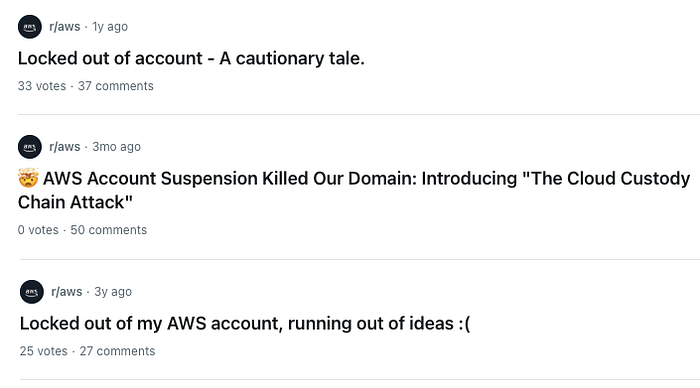
posts from r/aws in Reddit.com
Best practice:
Keep the company’s primary domain outside the main production AWS account, even in a separate provider like GoDaddy or NameCheap or in a dedicated AWS account. If you are locked out of your production account, you can still maintain the DNS records with the other provider/account.
5\. Maintain an expiration calendar so you don’t miss critical renewal dates
Even in the first year, a startup quickly accumulates:
- Contracts
- API keys
- Credit cards
What they all have in common is an expiration date.
The unwanted outcomes are usually:
- Blocked AWS accounts due to non-payment.
- Unexpected service outages due to an expired API key.
- Rushed contract renewal negotiations due to missed or imminent renewal dates.
A shared calendar with automated reminders (“Credit card 3344 expires in 30 days”, “MAP Provider contract renewal in 45 days”) helps prevent these issues.
Final Thought
There are many challenges to deal with. I would strongly recommend finding a mentor who has been a founder before and has already led several startups. Experienced advice is truly worth gold.
If you want to build your cloud the right way from day one, DoiT brings the technology, the expertise, and years of experience helping both startups and global enterprises avoid these exact mistakes — and many others.
Let’s make your cloud a growth engine, not a risk factor.