

Pricing Models Overview
Let’s start by looking at the published pricing figures from AWS to see if we can make a decent comparison using them. Spoiler alert: We can’t.
Aurora DSQL
- Compute: Billed per Distributed Processing Unit (DPU)
- Rate: $8 per 1 million DPUs
- 100K DPUs ≈ ~700,000 TPC-C transactions (based on AWS benchmarks)
https://aws.amazon.com/rds/aurora/dsql/pricing/
- Storage: $0.33 per GB-month
- Free tier: First 100K DPUs and 1 GB-month of storage are free each month
So what exactly is a DPU? It’s like ACUs all over again, where it’s nearly impossible to work out what it means in practice, isn’t it?
Let’s compare to Aurora Serverless v2.
Aurora Serverless v2
- Compute: Billed per Aurora Capacity Unit (ACU)
- Rate: $0.12 per ACU-hour
- Scales between 0.5 to 128 ACUs, even down to 0 when idle
- Storage: Two options:
- Standard: $0.10 per GB-month + $0.20 per 1M I/Os
- I/O-Optimized: $0.225 per GB-month, no separate I/O charges
The first takeaway is that the billing constructs differ between Aurora Serverless v2 and Aurora DSQL, so apart from storage, we can’t directly compare. You’ll note that storage is nearly 50% more expensive than even I/O Optimized, meaning that a large storage system with low transaction volumes is always going to cost more on DSQL even before we get into what exactly is a DPU? Read on for that!
What exactly is a DPU?
A DPU is Aurora DSQL’s compute billing metric. Each DPU reflects the resources used to process distributed queries across Aurora’s highly parallel query execution engine. It includes CPU time, memory usage, and the work required to retrieve and manipulate data.
DPUs are fractional and usage-based, meaning you’re only billed for the compute resources you actually consume. This is different from Aurora Serverless v2’s ACUs, which are provisioned in half-unit increments per second. However, just like ACUs it’s almost impossible to know what you’ll use ahead of time, so the only way to get accurate estimates is to test it.
Free Tier
Aurora DSQL includes a free tier every month:
- 100,000 DPUs free (worth $0.80)
- 1 GB-month of storage free (worth $0.33)
That’s a grand total of $1.13 in monthly savings — not exactly a game-changer for production, but perfect for free dev/test workloads. And without knowing how much a DPU covers, we can’t tell if this is drop in the ocean or if it’ll cover your entire production workload. Let’s try to get some real-world metrics then.
Real-World Benchmarking
In this test we’ll be using pgbench to put the database under pressure in a fairly realistic scenario. I used the standard pgbench TCP-B benchmarking and ran it with 100,000 transaction calls for each database. I did start with running it for 60 minutes but I quickly realized the throughput of DSQL was so much lower than ASv2, it didn’t make sense for a cost analysis blog. I’ll come back to the performance part briefly at the end.
This is the pgbench command if you’d like to run your own tests for validation. I had to run with a single client, as due to the optimistic locking (see my previous blog — https://engineering.doit.com/aurora-dsql-uncovered-the-future-of-scalable-databases-f2fabcde672a) lots of the clients errored on DSQL due to conflicts so the test wasn’t fair across both engines:
pgbench -n -p 60 -h "$DB_HOST" -p "$DB_PORT" -U "$DB_USER" -d "$DB_NAME" -c 1 -j 2 -t "$NUMBER_OF_TRANSACTIONS"
Or if you’d prefer you can use the script I ran instead ( https://gist.github.com/Katedoit/8b23a1434db9b9c126b37fb2a085fce5). Here’s the pgbench output for ASv2:
transaction type: <builtin: TPC-B (sort of)>
scaling factor: 1
query mode: simple
number of clients: 1
number of threads: 1
number of transactions per client: 100000
number of transactions actually processed: 100000/100000
latency average = 4.835 ms
initial connection time = 16.942 ms
tps = 206.831172 (without initial connection time)
And for DSQL:
transaction type: <builtin: TPC-B (sort of)>
scaling factor: 1
query mode: simple
number of clients: 1
number of threads: 1
number of transactions per client: 100000
number of transactions actually processed: 100000/100000
latency average = 19.700 ms
initial connection time = 243.453 ms
tps = 50.760523 (without initial connection time)
This workload consumed 8327 DPU, as measured using Aurora DSQL’s billing insights and 0.48 ACU on Aurora Serverless v2. As I said at the start, they really aren’t comparable!
This was a very simple example, but we can extrapolate rough monthly costs using some simple maths and assumptions.
Monthly Cost Projections (Compute + I/O)
So let’s look at how things would work across a month. We’ll have to make a lot of assumptions here but it should give a reasonable idea of the cost differences between the two. Don’t forget our free tier (that amazing free $1.13) on DSQL either.
- 100000 queries every hour (i.e. the workload test we ran would run every hour) — 720 hours
- Flat workload without peaks and troughs
- 10GB database storage size
Aurora DSQL Monthly Estimate
1. Compute (DPUs)
- 8327 (taken from the pgbench test) × 720 (hours in a month) = 5,995,440 DPUs
- First 100,000 DPUs are free
- Billable DPUs: 5,895,440
- Cost = 5,895,440/1,000,000 × $8 = $ 47.16
2. Storage
- 10 GB total — 1 GB free tier × $0.33 = $2.97
Total DSQL Cost: $47.16 + $2.97 = $50.13
Aurora Serverless v2 (I/O-Optimized) Estimate
1. Compute (ACUs)
- 0.48 (taken from the pgbench test) × 720 (hours in a month) = 345.6 ACU
- Cost = 345.6 × $0.12 = $41.47
2. Storage (I/O-Optimized)
- 10 GB × $0.225 = $2.25
Total ASv2 I/O-Optimized Cost: $41.47 + $2.25 = $43.72
Cost Summary
- DSQL — $50.13
- ASv2 — $43.72
ASv2 is approximately 13% cheaper than DSQL as close to like for like on cost per transaction and storage alone.
But in reality, you don’t just look at costs. There has to be a trade-off on performance too, and sadly for DSQL that’s not looking great either…
Performance Analysis
I’m not going to dwell too long on the performance side. Mainly because this is a cost-focused blog, but also because DSQL performs so differently from any other database you might consider using, a like-for-like performance test is tough to do. Current benchmarking tools, like pgbench that I used, are not designed for optimistic locking and retries, so they fail when put under high load. However, my testing showed that DSQL was 4 times SLOWER than ASv2.
Look at the pgbench results for transaction per second (tps):
- DSQL –50.760523
- ASv2 — 206.831172
So it’s not cheaper and it appears to be considerably slower, so…
When to Use Which?
Use Aurora DSQL when:
- You want predictable scaling with linear performance
- You’re willing to trade some flexibility for strong write scalability
- Low-latency, multi-region writes are a game-changer for you and are worth paying for
- You have massive scale with thousands of transactions and connections per second and Aurora RDS is starting to bottleneck
Use Aurora Serverless v2 when:
- You have bursty or intermittent workloads
- You want automatic cost optimization with ACU scaling
- You prefer a simpler, more flexible deployment model
Or put more simply, you are going to need a very specific use case to justify using DSQL at the moment.
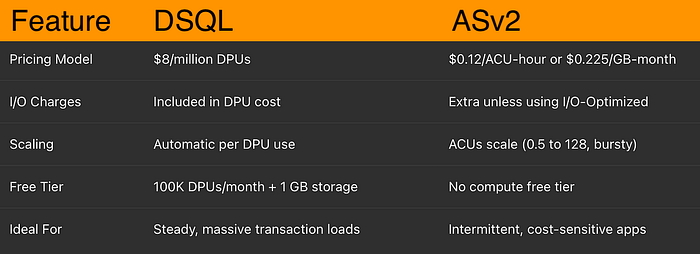
DSQL vs ASv2 Summary Chart
If you are consider a PoC or migration to DSQL, you are not alone. DoiT International is here to help you assess, plan and migrate with a strong focus on your business outcomes. With over 180 senior cloud experts specializing in crafting customized cloud solutions, our team is ready to help you navigate this process smoothly and optimize your infrastructure to ensure compliance and meet future demands efficiently.
Our experts are ready to provide you with strategic guidance and technical expertise every step of the way. Let’s discuss what makes the most sense for your company during this policy enforcement phase, ensuring your cloud infrastructure is robust, compliant, and optimized for success. Contact us today.