

Managing Google Workspace can be a complex task, especially regarding security. Administrators often face challenges such as:
Limited access to security recommendations:
Historically, Google’s automated security recommendations (like those found in the Security Health page) were locked behind the Enterprise Plus tier. Even now, Enterprise Standard customers may not have access to all the insights they need.
This means organizations often rely on costly and time-consuming security reviews from third-party partners, involving quote comparisons, upfront payments, and potential scheduling delays.
Scattered security information:
Identifying all the necessary security configurations can be like finding needles in a haystack. Security settings are spread across numerous menus and documentation pages, making it difficult to ensure comprehensive protection or even know which settings to configure. Google’s own security checklists for example are spread out between multiple help articles and don’t have a way to save your progress when reviewing configurations.
Cumbersome reporting tools:
Extracting critical security data such as OAuth Token Reports that show all connected applications to each user account, or Group Membership reports with all internal and external members often requires familiarity with command-line tools like GAM. Setting up and using GAM can be a significant hurdle for admins who are less comfortable with the command line, potentially hindering their ability to gain valuable insights into crucial security areas.
Introducing DoiT AdminPulse for Workspace
DoiT AdminPulse for Workspace is a free, open-source Google Sheets editor add-on that simplifies Google Workspace security and management. This powerful tool empowers administrators with a comprehensive checklist of over 130 security configuration items, guiding them through the setup and maintenance of a robust security posture.
In addition to the checklist, many read-only reports can be generated leveraging your access as a Super Admin to the environment. DoiT AdminPulse for Workspace is ideal for any organization using Google Workspace, particularly those with security-related initiatives, new Google Workspace deployments or environments, or a desire for a more efficient and secure environment.
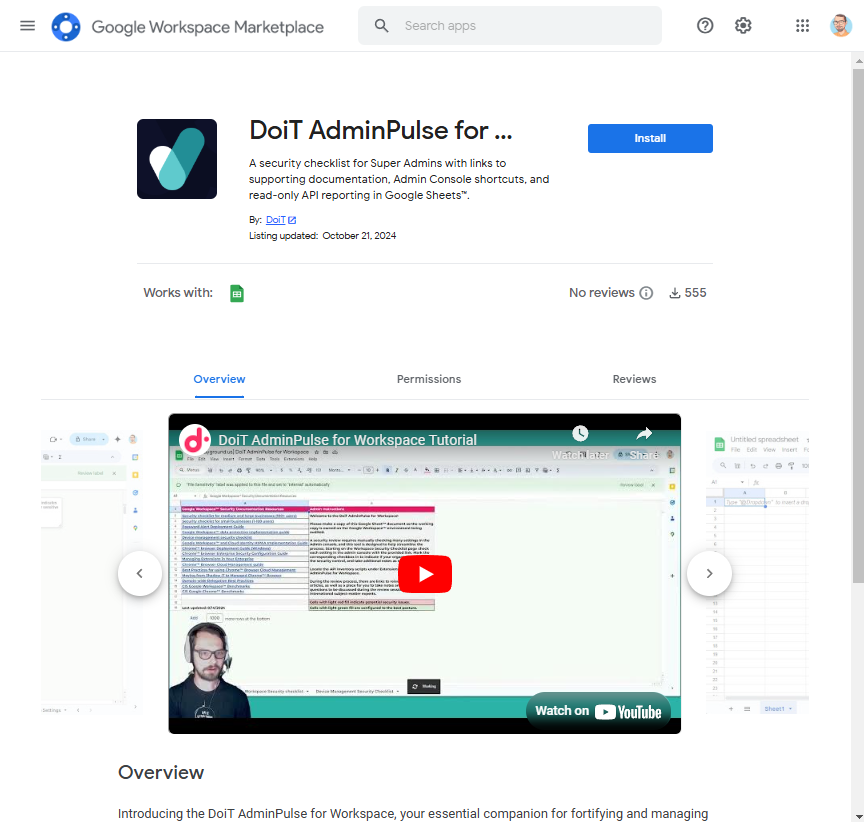
DoiT AdminPulse Marketplace App store page
Key Benefits
- Set up in 7 clicks: Install the add-on with a few clicks from the Google Workspace Marketplace. No command-line expertise or complex GCP setup is required. Install the marketplace add-on for Google Sheets and find the tool in the Extensions menu of a new Sheets document.
- 360 ° Workspace visibility: Gain a deeper understanding of your Google Workspace configurations with API level reports that would otherwise require set up of the command line tools.
- Best Practices: Compare your Google Workspace environment to the recommendations of best practice recommendations from expert level Google Workspace administrators. We have included links to Google’s hard to find guides, such as the HIPAA implementation, and Chrome Browser Cloud Management guide to make them easy for admins to reference.
- Cost Savings: Optimize license assignments and identify areas where you can reduce Google Workspace expenses.
- Data Privacy: Your data remains yours. DoiT AdminPulse does not report any of your configuration data or user information back to DoiT unless you explicitly share the report back with us or request additional support.
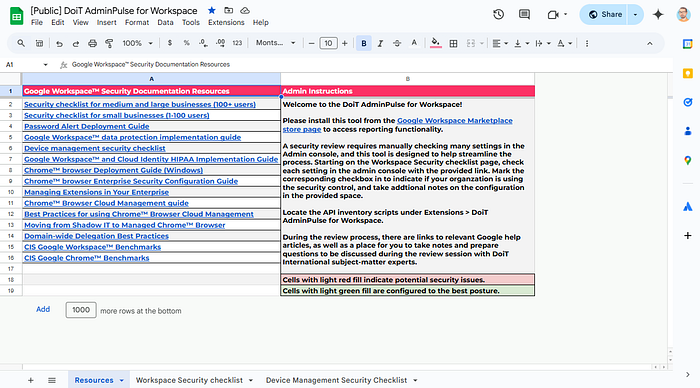
DoiT AdminPulse for Workspace
How it Works
- Install: Use your Super Admin account to get the add-on from the Google Workspace Marketplace.
- Assess: Use the provided checklist to conduct a self-guided security review. DoiT’s Workspace Solution Engineers are available to provide expert assistance or a consultant led review when requested.
- Remediate: Follow the linked documentation and in-line recommendations to implement security configurations.
- Maintain: Regularly revisit the checklist to ensure ongoing security and compliance.
**When to use DoiT AdminPulse for Workspace**
DoiT AdminPulse for Workspace streamlines a variety of reporting tasks including:
- Users, last login, account status, MFA status, and license assignments
- Group members, roles, and group configuration settings
- Alias addresses for both users and groups
- Domains in Google Workspace and DNS records for mail flow
- Mobile devices
- Shared drive configuration settings
- OAuth2 tokens (connected applications)
- App-specific passwords
- Organizational units and associated IDs
For example, administrators can use the OAuth2 tokens report to list all third party applications that that users have authorized with Google, including highlights on the apps that use Gmail and Drive scopes deemed as restricted. Another example is the Domains/DNS report which will show all domains that admins have added to Google Workspace along with associated DNS records for mail flow, streamlining the process to check DNS records across multiple domains into a single screen.
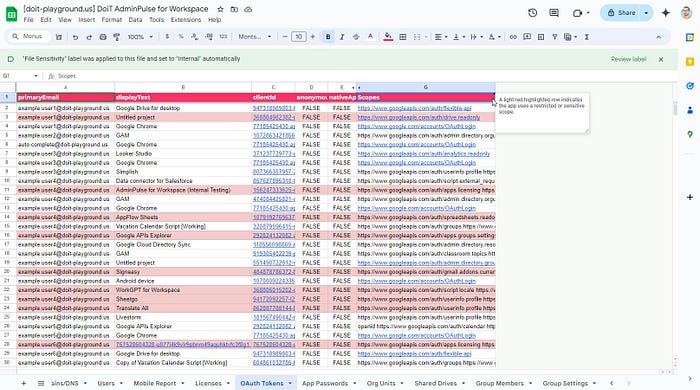
Example OAuth Tokens report in DoiT AdminPulse for Workspace
Security Assessments
Conduct thorough security assessments and identify areas to enhance security posture of the Workspace platform.
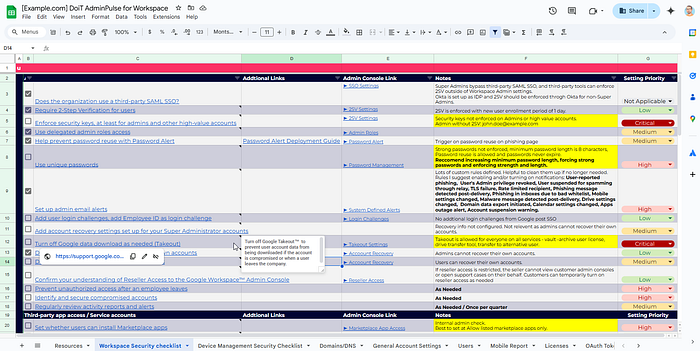
A completed review using DoiT AdminPulse for Workspace
Compliance Management
Ensure compliance with industry regulations and internal security policies by following best practice recommendations included throughout the security checklists as notes. This empowers admins to be aware of the most secure configurations throughout the admin console.

Best practice recommendations included as Notes.
Cost Optimization
Identify opportunities to optimize license usage and reduce costs. For example, the License report can be used to identify suspended users who are still assigned a full Google Workspace license and an opportunity for cost savings may exist by transitioning those suspended accounts to the Archived user license type.
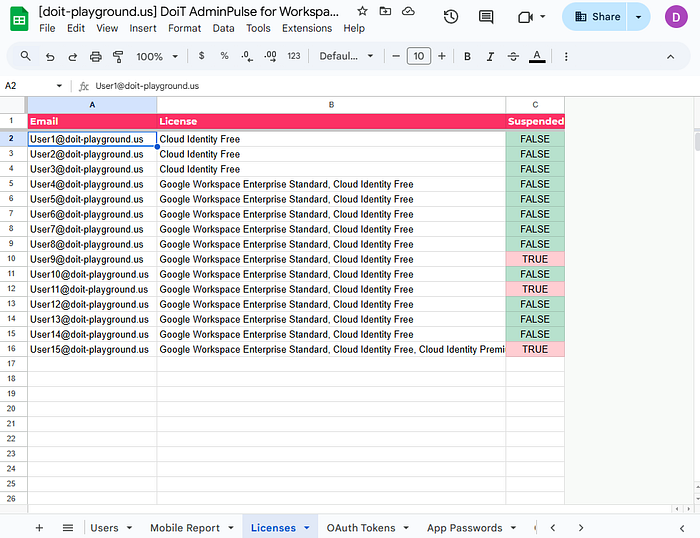
DoiT AdminPulse for Workspace License assignments report
Get Started Today
Visit the Google Workspace Marketplace to install DoiT AdminPulse for Workspace and start optimizing your Google Workspace security and management. For more information, please visit our website or contact our team of experts.