

Have you ever experienced that heart-stopping moment when you realize you’ve accidentally deleted important data from your database or messily dropped your production system instead of the dev environment? And to add to the nightmare, you discover that backups weren’t turned on? It’s a scenario that’s all too familiar for many of us. At DoiT, we receive tickets from customers almost weekly with stories like this. In this blog, you’ll learn how to avoid this from happening again!
Let’s start by looking at Organizational Policies.
Organizational Policies
As the name suggests, Organizational Policies are tools that help administrators manage and control the behavior of resources within their GCP organization and projects. They are rules set at the organization, folder, or project level that define what actions can or cannot be performed on resources within those levels. These policies help enforce security, compliance, and operational guidelines. And specifically for our scenario, can be used to enforce CloudSQL backups!
How do you do this? Unfortunately, the GCP Documentation and guides aren’t all that useful, and the examples either don’t work or aren’t clear unless you already know Common Expression Language. I only found this by chance when helping a customer fix this issue. Let’s walk through it. We’ll be using Custom Constraints to block the creation or modification of any CloudSQL database that doesn’t have point-in-time recovery (PITR) enabled. PITR is a database recovery technique that allows you to restore a database to a specific point in time, typically before a data loss or corruption event occurs.
Walkthrough
Step 1: Create the Custom Constraint
Our first task is to create a constraint that will deny any attempts to launch or modify a CloudSQL database that does not have PITR enabled. Please note that if you attempt to modify an existing CloudSQL database that does not have PITR enabled, that modification will be blocked unless you also enable PITR!:
- Navigate to the Organizational Policies Console
Go to the Google Cloud Console and select your organization
2. Create a Custom Constraint
- Click on CUSTOM CONSTRAINT
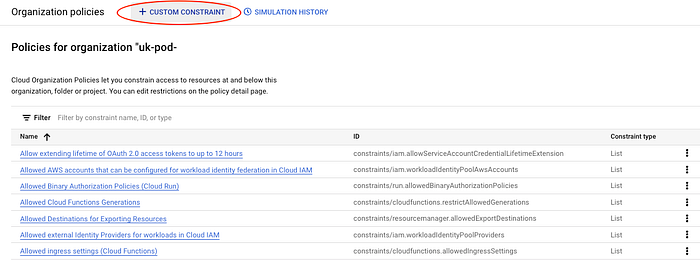
- Provide a name and description for your constraint. This helps in identifying and understanding the constraint later.
- Under Enforcement Type, select `sqladmin.googleapis.com/instance`.
- Choose to enforce the constraint on Create and Update actions.
- Click the pencil symbol next to [define condition] to enter the condition.
3. Define the Condition
- Enter the following condition to enforce PITR backups:
resource.settings.backupConfiguration.pointInTimeRecoveryEnabled == false
- Set the Action to `deny`.
Step 2: Enforce the Constraint
Once the custom constraint is created, the next step is to enforce it within your organization:
1. Open the Constraint:
If you are not already there, navigate to the constraint you created in the Organizational Policies console.
2. Manage Policy:
- Click MANAGE POLICY at the top of the constraint page.
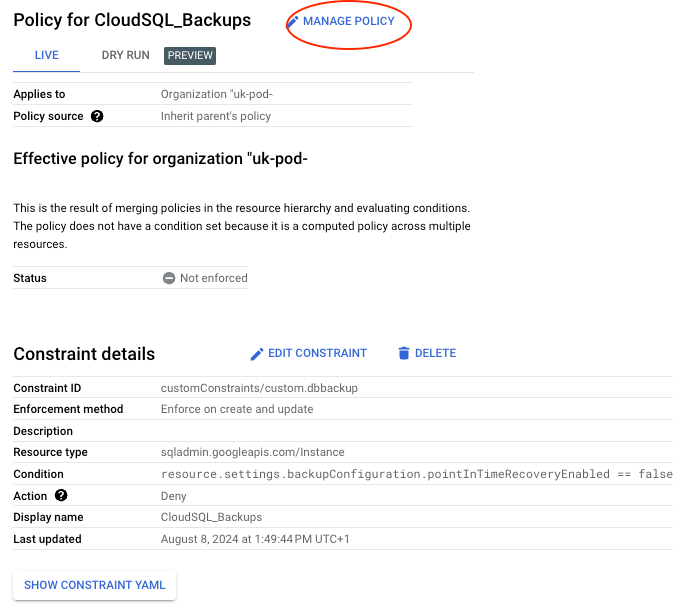
- Select Override parent’s policy if there is an existing policy.
- Set the enforcement rule to On.
- It should look like this:

If you only want some of your Cloud SQL databases to have the PITR requirement, you can use Conditions to filter which resources are in scope.
- Click ADD CONDITION.
- Enter your filter criteria, such as the Tag, and choose the Value path required:
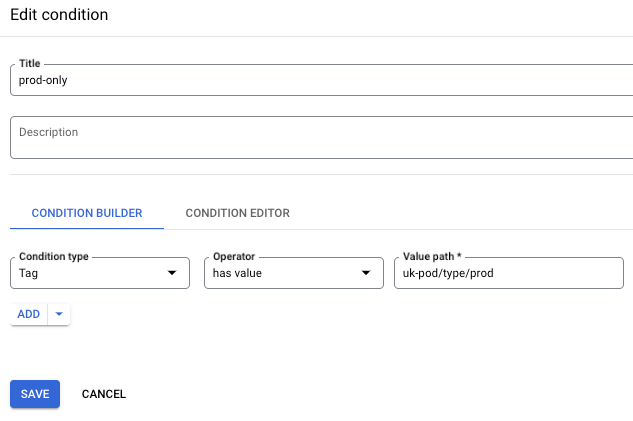
To make sure we don’t accidentally cause problems with existing resources (see the previous note about being unable to modify existing CloudSQL databases without adding PITR), I recommend you test the policy first:
- Click Test Policy and wait for the validation to complete.
- Navigate to the SIMULATION HISTORY page to check the output matches your expectations.

- If satisfied, navigate back to the custom constraint and select MANAGE POLICY.
- If the changes haven’t been made, set the policy as before (see above). Click SET POLICY and accept any warnings that appear.
Step 3: Verify the Policy Enforcement
Testing and verifying that the policy is working as intended is essential. Follow these steps to ensure the policy enforcement:
- Test the Policy:
Attempting to create or update a Cloud SQL instance without enabling point-in-time recovery should be denied by the Organizational Policy.
- Run the following command:
gcloud sql instances create test-instance --region=us-central1 --no-backup
- You should receive an error indicating that point-in-time recovery must be enabled.
2. Create a Compliant Cloud SQL Instance:
Now, create a Cloud SQL instance with point-in-time recovery enabled to ensure it complies with the policy.
- Run the following command:
gcloud sql instances create compliant-instance — region=us-central1 — backup-start-time=23:00 — enable-point-in-time-recovery
This should be allowed.
By following these steps, you have successfully created and enforced a custom constraint in your organization’s policies to ensure that all Cloud SQL instances have point-in-time recovery backups. This not only aligns with best practices for data protection but also ensures compliance across your organization’s cloud resources. And saves you a massive headache when someone deletes critical data. Again.
Don’t panic!
If you have lost data, you are not alone. DoiT International is here to help you recover data and assist with Cloud SQL backup enforcement to prevent it from happening again. With over 180 senior cloud experts specializing in crafting customized cloud solutions, our team is ready to help you navigate this process smoothly and optimize your infrastructure to ensure compliance and meet future demands efficiently.
Contact us today to ensure that your Cloud SQL backup policies are professionally and seamlessly managed. We are here to help you make informed decisions and implement the best solutions tailored to your specific needs. Beyond Cloud SQL, we can review all your policies across AWS, GCP, and Azure to ensure comprehensive compliance and security.
Our experts are ready to provide you with strategic guidance and technical expertise every step of the way. Let’s discuss what makes the most sense for your company during this policy enforcement phase, ensuring your cloud infrastructure is robust, compliant, and optimized for success.