

Using DoiT Console, Amazon Price API and Amazon Q AI assistant to expedite the estimation of the AWS Cloud Infrastructure in a target region

Understanding the cost differences between AWS regions is important when planning infrastructure changes. It can show which region is more cost-sensitive than another based on the use case. For example, when deciding on a disaster recovery region, a region to expand your business or a region to migrate the current infrastructure.
In this article, I’ll walk you through how I estimated the cost of moving my AWS infrastructure from Virginia (us-east-1) to two European regions: Frankfurt (eu-central-1) and Ireland (eu-west-1). I used three main tools for this analysis: the DoiT Console, Amazon Q, and the AWS Price API.
Use the DoiT Console to get the current Usage in Virginia.
The DoiT console is a web-based application that allows customers to interact with DoiT’s suite of products. It includes reports that give a detailed and flexible visualisation of your cloud billing.
The first step was to use one of the DoiT reports to get the current cloud usage data from Virginia, since this would serve as the input for my cost estimation. I used the DoiT Console’s “Services Breakdown” report for this. I customized the report by:
• Switching to table view
• Changing the metric from cost to usage
• Setting the time period to monthly
• Grouping the data by Account, Service, SKU, SKU ID, and Unit
The configuration is shown in the image below:
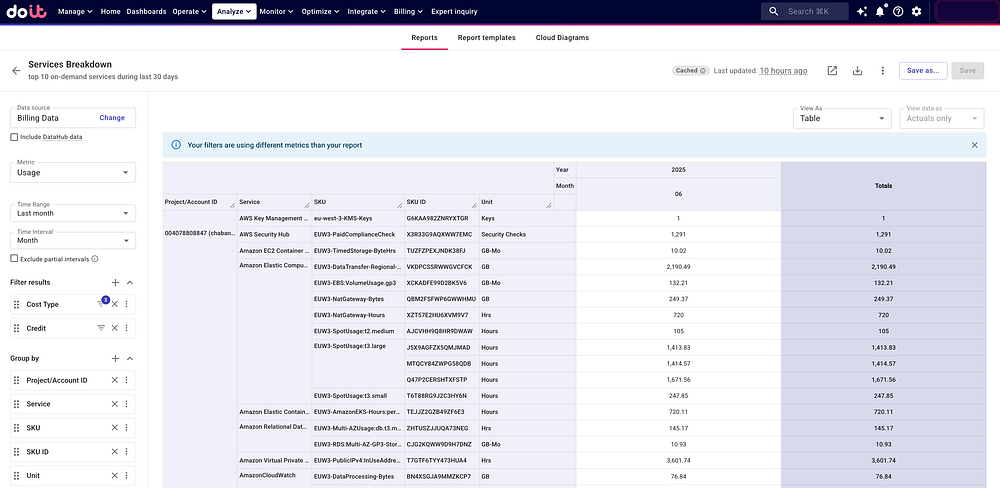
Customising DoiT Predefined Report Service Breakdown
Then, I downloaded this report, and this CSV file was used as the estimation input:

Export DoiT report
AWS Price API as a tool to estimate the cost in a different Region.
The report shows the usage, SKU IDs, and prices for all services currently deployed in Virginia. I can use this data to find the equivalent SKU IDs and prices in Frankfurt and Ireland, then calculate the estimated costs for each region.
The AWS Price API provides pricing information for all AWS services. It includes a GetProducts function that lets you search for products using specific attributes. Since I have the SKU IDs from the DoiT report, I can use them to get detailed product information. Using the AWS CLI, I can retrieve these attributes with the following command:
aws pricing get-products \
--service-code AmazonEC2 \
--region us-east-1 \
--filters Type=TERM_MATCH,Field=sku,Value="6C86BEPQVG73ZGGR"
{
"PriceList": [\
{\
"product": {\
"productFamily": "Compute Instance",\
"attributes": {\
"enhancedNetworkingSupported": "Ye\
"intelTurboAvailable": "Yes",\
"memory": "8 GiB",\
…\
"locationType": "AWS Region",\
"storage": "EBS only",\
"instanceFamily": "General purpose\
"operatingSystem": "Linux",\
"intelAvx2Available": "Yes",\
…\
"processorFeatures": "Intel AVX; I\
"servicecode": "AmazonEC2",\
"licenseModel": "No License required"\
"currentGeneration": "Yes",\
…\
"processorArchitecture": "64-bit",\
"marketoption": "OnDemand",\
},\
"sku": "6C86BEPQVG73ZGGR"\
},\
"serviceCode": "AmazonEC2",\
"terms": {\
"OnDemand": {\
"6C86BEPQVG73ZGGR.JRTCKXETXF": {\
"priceDimensions": {\
"6C86BEPQVG73ZGGR.JRTCKXET\
"unit": "Hrs",\
"endRange": "Inf",\
"description": "$0.096\
"appliesTo": [],\
"rateCode": "6C86BEPQV\
"beginRange": "0",\
"pricePerUnit": {\
"USD": "0.09600000\
}\
}\
},\
"sku": "6C86BEPQVG73ZGGR",\
"effectiveDate": "2025-07-01T0\
"offerTermCode": "JRTCKXETXF",\
"termAttributes": {}\
}\
},\
"Reserved": {\
…\
```\
Then, these attributes can be used to find the corresponding product with its SKU and price in the target region, using the following command:\
```\
aws pricing get-products --service-code AmazonEC2 --region eu-central-1 \\
--filters 'Type=TERM_MATCH,Field="instanceType",Value="m5.large"' \\
'Type=TERM_MATCH,Field=productFamily,Value="Compute Instance"' \\
'Type=TERM_MATCH,Field="instanceFamily",Value="General purpose"' \\
'Type=TERM_MATCH,Field="operatingSystem",Value="Linux"' \\
'Type=TERM_MATCH,Field="licenseModel",Value="No License required"' \\
'Type=TERM_MATCH,Field="locationType",Value="AWS Region"'\
```\
The result provides the equivalent product:\
```\
{\
"product": {\
"productFamily": "Compute Instance",\
"attributes": {\
"enhancedNetworkingSupported": "Yes",\
…\
"gpuMemory": "NA",\
"vpcnetworkingsupport": "true",\
"instanceType": "m5.large",\
…\
"availabilityzone": "NA"\
},\
"sku": "223J7SG3VCFCDM9M"\
},\
"serviceCode": "AmazonEC2",\
"terms": {\
"OnDemand": {\
"223J7SG3VCFCDM9M.JRTCKXETXF": {\
"priceDimensions": {\
"223J7SG3VCFCDM9M.JRTCKXETXF.6YS6EN2CT7": {\
"unit": "Hrs",\
"endRange": "Inf",\
"description": "$0.112 per Unused Reservation Linux m5.large Instance Hour",\
"appliesTo": [],\
"rateCode": "223J7SG3VCFCDM9M.JRTCKXETXF.6YS6EN2CT7",\
"beginRange": "0",\
"pricePerUnit": {\
"USD": "0.1120000000"\
}\
}\
},\
"sku": "223J7SG3VCFCDM9M",\
"effectiveDate": "2025-07-01T00:00:00Z",\
"offerTermCode": "JRTCKXETXF",\
"termAttributes": {}\
}\
}\
},\
"version": "20250715014947",\
"publicationDate": "2025-07-15T01:49:47Z"\
```\
**Generate a script that finds the equivalent SKU in the target region using Amazon Q.**\
Writing a script to process the CSV file, look up each SKU in the current region, and find the matching SKU in the target region would be time-consuming. However, Amazon Q, which is an AI-powered assistant from AWS, provided good help in performing these tasks.\
Join Medium for free to get updates from this writer.\
Subscribe\
Subscribe\
Remember me for faster sign in\
First, I installed Amazon Q CLI using the instructions provided [here](https://docs.aws.amazon.com/amazonq/latest/qdeveloper-ug/command-line-installing.html). Then I created a new project folder and copied the CSV file with the DoiT report into it. I opened Amazon Q chat in this folder and gave it instructions about what I wanted to accomplish. The instructions were similar to this:\
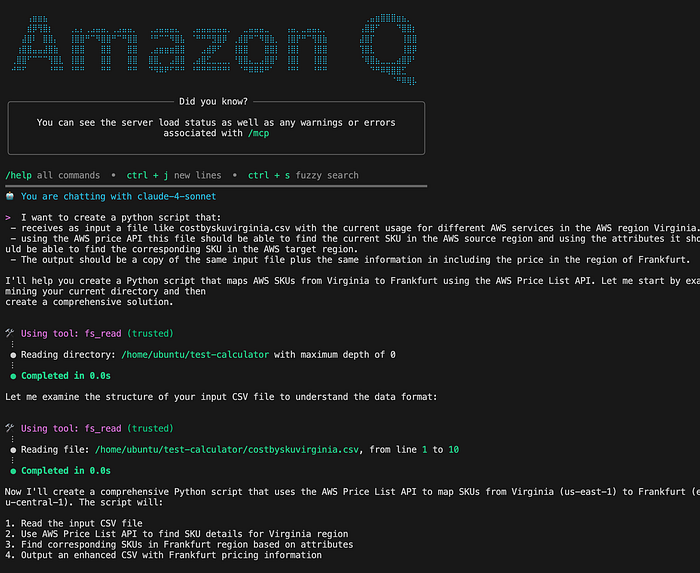\
Using Amazon Q to generate the cost estimation in a target region\
```\
I want to create a python script that:\
- receives as input a file like costbyskuvirginia.csv with the current usage for different AWS services in the AWS region Virginia.\
- using the AWS price API this file should be able to find the current SKU in the AWS source region and using the attributes it should be able to find the corresponding SKU in the AWS target region.\
- The output should be a copy of the same input file plus the same information in including the price in the region of Frankfurt.\
```\
With this input, Amazon Q did a good starting job:\
- It creates a working logic for reading and processing the CSV file.\
- It creates the maps from the AWS service name provided in the input file to the AWS service code required by the AWS price API.\
- It creates the logic to query the SKU in the source region.\
- It creates an initial logic for searching for the SKU in Frankfurt.\
- It generates the new file with the same fields in Frankfurt and adds some additional fields.\
The following were the relevant fields of my initial costbyskuvirginia.csv file:\
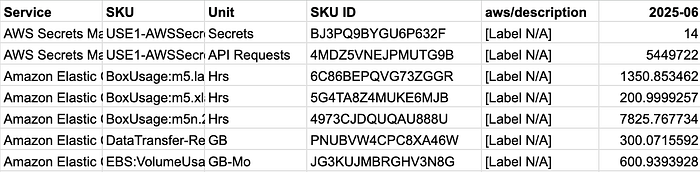\
csv file with the Virginia cost usage by SKU\
The output of the Python Script generated for Amazon Q was like the following:\
\
The initial calculations were correct for some rows, but I noticed issues with others. In some cases, the tool estimated costs instead of finding the exact matching SKU. I also encountered cost differences that appeared inconsistent with expected pricing patterns. When I checked the descriptions, I discovered mismatches. For example, it paired a SKU for “Amazon EKS cluster usage in US East (N. Virginia)” at $0.08928 per hour with “EKS Auto Mode management of i3.2xlarge in EU (Frankfurt).”\
I tried instructing Amazon Q to solve these discrepancies. However, it tried approaches that did not solve the real problem. Therefore, I changed my strategy and started a manual investigation of the issues. In this way, I could provide clear instructions to Amazon Q.\
Using the manual process, I found that some SKUs, like Spot instances, are not included in the AWS price API. For this reason, I left them outside the estimation.\
Then, I asked Amazon Q to find the rows where the description differed. Which means without considering the price and the region, the description text is different. For this task, Amazon Q created a Python script and was able to provide the differences.\
After determining the differences, I checked manually and found that the algorithm needed to provide additional attributes for some products to get the correct SKU in the target region. For example, the attributes for the product family “Compute Instance” did not include licenseModel. For this reason, it was finding the SKU for a Windows instance instead of the Linux one.\
Some products have multiple prices for the same SKU ID. In this case, the algorithm found the correct SKU in the target region, but i picked the first price from the list. This was a problem because it didn’t account for tiered pricing, where the price depends on how much you use.\
I used Amazon Q to solve this problem. I gave it detailed instructions, and it created the logic to pick the right price tier based on usage. After making these changes, the algorithm successfully estimated costs for 108 out of 140 products. This was sufficient for my analysis.\
Once I had the Frankfurt calculations working properly, I asked Amazon Q to add Ireland to the script. It correctly added the Ireland estimation and updated the output file accordingly.\
The initial code generated with the help of Amazon Q is located in this public GitHub [repository](https://github.com/dianibar/estimate-aws-region-cost).\
The next step for this project will be:\
- Generalize the algorithm to receive an input file from any source region and create an estimation for any target region.\
- Recognize when a new service is requested in the estimation and update the algorithm to include the required filters.\
- Consider the AWS recently launched [AWS Pricing MCP Server](https://aws.amazon.com/blogs/aws-cloud-financial-management/aws-price-list-gets-a-natural-language-upgrade-introducing-the-aws-pricing-mcp-server/) feature.\
- Improve the quality of the code.\
Estimating AWS cloud infrastructure cost when comparing between regions is essential for informed decision-making. The **DoiT Console plays a crucial role by providing the foundational current usage data** in the source region. This detailed input, combined with the AWS Price API for region-specific pricing and Amazon Q for automation, enables a reliable cost estimation.\