
DoiT Cloud Intelligence™
Fearless Deployments: Argo Rollouts - Your Safety Net for Kubernetes

Kubernetes has revolutionized software development by providing a seamless way to deploy and scale containerized applications. However, its basic rolling update strategy often causes unease even among experienced developers. This is because it's like flipping a switch; you push new code, and the outcome is either a success or a failure. There is no gradual rollout or safety net in case things go wrong.
Rolling updates are often considered too risky for large-scale, high-volume production environments. This is because they provide no control over the blast radius, may roll out too aggressively, and do not provide automated rollback upon failures.
But there's good news! Meet Argo Rollouts from Argo Projects. This powerful Kubernetes controller takes your deployments to the next level. With Argo Rollouts, you can:
- Control the speed and scope of your updates: No more Big Bang releases. Gradually roll out changes to a controlled subset of users, minimizing risk and maximizing peace of mind.
- Direct traffic exactly where you need it: Send users to the new, old versions, or a mix of both. This lets you test features, gather feedback, and ensure a seamless transition.
- Use sophisticated checks to validate updates: Beyond simple "is it running?" checks, Argo Rollouts can perform advanced checks to validate updates, including external metrics, stress tests, and custom checks, ensuring your update is ready for release.
- Automate rollbacks if things go south: No more manually revert changes. Argo Rollouts automates rollbacks if errors occur, reducing downtime and keeping users satisfied.
In this article, I'll demonstrate how you can use Argo Rollouts to do Blue -Green and Canary deployments for safer, smoother, and more confident deployments.
What is Argo Rollouts?
Argo Rollouts is a powerful Kubernetes controller with a set of CRDs to enhance deployment capabilities, including blue-green, canary analysis, experimentation, and progressive delivery features in Kubernetes.
Argo Rollouts can be integrated with ingress controllers and service meshes to gradually shift traffic to new versions during an update. Additionally, Rollouts can collect and analyze metrics from various providers to verify key KPIs and promote or roll back automatically during the update.
Similar to the deployment object, the Argo Rollouts controller will manage the creation, scaling, and deletion of ReplicaSets. These ReplicaSets are defined by the spec.template field inside the Rollout resource, which uses the same pod template as the deployment object. Argo rollout support is not available for StatefulSet or DaemonSet.
When the spec.template is changed, which signals to the Argo Rollouts controller that a new ReplicaSet will be introduced. The controller will use the strategy set within the spec.strategy field to determine how the rollout will progress from the old ReplicaSet to the new ReplicaSet. Once that new ReplicaSet is scaled up (and optionally passes an Analysis), the controller will mark it as "stable".
You can also use spec.WorkoadRef to manage existing deployments in Argo Rollouts without deleting the current setup.
Argo Rollouts Demo
Prerequisites
- Kubernetes cluster set up and kubectl installed and configured.
- Install the Argo Rollouts kubectl plugin on your machine.
Install Argo Rollouts
- Run the below commands to install argo rollouts in the cluster. Refer to the official documentation for more options.
kubectl create namespace argo-rollouts
kubectl apply -n argo-rollouts -f https://github.com/argoproj/argo-rollouts/releases/latest/download/install.yaml
Blue-Green Deployment Strategy
A blue-green deployment involves running two identical environments simultaneously. One environment, known as the blue environment, represents the current production environment, and the other environment, known as the green environment, represents the new version of the application you want to deploy. During this time, only the old version of the application will receive production traffic. This approach allows developers to test the new version of the application before switching live traffic to the new environment.

visual representation of blue-green deployment
Let's explore how to use Argo rollouts for the Blue-Green Deployment strategy with a simple deployment.
- Deploy a sample nginx application in the cluster with the command below, which will act as a blue environment.
kubectl create deployment nginx --image nginx:1.19.10 --replicas 2
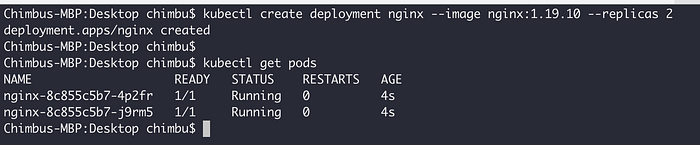
Sample application pods
- Create two kubernetes services for the deployment . One is for the current environment (blue), and the other is for the new environment (green).
kubectl expose deployment nginx --name nginx-active --port 80 --target-port 80
kubectl expose deployment nginx --name nginx-preview --port 80 --target-port 80
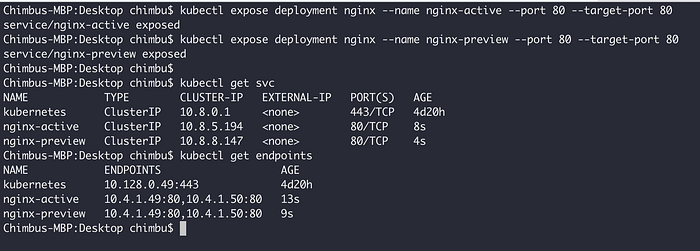
Sample service and endpoints
- Create an Argo rollout resource with the required rollout configurations for the Blue-Green strategy. Refer to the official documentation for all options.
cat <<EOF | kubectl apply -f -
---
apiVersion: argoproj.io/v1alpha1
kind: Rollout
metadata:
  name: nginx
  namespace: default
spec:
  replicas: 2
  selector:
    matchLabels:
      app: nginx
  strategy:
    blueGreen: #Indicates that the rollout should use the Blue-Green strategy
      activeService: nginx-active # Reference to service that the rollout modifies as the active service.
      previewService: nginx-preview # Name of the service that the rollout modifies as the preview service.
      previewReplicaCount: 1 #The number of replicas to run under the preview service before the switchover.
      # Indicates if the rollout should automatically promote the new ReplicaSet
      # to the active service or enter a paused state. If not specified, the
      # default value is true. +optional
      autoPromotionEnabled: false
  # WorkloadRef holds a references to a workload that provides Pod template
  workloadRef:
    apiVersion: apps/v1
    kind: Deployment
    name: nginx
EOF
- Verify the new replicaset and argo rollout configuration as shown below.
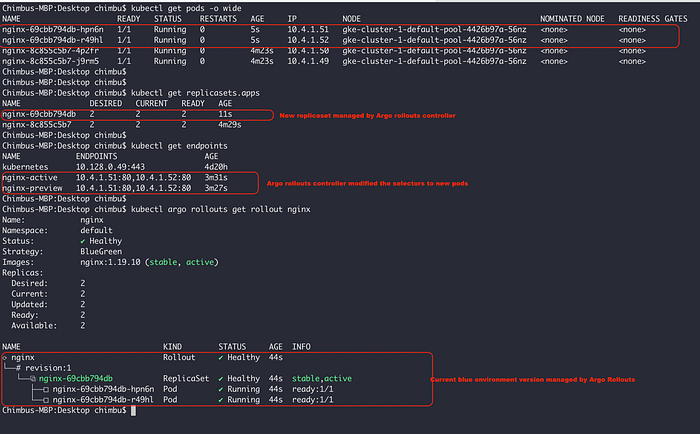
Pods, Replicasets and Argo Rollout status
- The pods managed by the initial replicaset are not removed automatically. It is recommended to manually scale down the deployment replicas to 0 since the argo rollout now manages the management. Run the below command to scale down the unmanaged pods.
kubectl scale deployment nginx --replicas 0

- Let's change the image version to the
latestwhich will trigger a new revision.
kubectl set image deployment/nginx nginx=nginx:latest
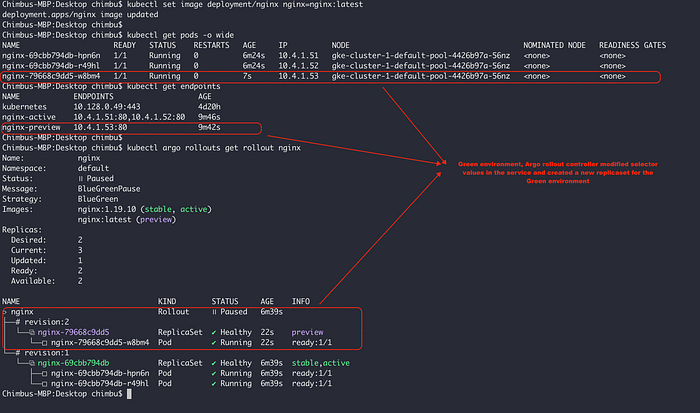
Blue-Green Deployment Status before promotion
- The Green environment is now ready, and you can use the
nginx-previewservice to test the changes without affecting the live traffic served bynginx-activeservice. - You can also use the Argo rollout dashboard to monitor the rollout status. Run the command below to access the dashboard.
kubectl argo rollouts dashboard -n default
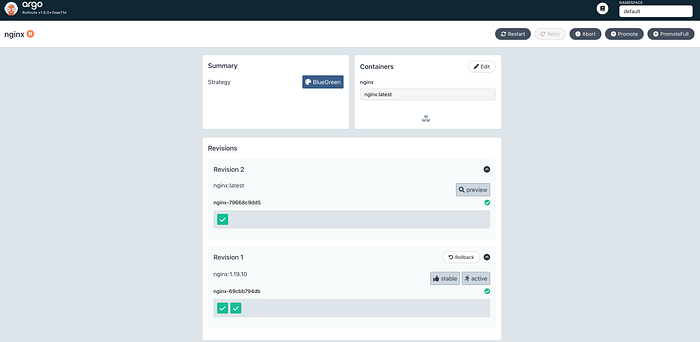
Rollout status in Argo Rollout Dashboard
- Promote the new version to production with the below command.
kubectl argo rollouts promote nginx

Blue-Green deployment status after promotion
Canary Deployment Strategy
A canary deployment is a phased deployment of an application that directs traffic between an already deployed version and a new version, gradually rolling it out to a subset of users before deploying it fully.
Ingress controllers and service meshes, like NGINX and Istio, allow for more advanced traffic shaping for canarying, such as fine-grained traffic splitting or splitting based on HTTP headers.
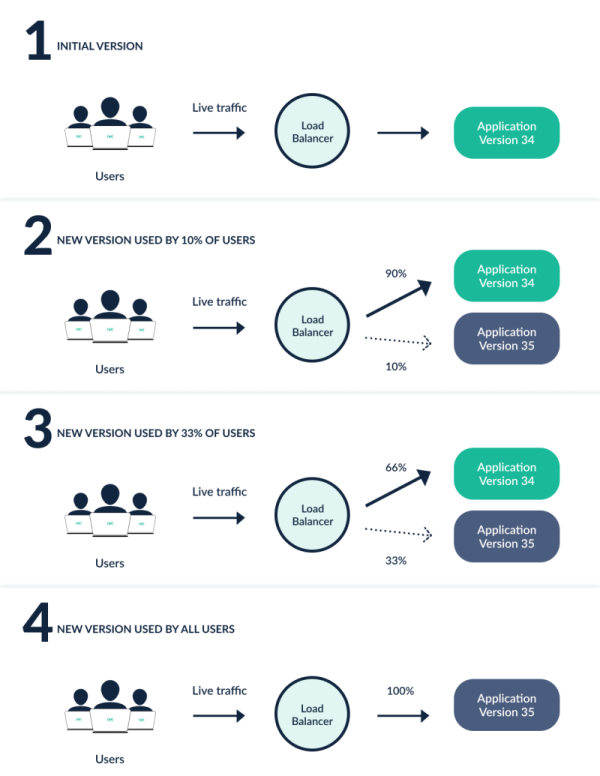
visual representation of the canary deployment
Let's explore how you can use Argo rollouts for the Canary deployment.
- Deploy a sample application to the cluster.
kubectl create deployment nginx-canary --image nginx:1.19.10 --replicas 5
- Create a kubernetes service for the deployment. Unlike Blue-Green deployment, canary does not require two different Kubernetes services for the same deployment since new pod endpoints are added to the kubernetes service based on the Canary percentage.
kubectl expose deployment nginx-canary --port 80 --target-port 80
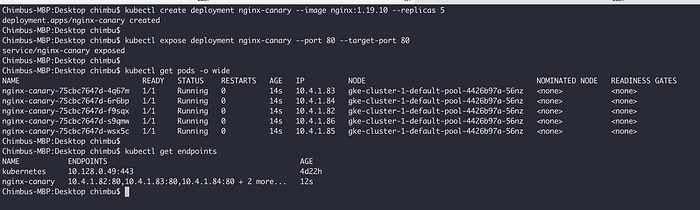
Sample Application Pods and Service
- Create an Argo rollout resource for the canary strategy. Refer to the official documentation for all options.
cat <<EOF | kubectl apply -f -
---
apiVersion: argoproj.io/v1alpha1
kind: Rollout
metadata:
  name: nginx-canary
spec:
  replicas: 5
  selector:
    matchLabels:
      app: nginx-canary
  workloadRef:
    apiVersion: apps/v1
    kind: Deployment
    name: nginx-canary
  strategy:
    canary: #Indicates that the rollout should use the Canary strategy
      maxSurge: "25%"
      maxUnavailable: 0
      steps:
      - setWeight: 10
      - pause:
          duration: 1h #Pause for 1 hour and wait promote to next canary stage
      - setWeight: 30
      - pause: {} # pause indefinitely and requires manual promote action
      - setWeight: 100
      - pause: {} # pause indefinitely and requires manual promote action
EOF

Pods, replicaset and Argo Rollout Status
- Similar to the blue-green deployment, we need to scale down the current deployment replicas to zero so that the argo rollout can manage all the new pods part of the new replicaset.
kubectl scale deployment nginx-canary --replicas 0
- Let's deploy a new application version and observe the canary deployment.
kubectl set image deployment/nginx-canary nginx=nginx:latest
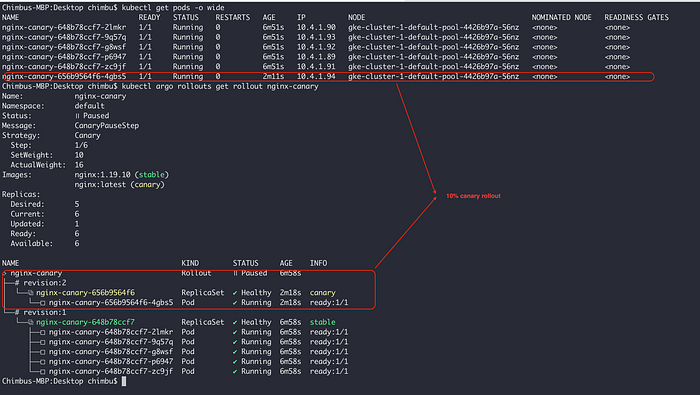
Initial(10%) Canary deployment status

Canary Rollout status in Argo Dashboard
- Manually promote the rollout to the canary stages.
kubectl argo rollouts promote nginx-canary
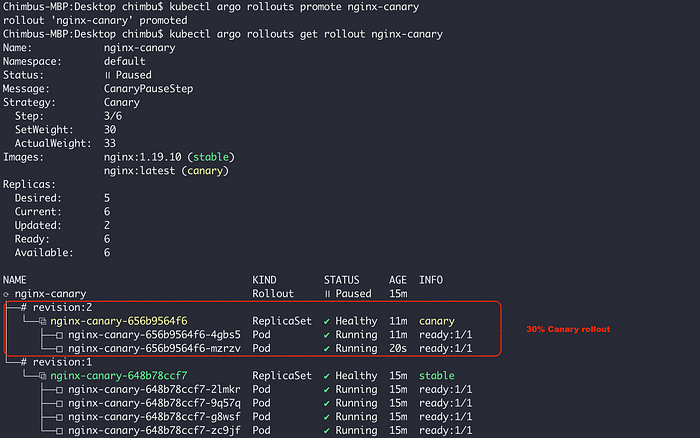
30% Canary rollout status
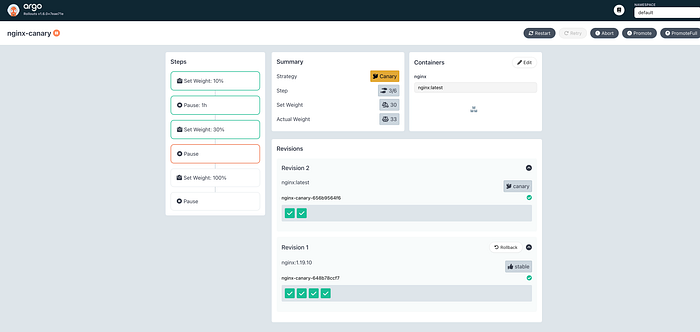
Canary Rollout status in Argo Dashboard
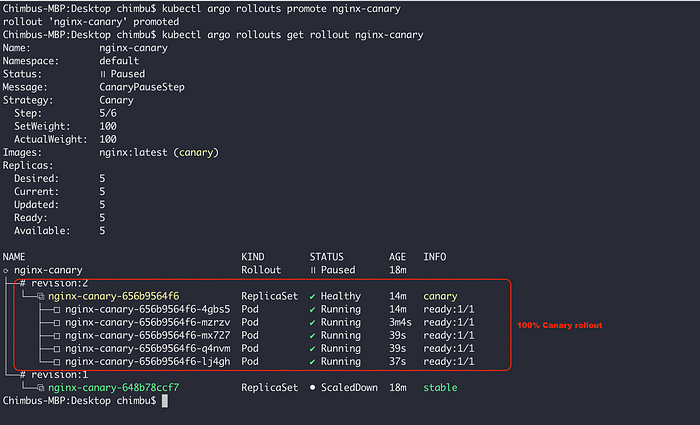
100% Canary rollout status
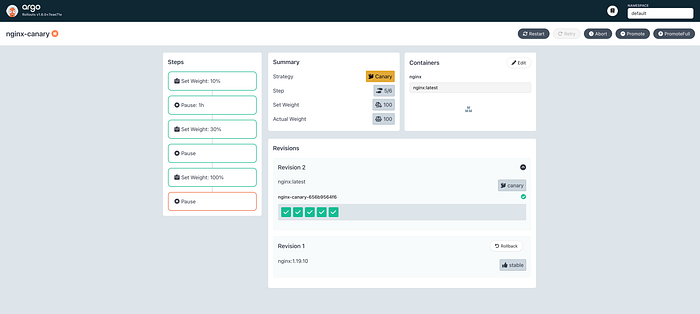
Canary Rollout status in Argo Dashboard
Argo rollout provides an analysis feature that enables you to define and run various checks and tests on your application during or after deployments, helping you validate the stability and performance of the new version before promoting it to full production traffic.
To sum up, Argo Rollouts is a valuable tool for any Kubernetes expert who wants to improve their deployment methods and guarantee seamless, dependable application updates. Its comprehensive features make it a preferred option for companies aiming to achieve progressive delivery, enhance user experience, and minimize downtime when implementing software upgrades.