

In today’s cloud-native landscape, securing your containerized applications is paramount. Google Kubernetes Engine (GKE) offers a robust platform for deploying and managing containerized workloads, but security is a shared responsibility. This blog post delves into GKE Security Posture, a set of tools and functionalities designed to empower you to proactively manage the security posture of your GKE clusters.
Why GKE Security Posture Matters
Traditional security approaches often struggle with the dynamic and distributed nature of containerized environments. GKE Security Posture bridges this gap by providing a centralised view of potential security vulnerabilities within your GKE clusters. This allows you to identify and address security concerns before they become critical issues.
The security posture dashboard reveals your workload security posture across multiple clusters during runtime.
Key Features of GKE Security Posture
Workload Security Checks
This feature automatically audit the configuration of all your running workloads across multiple clusters and return actionable recommendations with severity scores to improve your security posture. For each eligible deployed workload, GKE continuously scans the workload’s specification and compares the fields and values to the controls defined in the underlying security policy.
Some example of configurations this would alert are:
- Pods that share host namespaces which allow their processes to communicate with host processes and gather host information, which could lead to a container escape. Ie:
spec.hostNetwork,spec.hostPID - Privileged containers that share namespaces with the host, and lack control group, seccomp, AppArmor, and capability restrictions. Ie.:
spec.containers[*].securityContext.privileged. - Allowing a container to run as root with
runAsUseror theUSERdirective in the image specifies the root user. Ie:.spec.securityContext.runAsNonRoot.
Here you can find all the fields that this feature is checking.
In the Security posture Dashboard you will see the concerns ordered by severity. You can also see the details on how to mitigate the findings.

GKE Security Posture Dashboard — Workload Configuration
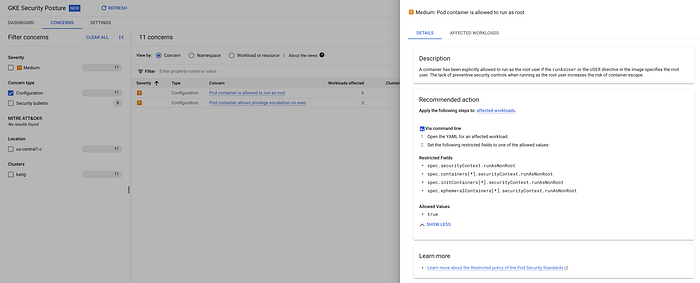
GKE Security Posture Dashboard — concerns
Vulnerability scanning
GKE Security posture provide Vulnerability scanning in two flavours: Basic and Advanced.
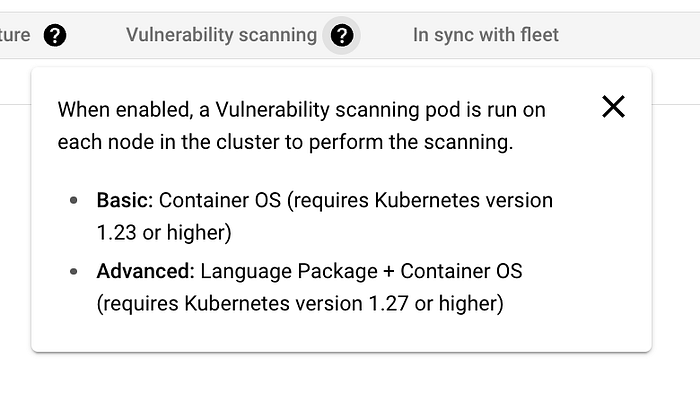
GKE Security Posture Dashboard — Vulnerability scanning flavours
Basic vulnerability scanning — Container OS vulnerability scanning:
This is the basic mode of vulnerability scanning which has no extra cost. GKE continuously scans container images that run on enrolled GKE clusters.
GKE uses vulnerability data from public CVE databases such as NIST. The images can come from any image registry.
The OS version must be supported for scanning. For a list of supported operating systems, see Supported Linux versions.
Advanced vulnerability scanning — Language package scanning:
In the advanced mode, as an increment of the OS vulnerability scans GKE also continuously scans containers for known vulnerabilities in some language packages. Vulnerability data comes from public sources such as the GitHub Advisory Database.
The scanner is the Artifact Analysis scanner, which you can separately implement to safeguard your Artifact Registry repositories. In the security posture dashboard, the container images can come from any image registry because GKE scans the images while the workloads run. GKE provides continuous scanning of your language packages when your workflows push changes to your container images.
Continuous scanning ensures that you’re notified of new vulnerabilities as soon as fixes are available, which reduces your time to discovery and remediation. GKE scans the following language packages: Go, Maven, Javascript, Python.
The scans are automatically enabled when you create new Autopilot clusters running version 1.27 and later. For the Standard cluster, we need to enable ourselves.
Only vulnerabilities that have an associated CVE number are displayed in the security posture dashboard. The advanced scanning is a paid service, which you pay per cluster/per hour.
You can see more details here.
Security bulletin surfacing
When a vulnerability is discovered in GKE, Google patch the vulnerability and publish a security bulletin for the vulnerability. For information about identification, patching, and timelines, refer to GKE security patching.
This feature is automatically enabled when you create an Autopilot or Standard cluster, however this feature is currently in preview (Jun/2024)
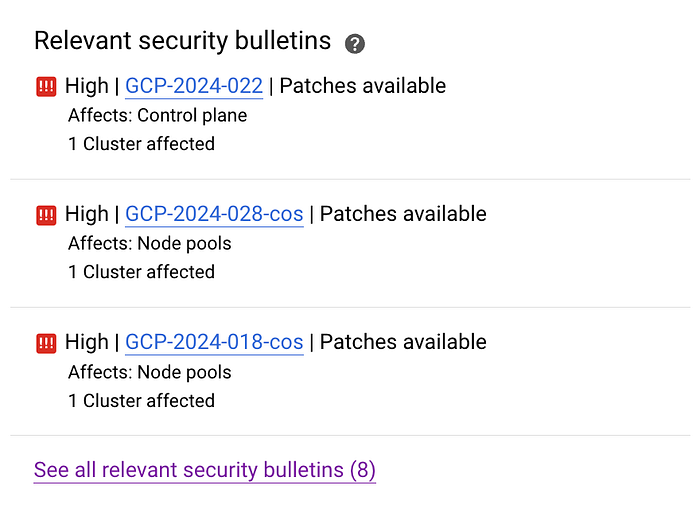
GKE Security Posture Dashboard — Security bulletins
Supply chain — Binary Authorization
The security posture dashboard can show you insights from other Google Cloud security offerings that are running in your project, and one example of it is the Binary Authorization.
There is no extra charge for security posture dashboard, however, using other Binary Authorization features like enforcement is separate to the dashboard functionality, and is subject to Binary Authorization for GKE pricing.
The Binary authorization checks for the following issues with running container images:
- Images that use the
latesttag, either implicitly or explicitly - Images (deployed by digest) that were uploaded to Artifact Registry or Container Registry ( Deprecated) more than 30 days ago
For more details on the Binary Authorization please check this link
GKE threat detection
GKE threat detection is an advanced capability that’s available to GKE Enterprise users at no extra charge. This feature is currently in preview, Jun/2024.
When your GKE clusters are registered in a fleet, GKE threat detection evaluates your GKE audit logs in Cloud Logging against a set of predefined rules for cluster and workload threats. If a threat is found, you see a finding in the GKE security posture dashboard with a description of the threat, the potential impact, and recommended actions to mitigate the threat.
All enrolled GKE clusters across your fleet are continuously scanned for active threats. We classify detected threats using MITRE ATT&CK® tactics.
GKE threat detection is powered by the Security Command Center Event Threat Detection service. In the GKE security posture dashboard, only the subset of rules that apply to GKE are evaluated.
Integration with Security Command center
If you use the Security Command Center Standard tier or Premium tier in your organization or project, you’ll see security posture dashboard findings in Security Command Center. For more details about the types of Security Command Center findings that you’ll see, refer to Security sources.
If you would like to know more about GKE Security Posture Dashboard you can check the Google documentation here.
Get In Touch
If you don’t know DoiT International yet you should definitely check us out. Here, our team is ready to learn more about you and your cloud engineering needs. Staffed exclusively with senior engineering talent, we specialise in providing advanced cloud consulting architectural design and debugging advice. Get in touch, and let’s chat!
By leveraging GKE Security Posture, you gain a centralized view of your cluster security posture, allowing for proactive threat detection and mitigation. This comprehensive set of tools empowers you to secure your containerized applications and maintain a healthy cloud-native environment.
I hope you found this post informative! If you have any questions, please feel free to leave a comment below.
References:
https://cloud.google.com/security-command-center/docs/concepts-security-sources#gke-security-posture-dashboard\ d https://cloud.google.com/kubernetes-engine/docs/concepts/about-configuration-scanning#what-checks
https://cloud.google.com/artifact-analysis/docs/scan-os-automatically#linux-versions
https://nvd.nist.gov/vuln/search
https://cloud.google.com/artifact-analysis/pricing#avi
https://cloud.google.com/kubernetes-engine/docs/resources/security-patching
https://cloud.google.com/binary-authorization/pricing#for_pricing
https://attack.mitre.org/tactics/enterprise/
https://cloud.google.com/security-command-center/docs/concepts-event-threat-detection-overview