

Google Workspace offers a robust spam filtering feature that helps protect users from unwanted and potentially harmful emails. This feature can be customized to meet an organization's specific needs, giving admins greater control over the visibility of warning banners for incoming email messages.
The spam filter feature is available to all Google Workspace customers.
However, it is not available to legacy G Suite customers or users with personal Google Accounts.
Admins can access and configure the spam filter settings in the Google Workspace Admin console at Apps > Google Workspace > Settings for Gmail > Spam, Phishing, and Malware.
Here is a guide on how to add spam filter settings in the Google Workspace Admin console.
Examples of banners users may see in their Gmail:
Google Workspace’s key benefits of spam filtering conduct of the following:
- Enhanced Security: The spam filter helps to identify and block spam, phishing, and malware emails before they reach users’ inboxes. This reduces the risk of users falling victim to scams or compromised accounts.
- Customization: Admins can tailor the spam filter settings to their organization’s needs. They can choose to disable spam filters and hide warning banners for all users or specific allowed senders. This flexibility allows admins to configure the visibility of these warnings based on their preferred security protocols.
- Improved User Experience: By filtering out spam and unwanted emails, the spam filter helps to keep users’ inboxes clean and organized, making it easier for them to focus on important messages.
- Anti-Phishing Training: Admins can leverage the spam filter feature to conduct anti-phishing training with end users. By temporarily disabling spam filters and hiding warning banners, admins can simulate phishing attacks and educate users on how to identify and report suspicious emails.
While the Google Workspace spam filter offers robust protection against unwanted and harmful emails, it’s important to be aware of its limitations.
Potential Limitations:
- False Positives: The filter might occasionally misidentify legitimate emails as spam, causing them to be quarantined or blocked. This can lead to missed important messages.
- False Negatives: Despite its effectiveness, the filter may sometimes fail to detect sophisticated spam or phishing attempts, allowing them to reach users’ inboxes.
- Dependence on User Reporting: The filter’s accuracy can be improved by users reporting spam and phishing emails. However, this relies on users’ vigilance and understanding of how to identify such emails.
- Limited Customization for Individual Users: While admins have granular control over spam filter settings, individual users may have limited options to personalize the filter’s behavior for their specific needs.
It’s crucial for organizations to educate users about these limitations and encourage them to remain cautious when interacting with emails, even with the spam filter in place.
In addition to the built-in spam filter, organizations can implement several other security features to enhance their email security within Google Workspace:
- Email Authentication Protocols: Implementing SPF, DKIM, and DMARC can help verify the authenticity of incoming emails and prevent spoofing and phishing attacks.
- Data Loss Prevention (DLP): DLP can help prevent sensitive information from being leaked through email by scanning outgoing messages for confidential data and blocking or quarantining them if necessary.
- Security Sandbox: This feature allows admins to test potentially harmful attachments in a secure environment before they are delivered to users’ inboxes.
- Enhanced Encryption: Organizations can enable S/MIME encryption for added email security, ensuring that only the intended recipient can decrypt and read the message.
By combining these security features with the spam filter, organizations can create a multi-layered defense against email-based threats and better protect their users and data.
S/MIME encryption and DLP (Data Loss Prevention) features are included in GWS’s Enterprise license plans (Google Workspace).
This is due to the technical requirements and compatibility of these features with different GWS versions.
Another feature that is included in the Enterprise license plans of GWS called “ Advanced phishing and malware protection”.
Spam filters and advanced phishing and malware protection are both email security measures, but they differ in their focus and capabilities. While spam filters primarily target unwanted or unsolicited emails, advanced protection goes further by proactively identifying and blocking sophisticated phishing attacks and malware threats.
In the “Safety” section of “Settings for Gmail” in the Workspace Admin console, admins can select to keep suspicious emails in the inbox and show a warning, move the email to the spam folder, or move to admin quarantine.
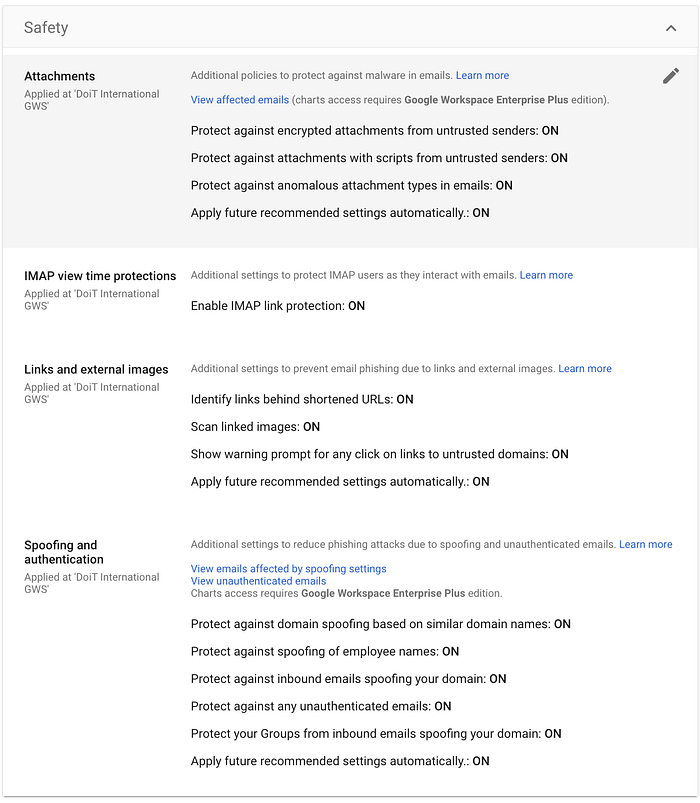
A key distinction lies in the use of allow lists or exemptions. Spam filters support allow lists, letting users specify senders or domains whose emails should always be delivered. In contrast, advanced phishing and malware protection typically do not support allow lists or exemptions. This is because allowing exceptions could create vulnerabilities that attackers might exploit, potentially undermining the effectiveness of the protection.
There are cases where email won’t reach its destination and we need to understand why.
The email headers contain valuable information, such as the sender, recipient, and routing of the email, and can be used to analyze and troubleshoot delivery issues, identify potential spoofing attempts, and gain insights into the email’s journey.
The most useful tools to analyze email headers are MX toolbox, Learn DMARC, and Google toolbox.
The email header can be exported using this guide.
If you have the Enterprise Plus license plan, you could export the email header via the audit and investigation tool in the Workspace admin console.
By pasting the email header into one of the tools mentioned above, we can investigate the case of an email not delivered properly.
Another investigation tool that you can use is the ELB (email log search), this can show you the email delivery and the actions made by Google security and the recipient of the email, see the example image below.
In this example, we can see that the email was delivered to the Gmail inbox with no errors to the recipient and that the recipient has unopened, unread, or unseen by the user.
Wrapping up:
The Google Workspace spam filter feature is a valuable tool for protecting organizations from email-based threats.
With its customizable settings and ability to integrate with anti-phishing training, the spam filter helps to create a safer and more productive email experience for users.
If your organization’s Workspace doesn’t have this feature configured, we strongly advise you to do so.
DoiT International offers expert consultancy paired with unlimited, world-class support to customers of all sizes across Google Workspace and Google Cloud Platform.