

TensorFlow Extended is an end-to-end platform for implementing production ML pipelines.

To make your ML pipeline work, you need an orchestrator that runs those pipelines. As part of this article, we will use Kubeflow as an orchestrator.
By the end of this article, you will see how well Kubeflow and TensorFlow Extended are made for each other ❤️.
We are covering the aspects of creating a TensorFlow Extended pipeline. Deploy this pipeline to Kubeflow Pipelines using the built-in functionality of TensorFlow Extended. Finally, we are going into the details of how to do that in a CI/CD way.
Back to the past
In a previous article, TensorFlow Extended 101, we covered everything you need to know to create your TFX pipeline. Let’s take it a step further with this article.
What is AI Platform Pipelines, and why are we using them?
As soon as we talk about AI Platform Pipelines, we are also talking about Kubeflow.
Kubeflow is made of various features such as Notebook, Pipelines, Feature Store, Serving, and much more.
Google AI Platform Pipelines takes one of these components, Kubeflow Pipelines, and provides it as a “service.”
Choose AI Platform Pipelines if you only need Pipelines and no other feature.
In the following, we use AI Platform Pipelines and Kubeflow Pipelines interchangeably. The approach we use can also be applied to Kubeflow without any further adaptions.
Using AI Platform Pipelines saves us some serious time setting up Kubeflow.
Want to jump to the notebook and code?
I believe machine learning has to follow the same standards as any other code. Even if it is convenient, no production pipeline should exist in a notebook.
Ways of creating a Kubeflow Pipeline
You can build pipelines for Kubeflow in many ways. We focus on the first approach, but I want to outline additional ways of creating Kubeflow Pipelines.
- With TensorFlow Extended Choose this way if you are anyway using TensorFlow. The TFX pipeline is compiled into a format Kubeflow understands.
- With Kubeflow Components
- With TensorFlow Extended Components implemented as Kubeflow Components.
This is useful if you want to mix and match TFX with other components and features. In the past, there was unofficial support for that use case. It got deprecated in May 2020 in favor of the TFX SDK. Anyway, if you are interested in that kind of architecture, please follow the conversation https://github.com/kubeflow/pipelines/issues/3853.
AI Platform Pipelines Installation
The setup is as easy as 2 button clicks and a couple of minutes of waiting time to spin up the infrastructure.
https://cloud.google.com/ai-platform/pipelines/docs/setting-up
Google takes care of setting up the Kubernetes cluster required to run Kubeflow pipelines. You also can install Kubeflow Pipelines on an existing Kubernetes cluster.
If you are familiar with managing and working with Kubernetes use your existing Kubernetes Cluster and install Kubeflow Pipelines or the full Kubeflow.
Kubeflow Pipelines SDK
To create a pipeline for Kubeflow, we need to make sure Kubeflow Pipelines SDK is installed.
pip install kfp
If you get the following error while creating the pipeline using the CLI, check, the SDK is installed properly.
error Kubeflow not found
Create Pipeline
We used various components of TensorFlow Extended. A pipeline is just putting those components together.
#pipeline.py (simplified full code in repository)from tfx.orchestration import pipelinecomponents.append(example_gen)
components.append(trainer)
components.append(pusher)return pipeline.Pipeline(
   pipealine_name=pipeline_name,
   pipeline_root=pipeline_root,
   components=components
)
In our previous article, we mentioned possible Orchestrators TensorFlow Extended is supporting. Each of them requires orchestrator-specific configurations and implementation to run the pipeline.
The only part of our pipeline which differs between those Orchestrators is our runner. Even though this article is focused on Kubeflow, most parts are identical to the other orchestrators.
In the following, we split up the runner and go through the required implementation.
First, we obtain an instance of KubeflowMetadataConfig proto. It is nothing other than a bunch of information on how to connect to Kubeflow metadata. Metadata is a Kubeflow component used for tracking and managing metadata of machine learning pipelines. Let us recap on the previous article. We covered ML Metadata (MLMD) that implements similar functionality to Kubeflow metadata.
#kubeflow_runner.py (simplified full code in repository)metadata_config = kubeflow_dag_runner.get_default_kubeflow_metadata_config()
Kubeflow pipelines are executed as containers or as multiple containers. To run our TFX pipeline in Kubeflow, we need to create a Docker container image. Our pipeline might contain specific dependencies like pandas or our transformation code. Putting those dependencies into a Docker enables us to run the pipeline on Kubeflow. We get to that in detail in our CI/CD section later on in this article.
Deep dive:
If you are interested to dig deeper I recommend to take a look at the TFX Kubeflow orchestration implementation. It’s always good to know how the tools we are using work. From the implementation we can see that TFX is using the Kubeflow SDK and its domain-specific-language to define the component. The Kubeflow SDK documentation describes the process used in TFX.
To keep it simple, it’s enough to remember our pipeline needs to be in a Docker container image.
tfx_image = "gcr.io/sascha-playground-doit/sentiment-pipeline"
In our case, the runner requires a configuration, the KubeflowDagRunnerConfig, that consists of our metadata config and our Docker container image.
#kubeflow_runner.py (simplified, full code in repository)runner_config = kubeflow_dag_runner.KubeflowDagRunnerConfig(
      kubeflow_metadata_config=metadata_config, tfx_image=tfx_image)
Finally, we are putting everything together by defining our KubeflowDagRunner using the configuration and our pipeline. The create_pipeline function encapsulates our TFX components and returns a TFX pipeline object.
#kubeflow_runner.py (simplified, full code in repository)from pipeline import create_pipelinekubeflow_dag_runner.KubeflowDagRunner(config=runner_config).run(                                              create_pipeline(                                           pipeline_name=PIPELINE_NAME,                                                  pipeline_root=PIPELINE_ROOT)
)
Runner API documentation:
TFX provides a CLI command to create a pipeline. Different runners might require additional parameters. In our case, we deploy to Kubeflow, and the following is the minimum configuration required.
!tfx pipeline create  \
--pipeline-path=./kubeflow_runner.py \
--endpoint={ENDPOINT}
Deep dive:
The command passes the parameters to the kpf.client. The CLI is a useful wrapper to simplify the process of creating pipeline in Kubeflow. Check out the CLI implemenation quite interesting and good to understand how the process is working.
After a couple of minutes, our pipeline is created and ready to use. Your ML team could facilitate the CLI in notebooks to deploy a new version of the pipeline manually.
There is always room for improvement, and we cover that in the next section by implementing a continuous delivery solution.
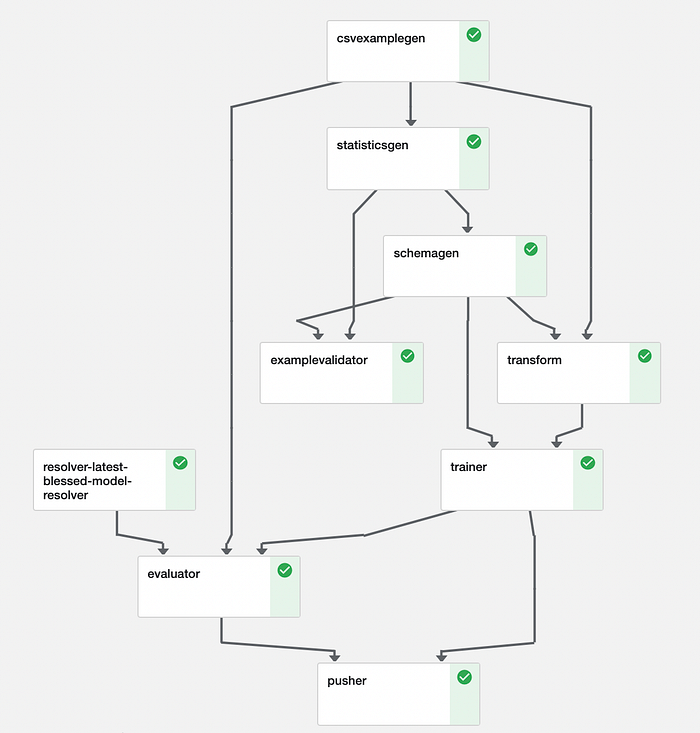
Continuous Delivery
Our pipeline runs on Google Cloud Platform; hence we use the Google Cloud Build, a serverless CI/CD platform.
From the previous section, we know what we need to deploy our pipeline.
- A Docker container image containing our pipeline and dependencies. The image is pushed to the Google Container Registry.
- And the CLI to create the pipeline.
With Cloud Build, we define those steps in a yaml file.
# cloudbuild.yaml
steps:
# Build the image that encapsulates the pipeline.
- name: 'gcr.io/cloud-builders/docker'
  args: ['build', '-t', 'gcr.io/sascha-playground-doit/sentiment-pipeline', '.']
  dir: 'pipeline'- name: 'gcr.io/sascha-playground-doit/tfx-cli'
  args: ['pipeline', 'create', '--engine', 'kubeflow', '--pipeline_path', 'runner.py', '--endpoint', 'xyz-dot-us-central1.pipelines.googleusercontent.com']
  dir: 'pipeline'# Push the custom image to Container Registry
images: ['gcr.io/sascha-playground-doit/sentiment-pipeline']
Our build process requires calling the TFX CLI create command. Currently, there is no public ready to use Docker image for that. But we can build our own with a few lines of code.
#dockerfile (simplified, full code in repository)FROM gcr.io/deeplearning-platform-release/tf2-cpu.2-4
COPY requirements.txt .
RUN python3 -m pip install -U -r requirements.txtENTRYPOINT ["tfx"]
To finalize our continuous deployment process, we connect our Github repository to Cloud Build. We define triggers to start the continuous deployment process. For example, for each push into the main branch, our pipeline gets built and deployed to Kubeflow.
Google Cloud Build needs access to our Kubernetes cluster make sure you enable the access. https://cloud.google.com/build/docs/deploying-builds/deploy-gke
Best practices and limitations
Data graveyard 🧟
Each pipeline run produces an amount of metadata. Our pipelines stores the metadata, also called artifacts, on Google Cloud Storage. For observability also the data for each run is stored. In case you train on a high cadence or large datasets, consider adding a lifecycle rule for your bucket. Depending on your use case, you could delete data older than X days. https://cloud.google.com/storage/docs/managing-lifecycles
TFX CLI authentication 🔑
The TFX CLI does not support authentication. The environment that runs the command needs access to the Kubeflow / AI Platform Pipelines to create the pipeline.
TFX API confusion 🤔
The TFX API provides two different Kubeflow runner
It is against my instincts as an engineer to use the KubeflowV2DagRunner because it seems newer, Google recommends using KubeflowDagRunner. (as of March 2021, V2 is still under development https://github.com/tensorflow/tfx/issues/3361.
Be manual to be automatic 🧂
The very first version of our pipeline needs to be created with the TFX CLI create command. Following changes on the pipeline with the update command. Keep that in mind if you implement a CI/CD process. The TFX team is working on a solution https://groups.google.com/a/tensorflow.org/g/tfx/c/MhUwMLjipGs
Memory 🍫
Depending on your machine learning solution, you might run low on resources. For our Sentiment Analysis use case, we need to increase the default memory of AI Platform Pipelines to run the transformations (Using BERT comes with its costs :). https://cloud.google.com/ai-platform/pipelines/docs/configure-gke-cluster.
GPU’s
Depending on your model, you might require GPUs for training. We have multiple ways of using GPUs. We can use the AI Platform Trainer component or add a GPU to our cluster.
Features and fixes along the journey so far 💪
I want to showcase how fast the teams at TensorFlow and Kubeflow are responding to issues. From writing this article till publishing, almost all issues are in progress.
- https://github.com/tensorflow/tfx/issues/3369 🟢 solved
- https://github.com/tensorflow/tfx/issues/3361 🟡 in progress
- https://github.com/kubeflow/pipelines/issues/5302 🟡 in progress
- https://github.com/kubeflow/pipelines/issues/5303 🟡 in progress
- https://github.com/tensorflow/tfx/issues/3386 🟡 in progress
Based on a discussion at the TFX Google group
- https://github.com/tensorflow/tfx/issues/3417 🟡 in progress
What’s next?
Stay tuned for more topics around machine learning.
Thanks for Reading
Your feedback and questions are highly appreciated. You can find me on Twitter @HeyerSascha or connect with me via LinkedIn . Even better, subscribe to my YouTube channel ❤️ .