

Let’s talk about fingerprints | Source: Everett Collection/Shutterstock
If you’ve ever found yourself analyzing AWS WAF logs, you might’ve noticed log fields for ja3fingerprintand ( more recently) ja4fingerprint. If you’re wondering what those are, welcome! If you’ve never seen them before but now you’re curious…welcome!
In this article, we’ll look at what these fingerprints are, how they can be helpful across whatever cloud service you’re using, and how you might detect, analyze, and work with them in AWS, Google Cloud, and Azure. We’ll also have some example queries to use with AWS WAF logs.
So what are JA3 and JA4 fingerprints?
JA3 and JA4 (pronounced “jah-three” and “jah-four”) fingerprints are client identifiers calculated by services like AWS WAF, and can be very useful when trying to identify types of traffic, specifically to help mitigate potential or ongoing attacks.
A short history
Perhaps surprisingly, JA3 and JA4 were not preceded by JA1 and JA2. The name “JA3” comes from the names of the three “J.A.” developers of the tool:
- John Althouse
- Josh Atkins
- Jeff Atkinson
(Source: an excellent presentation by John Althouse and Jeff Atkinson themselves: Profiling And Detecting All Things SSL With JA3 )
Their work was built off of TLS cipher suite analysis efforts by Ivan Ristić as well as Lee Brotherston.
JA3 was invented at Salesforce, and JA4 was a direct successor created by FoxIO—a company co-founded by John Althouse and a fourth(!) J.A., Josh Alexander.
While both fingerprints are open-source, FoxIO also licenses a larger suite of fingerprints called JA4+, which has separate licensing terms. AWS currently doesn’t support any JA4+ features, but many other network and security tools do.
A short (and oversimplified) explanation
In one sentence: JA3 and JA4 fingerprints are a way of identifying clients(anything accessing a service) based on information in the initial TLS handshake’s Client Hello packet sent to those services, regardless of IP address, ports, geolocation, or other common variables.
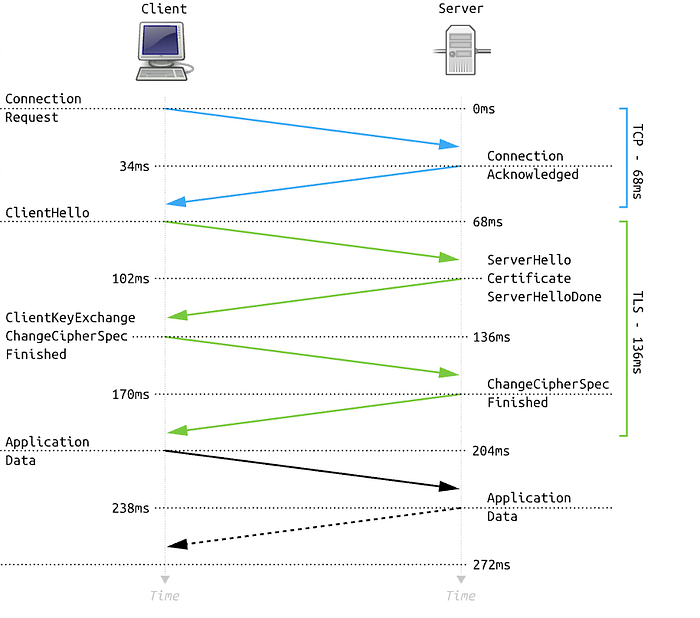
Simplified flow of TLS 1.2 handshake | Source: Wikimedia Commons

Calculating JA3 and JA4 fingerprints
JA3 fingerprints are calculated (as described in the official open-source repository) by using the following fields in the Client Hello packet:
- TLS Version
- Accepted ciphers
- List of extensions
- Elliptic curves
- Elliptic curve point formats
These fields are enumerated, ordered into a single string, and then that string is MD5 hashed to get a shorter string.
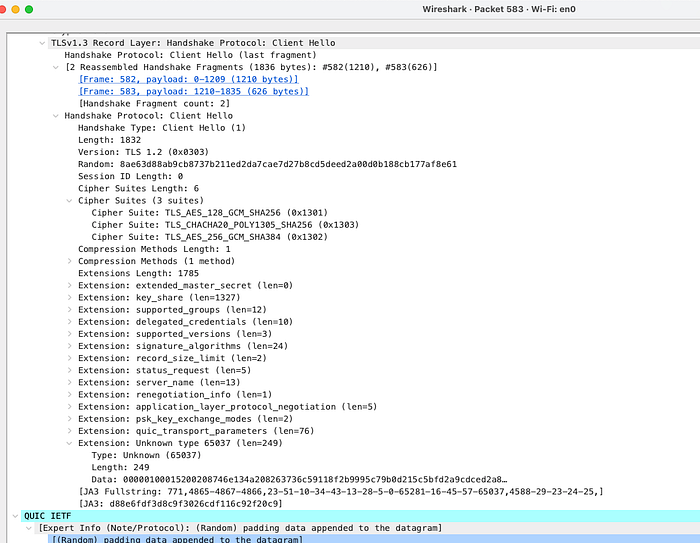
Here’s a Wireshark capture of a TLS 1.3 handshake from my machine. Hey, it shows the JA3 fingerprint!
JA4 client fingerprints use the following details from the Client Hello, as detailed in the JA4 repository:
- Protocol (TCP or QUIC)
- TLS version
- Is SNI used? (yes=“d” for domain, no=“i” for IP)
- Cipher suites (how many, and which ones)
- Extensions (how many, and which ones)
- ALPN extension value (Application-Layer Protocol Negotiation; examples include short codes for HTTP/2, HTTP/3, POP3, DNS-over-TLS, SPDY/3, and more)
A nice visual breakdown showing how each part of a JA4 fingerprint is calculated | Source: FoxIO’s JA4 repository; BSD-3-Clause licensed.
These details aren’t MD5 hashed; some parts of the signature are already hashed and truncated, so the signature is only 36 characters long.
A quick demo
The website https://ja4db.com shows your current JA4 fingerprint — give it a try!
Why would I want to use JA3/JA4 fingerprints?
Use Case 1: Rate limiting
Traditionally, rate limiting rules on WAFs or other protective layers have been based on IP address, URI path, or other parts of the client’s requests.
Limiting the request rate based on the specific client fingerprint provides the following benefits:
- Avoid false positives that may occur from IP-based limits or other common
- Limit attackers with the same fingerprint/tool regardless of IP address
Google Cloud Armor and AWS WAF both support this feature.
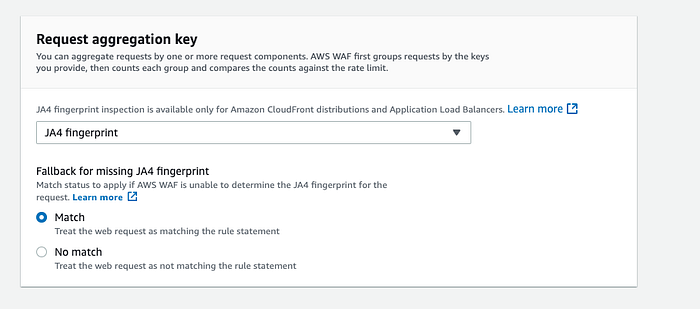
AWS lets you use JA3 or JA4 fingerprints as aggregation keys for a rate-limit rule
Use Case 2: Blocklisting
If you already know one or more malicious fingerprints, you can simply add them to a blocklist. Google Cloud Armor and AWS WAF also both support this feature.
Use Case 3: Threat hunting
Threat hunting is a defensive practice that is meant to proactively detect threats in your environment. For example, if you get news about some new C2 server IP addresses that have been discovered in the wild, you might check your network logs for any communication with those IPs.
Similarly, if you’re able to detect JA3/4 fingerprints in your network environment, you can check network logs for fingerprints of newly discovered malicious clients. These fingerprints are just another tool in your toolkit.
Fingerprints vs. IP addresses
Since JA3 and JA4 fingerprints track specific details about clients, there are cases where these will be extremely useful for defense instead of tracking down or blocking IP addresses:
- An attacker with a custom attack script would likely have a unique fingerprint, dependent on the libraries, operating system, etc.
- Traffic from malware on multiple compromised corporate laptops is likely to have the same fingerprint, or at least a very small set of fingerprints.
- Fingerprints from known malicious tools can be shared and automatically blocked before any such traffic is detected on the network.
JA3 vs. JA4
Using JA4 fingerprints is preferred, but JA3 fingerprints are still useful if you know what you’re looking for. Below are some key differences:
- JA4 fingerprints are based on more information than JA3 fingerprints.
- JA3 was created and sponsored by Salesforce, but is no longer actively maintained.
- As with anything in the world of cybersecurity, detection evasion research and methods are evolving. JA3 has been around longer, and has more well-known ways to bypass detection.
- Some clients (including Chrome and Firefox) now support the option to shuffle parts of their Client Hello packet. This will change the JA3 fingerprint, but the JA4 method uses sorting to keep fingerprints consistent.
- Both fingerprint types have community-managed databases. The largest publicly available JA3 database I could find has just over 128,000 entries by my count. I also counted roughly 105,000 entries in the JA4+ database as of the time of this writing.
- JA3 has a longer legacy, but JA4 support is active and growing. As I was drafting this article, for example, AWS announced that their Network Firewall service now supports JA4 filtering!
Other considerations
False positives Applying aggressive rate-limiting rules keyed on fingerprint value may result in a lot of false positives, especially in cases where you may have many similar clients. Using additional client data, such as header order as detailed in this AWS blog post, can help minimize blocks on legitimate users.
Databases are still growing Public JA3 and JA4 databases are community-maintained, so relying solely on these databases may not be ideal if you need cutting-edge threat detection. Cloud providers and managed security services are likely to maintain private databases of malicious fingerprints, so using managed rules such as AWS’s Bot Control rule group may be worth considering.
Attacker craftiness may vary Here at DoiT, we’ve helped customers analyze attacks that appeared to be very simple — a single fingerprint across multiple IPs that suggested a basic DoS tool was being used — as well as attacks that really couldn’t be pinned down to a consistent JA3/4 fingerprint. Any attacker’s capabilities, resources, and patience will vary.
Hey, what about Azure? Azure needs some love in this discussion! Azure’s tools don’t support custom JA3- and JA4-related features in the same direct way that AWS and Google Cloud do (yet), but a couple of their security tools do include fingerprinting capabilities:
- Azure Firewall Intrusion Detection & Prevention System (IDPS) notes that it uses JA3 fingerprinting in its signature rules. Azure has a nice blog post about it here.
- Azure’s SEIM tool, Sentinel, includes JA3 and JA3S (server fingerprinting) details in threat object data (using STIX). More in their documentation here.
How can I use this in AWS?
JA3 and JA4 fingerprint-based logging and rules are well-supported in AWS, and I’m going to focus on using AWS features in the following section.
Logging requests
The first step is to be able to log JA3 and JA4 fingerprints! The following AWS resource types support JA3 and JA4 fingerprint fields in their logs:
- WAF logs (only for logs related to CloudFront and Application Load Balancer resources)
- Network Firewall logs (only in some cases — AWS has an example here)
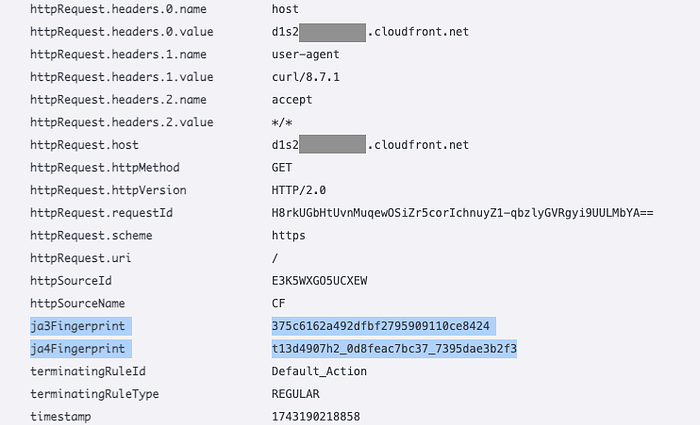
Example AWS WAF logs showing my JA3 and JA4 fingerprint values. Don’t block me!
Blocking and rate-limiting based on fingerprint values
I’ve discussed this feature in the above sections, but here’s a handy list of the referenced documentation:
- Blocking in AWS WAF
- Rate-limiting in AWS WAF
- Blocking in Google Cloud Armor
- Rate-limiting in Google Cloud Armor
Analyzing logs
Below are some CloudWatch Log Insights queries that I’ve used in the past to help research JA3 and JA4 fingerprints in WAF traffic.
Count of top JA3 fingerprints
fields ja3Fingerprint
| stats count(*) as requestCount by ja3Fingerprint
| sort requestCount desc

1,097? Is that too many?
Count of top JA4 fingerprints, split by URL path and user agent
parse @message /\{\"name\":\"[Uu]ser\-[Aa]gent\",\"value\"\:\"(?<useragent>[^"\}]*)/
| stats count(*) as requestCount by ja4Fingerprint, httpRequest.uri, useragent
| sort requestCount desc
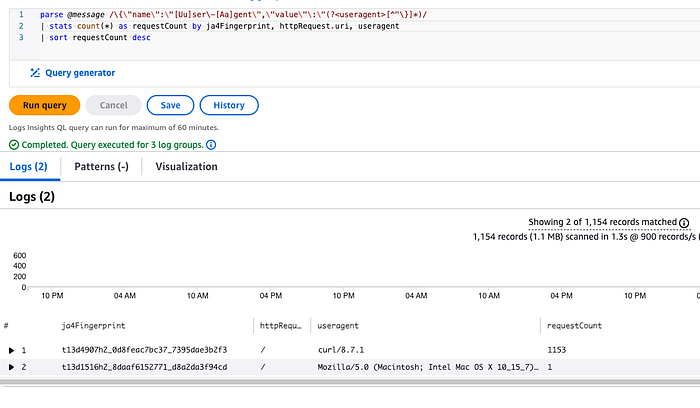
Adding more information makes it easier to see what’s going on!
Fingerprints of requests that have been blocked by rate-based rules
Note that this checks any rate-based rules. This is useful if you have IP-based rate-based rules in place and want to see if there are any common fingerprints.
fields @timestamp, httpRequest.clientIp as ClientIP, terminatingRuleId as rule, httpRequest.country as Country, ja4Fingerprint
| filter action = "BLOCK"
| filter terminatingRuleType = "RATE_BASED"
| stats count(*) as count by ja4Fingerprint, ClientIP, rule, Country | sort by count desc

Different clients may have the same IP but different fingerprints
AWS has additional examples in this blog post and in this re:Post article. You’ll need to customize them to include JA3/4 fingerprints, but this is a great place to start and see what might be useful for your situation.
More information
Below is a list of some of the most useful sources and tools I’ve found related to JA3 and JA4 fingerprinting.
Official sources
- JA3 GitHub repo
- JA4+ GitHub repo
- TLS Fingerprinting with JA3 and JA3S (Salesforce blog)
- JA4+ Network Fingerprinting (FoxIO blog)
Tools
- ja3.me — The largest open JA3 fingerprint database I could find
- JA3.ZONE — another database, not open-source
- The JA4+ fingerprint DB
Blog posts
- Ivan Ristić’s original blog post about TLS fingerprinting
- Lee Brotherston’s original work on TLS fingerprinting, including links to conference presentations
- Cloudflare’s discussion of JA3 and JA4 fingerprints, with details about how they are parsed
- Unveiling Hidden Connections: JA4 Client Fingerprinting on VirusTotal
Presentations
- Profiling And Detecting All Things SSL With JA3 (YouTube; John Althouse and Jeff Atkinson)
- JA4+ Intro (YouTube; John Althouse)
- BSides DC 2019 — Using JA3. Asking for a friend? (YouTube; Justin Warner and Ed Miles)
JA3 and JA4 fingerprints are an incredibly valuable addition to the various detection and analysis options you might already have, whether you’re a security analyst, a cloud engineer, a do-it-all person on a small team trying to handle a DDoS attack, or whatever role you might be filling when you see this in the wild.
Do you have questions about securing your cloud environment?
Contact DoiT today to discuss how we can help you maximize the efficiency, cost-effectiveness, and security of your cloud environment. With DoiT, you get access to exclusively-senior cloud expertise for consulting, upskilling, and support, and we’re here whenever you need expert advice, an outside opinion, assistance with adopting new technologies, or help fighting fires in production.
If you are interested in deep-diving into other cloud security and architecture topics, check out our cloud engineering blog posts.