
DoiT Cloud Intelligence™
Kubernetes Fine-Grained Horizontal Pod Autoscaling with Container Resource Metrics

Kubernetes Horizontal Pod Autoscaler (HPA) has revolutionized how we manage workloads by automatically scaling deployments/statefulset pods up or down based on the average CPU utilization, average memory utilization or any other custom metric you specify to match demand.
Current Implementation
When calculating the resource usage of pods, the total value is determined by adding up the usage of each container within the pod. However, this method may not be appropriate for workloads where container usage is not closely related or does not change at the same rate.
For instance, a sidecar container handling logs might not consume significant resources, while the main blog application container handles most of the workload.HPA wouldn’t scale based on the critical container’s usage because the average pod metric might not reflect the true picture.

HPA scaling based on the average resource utilization of all pods in a deployment
New implementation
Introduced in Kubernetes v1.20 and now graduated to stable in v1.30, the Container resource metrics feature allows HPA to target individual container metrics within a pod. You can define the HPA to scale based on the resource utilization (CPU, memory, etc.) of a specific container within the pod.
This feature helps to allocate resources efficiently and avoid unnecessary scaling due to high pod utilization triggered by non-critical containers. By monitoring the resource consumption of the container responsible for the core functionality, you can focus on the real workload. This leads to better decision-making regarding scaling and prevents performance bottlenecks.
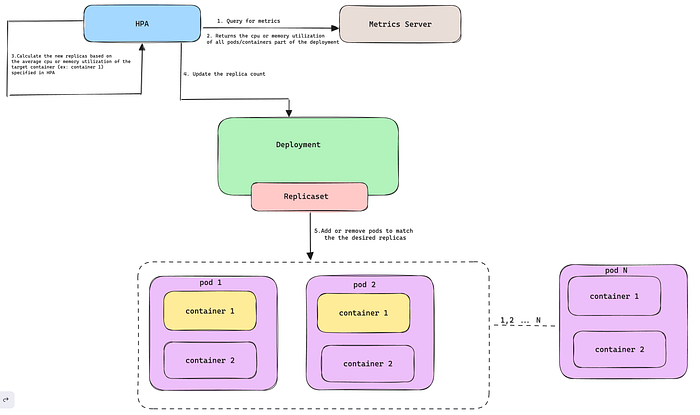
HPA scaling based on the average resource utilization of the target container across all pods in a deployment
In this blog, I will show you how to use the container resource metrics feature to scale your deployments in a multi-container pod setup.
Prerequisites
- A Kubernetes cluster with version 1.27 or above.
- Metrics Server is deployed on the Kubernetes cluster.
- Kubectl is installed on your workstation.
Container resource metrics Scaling in action
- Deploy a sample multi-container deployment with the below manifest, and
cpu-stressoris the main container designed to simulate CPU stress on Kubernetes pods. Refer to the Github repo for more details about thecpu-stressortool. Thelog-genertoris a sample secondary container in the same pod.
cat <<EOF | kubectl apply -f -
---
apiVersion: apps/v1
kind: Deployment
metadata:
  name: crm-scaling-demo
  labels:
    app: crm-scaling-demo
spec:
  selector:
    matchLabels:
      app: crm-scaling-demo
  template:
    metadata:
      labels:
        app: crm-scaling-demo
    spec:
      containers:
        - name: cpu-stressor
          image: narmidm/k8s-pod-cpu-stressor:1.0.0
          args:
            - "-cpu=0.5"
            - "-duration=3600s"
          resources:
            limits:
              cpu: "200m"
            requests:
              cpu: "100m"
        - name: log-generator
          image: busybox:1.28
          args: [/bin/sh, -c,\
                'i=0; while true; do echo "$i: $(date)"; i=$((i+1)); sleep 1; done']
          resources:
            requests:
              cpu: "100m"
EOF

Sample pod and resource usage across all containers in the pod
- Create a
HorizontailPodAutoscalerresource that performs scaling based oncpu-stressorcontainer CPU usage instead of pod metrics.
cat <<EOF | kubectl apply -f -
---
apiVersion: autoscaling/v2
kind: HorizontalPodAutoscaler
metadata:
  name: crm-scaling-demo
spec:
  scaleTargetRef:
    apiVersion: apps/v1
    kind: Deployment
    name: crm-scaling-demo
  minReplicas: 1
  maxReplicas: 10
  metrics:
  - type: ContainerResource #new-metrics-source
    containerResource:
      name: cpu
      container: cpu-stressor #container-name
      target:
        type: Utilization
        averageUtilization: 50
EOF

Sample HPA configuration based on the cpu-stressor container metrics
In the above example, the HPA controller scales the target such that the average utilization of the CPU in the cpu-stressor container of all the pods is 50%.
- Wait for the
cpu-stressorcontainer to simulate CPU stress, and you can see HPA recalculates the number of pods based on the CPU utilization of thecpu-stressorcontainer.
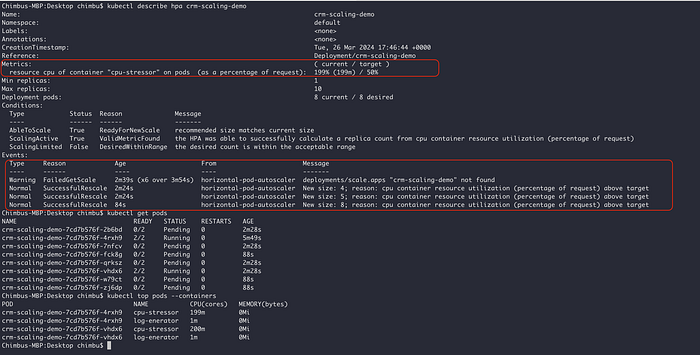
Sample HPA scaling based on the cpu-stressor container metrics
HPA scaling based on container resource metrics demo
The screenshot and demo video demonstrate successful HPA scaling based on the cpu-stressor container in a multi-container pod setup🚀.
With container resource metrics graduating to stable in Kubernetes v1.30, you can now achieve a new level of precision in your horizontal pod autoscaling, ensuring optimal application performance.
I hope this blog post has been helpful. For more information, please refer to the following resources: