

Generative AI is increasingly becoming an integral part of how teams operate, reason about systems, and query data. What started with code completion and chat-based assistants is now expanding into infrastructure, operations, and data systems. Databases are no exception. Teams are increasingly experimenting with natural language interfaces for querying data, exploring schemas, and assisting with analysis.
At the same time, databases remain some of the most sensitive and operationally critical components in any system. Exposing them directly to free-form AI prompts raises real concerns around correctness, security, and control. As AI capabilities move closer to production systems, the way models interact with databases needs more structure than simple prompt-based SQL generation.
MCP Toolbox for Databases is an open source project from Google that addresses this problem. It provides a structured, protocol-based way for AI tools to interact with databases through well defined operations, rather than raw text prompts. MCP Toolbox provides a database-agnostic framework for AI tool interaction, while individual databases are supported through database-specific MCP tools. These tools can be prebuilt integrations or custom implementations and can be used directly with Gemini CLI extensions. In this post, the focus is on AlloyDB as a PostgreSQL-compatible example. The source code and project documentation are available on GitHub: https://github.com/googleapis/genai-toolbox
Introduction: Why MCP Toolbox for Databases Matters
Large language models are increasingly used around databases. Developers ask them to write SQL, explain schemas, or answer analytical questions. In practice, many of these workflows still rely on simple text-to-SQL generation, where the model produces a query based on a prompt and hopes it matches the actual schema and data.
This approach works for small demos, but it quickly shows limitations. The model often has incomplete knowledge of the schema, no visibility into permissions, and no awareness of how a query is executed. From a database perspective, this makes it hard to trust the results or safely integrate these tools into real environments.
The Model Context Protocol, or MCP, takes a different approach. Instead of asking a model to guess, MCP allows AI tools to interact with systems through explicit, well defined operations. A database can expose capabilities such as listing tables, describing schemas, executing queries, or retrieving query plans as tools. The AI client calls those tools and works with real outputs, not assumptions.
MCP Toolbox for Databases is an open source implementation of this idea from Google. It exposes database functionality through MCP and provides a database-agnostic framework for AI tool interaction, while individual databases are supported through database-specific MCP tools. In this walkthrough, AlloyDB is used as a PostgreSQL-compatible example. Each operation is handled as a concrete tool invocation, which makes interactions more predictable, observable, and easier to control.
In this post, I walk through a hands-on setup using AlloyDB for PostgreSQL and the Gemini CLI. The focus is on what this looks like in practice. We explore a database schema without writing SQL, answer business questions using natural language backed by real queries, and inspect how those queries are executed. The goal is not to promote automation, but to show how MCP changes the way AI tools interact with databases in a way that database engineers can reason about and trust.
Architecture Overview: Gemini CLI, MCP Toolbox, and AlloyDB
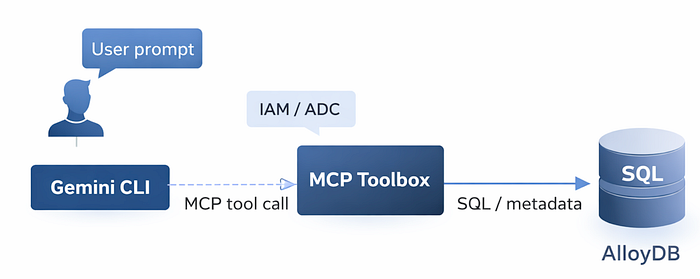
Before looking at individual queries and examples, it helps to understand how the components in this setup fit together. Although there are several moving parts, the overall architecture is simple and intentionally layered.
At a high level, the Gemini CLI acts as the user-facing interface. It is where prompts are entered and responses are displayed. When database-related prompts are issued, Gemini does not interact with AlloyDB directly. Instead, it relies on MCP to discover and invoke database capabilities in a structured way.
The AlloyDB integration for Gemini CLI bundles MCP Toolbox for Databases. In this setup, MCP Toolbox runs implicitly as part of the Gemini CLI extension. There is no separate MCP server process to install or manage when using Gemini CLI with the AlloyDB extension. When connecting from other IDEs or MCP clients, MCP Toolbox is typically run as a standalone server. When Gemini CLI starts, it loads the AlloyDB extension, which registers MCP servers and exposes a set of database tools.
These tools fall into two broad categories. One set covers administrative and infrastructure operations, such as listing clusters or instances. The other focuses on database-level operations, including schema introspection, query execution, and performance-related metadata. Each operation is exposed as a discrete tool with a well defined input and output.
When a prompt requires database interaction, Gemini selects the appropriate MCP tool and invokes it. The MCP server executes the request against AlloyDB and returns structured results. Gemini then uses those results to produce a natural language response. The model is not guessing schema details or fabricating results. It is working with live data returned by explicit tool calls.
Authentication and authorization are handled outside the prompt flow. Access to Google Cloud APIs uses Application Default Credentials, which map the local user identity to IAM permissions. Database access uses standard PostgreSQL credentials. AlloyDB itself remains a standard PostgreSQL-compatible system. MCP does not change how the database works. It changes how AI tools interact with it.
The setup shown in this post follows the AlloyDB integration approach documented by Google, which describes how Gemini CLI uses MCP Toolbox to connect to AlloyDB instances: https://docs.cloud.google.com/alloydb/docs/connect-ide-using-mcp-toolbox.
Secure Authentication and Access Control with ADC
Authentication is a critical part of this setup, even though it is mostly invisible once configured. Gemini CLI and MCP Toolbox authenticate to Google Cloud using Application Default Credentials, commonly referred to as ADC. Application Default Credentials provide a standard way for local tools and applications to obtain Google Cloud credentials based on the user’s identity and configured environment.
ADC allows local tools to authenticate to Google Cloud APIs using the developer’s own identity. There are no API keys or embedded service account files. Permissions are controlled through standard IAM roles, which determine what infrastructure-level operations MCP tools are allowed to perform.
Database access is handled separately. SQL execution uses standard PostgreSQL authentication with a database user. This separation allows cloud permissions and database permissions to be managed independently, which aligns with how most teams already operate.
This model avoids embedding secrets in prompts or configuration files. It also makes actions auditable using existing cloud and database logging. For AI-assisted database workflows, this separation of identity, authorization, and execution is essential.
Database Introspection Without Writing SQL
With the environment in place, the first useful capability to test is database introspection. Instead of relying on inferred knowledge, MCP allows the database to expose metadata directly through tools.
A simple prompt requesting an overview of the database triggers the MCP database_overview operation. This returns live information such as engine version, uptime, and connection statistics.

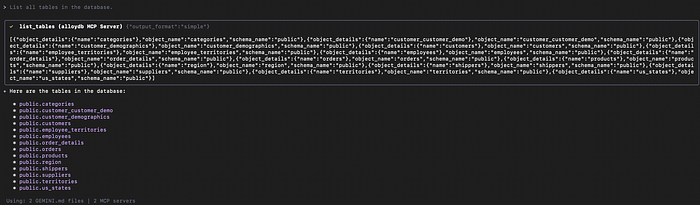
The next step is schema discovery. Asking to list all tables causes Gemini to invoke the appropriate MCP tool, which queries the system catalogues directly.
Schema Understanding and Relationships
Once basic schema discovery is available, understanding relationships between tables becomes critical. This is where many natural language approaches struggle if they lack direct access to metadata.
Using MCP, Gemini can describe a table by querying the database schema directly. In this example, the orders table is described, including its columns, primary key, and foreign key relationships.

Because this information comes directly from the database, it remains accurate as the schema evolves. This level of schema awareness is a prerequisite for generating correct analytical queries.
Natural Language to SQL Analytics
With schema awareness in place, higher-level analytical questions can be answered using natural language. In this setup, natural language queries are translated into explicit SQL operations executed through MCP tools.
The first example identifies the top five customers by total order value. Gemini generates a SQL query that joins customers, orders, and order details, aggregates revenue, and sorts the results. The SQL is executed directly against AlloyDB.

A second example introduces a more complex, join-heavy query that calculates revenue by product and supplier.
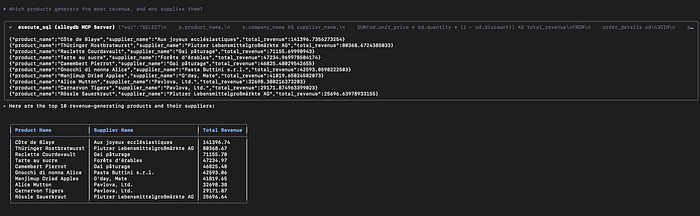
The key point is transparency. The generated SQL is visible, the execution is real, and the results come directly from the database.
Query Execution Plans and Performance Insight
Beyond query results, understanding how a query is executed is essential for real systems. MCP can surface query execution plans and related metadata.
When asked to explain how a query is executed, Gemini invokes an MCP tool that retrieves the query plan from AlloyDB. The database generates the plan using its normal PostgreSQL logic, and Gemini explains it in natural language.

On small demo datasets, sequential scans and hash joins are expected. On larger datasets, the same workflow can highlight index usage, parallel execution, and tuning opportunities. MCP does not optimize queries automatically. It helps interpret what the database is already doing.
Why MCP Toolbox Is Different from Prompt-Based SQL
Traditional prompt-based SQL relies on the model guessing schema details and query structure. MCP replaces this with explicit, tool-backed operations.
Because schema information, query execution, and performance metadata come directly from the database, results are easier to validate and reason about. This makes MCP-based workflows more suitable for real environments where correctness and control matter.
When to Use MCP Toolbox
MCP Toolbox is well suited for schema exploration, analytics, developer productivity, and assisted query analysis. It is not a replacement for transactional application paths or unrestricted automation. Its strength lies in making AI-assisted database interactions observable and grounded in real operations.
These examples focus on exploration and analysis workflows. In production environments, access controls, permissions, and operational safeguards should be applied in the same way as any other database interaction.
MCP Toolbox for Databases represents a practical step forward in how generative AI can interact with production databases. Rather than relying on prompt-based guesswork, it introduces a structured, tool-driven model where AI works with real schema metadata, executes real queries, and surfaces real execution plans. Combined with AlloyDB and Gemini CLI, this approach makes AI-assisted database exploration and analysis more transparent, auditable, and aligned with how database teams already operate.
As organizations begin to experiment with natural language interfaces for data access, the underlying interaction model matters. MCP provides a foundation that prioritizes correctness, control, and observability, which are essential when AI moves closer to critical data systems.
If you are exploring how to safely introduce AI-assisted workflows into your database environment, or evaluating MCP-based integrations on Google Cloud, DoiT can help. Our team of cloud architects and data specialists works with organizations worldwide to design, validate, and optimize modern data platforms, from proof of concept through production.
Let’s discuss how MCP, AlloyDB, and generative AI can fit into your data strategy, and how to do it in a way that remains secure, reliable, and aligned with your operational goals.
MCP Toolbox provides a structured way for AI tools to interact with databases without relying on guesswork. Combined with Gemini CLI and AlloyDB, it enables natural language workflows that remain transparent, auditable, and aligned with database fundamentals.
Rather than abstracting databases away, MCP exposes them in a way that AI tools can work with safely. For teams exploring how generative AI fits into data workflows, this approach offers a practical path forward.