

AI-generated image of Cloud Storage representation
Table of Contents
Comparing gp3 to gp2 volumes
In December 2020, AWS introduced a new generation of general-purpose SSD-based EBS volumes named gp3. Unlike its predecessor, its baseline performance is not tied to the volume size, and gp3 volumes offer a minimum baseline IOPS of 3000 regardless of volume size, in contrast to the gp2’s variable rate of 3 IOPS/GiB, directly tied to the volume size. Additionally, gp3 volumes are more cost-effective, priced at $0.08/GiB-month compared to the $0.10/GiB-month pricing of the older gp2 volumes.
Using gp2 EBS volumes, the baseline throughput and IOPS are directly tied to volume size, at a rate of 3 IOPS/GiB, and between 128 MiB/s and 250 MiB/s of throughput, depending on the volume size. For gp2, there is no way of increasing IOPS or throughput without increasing volume size. These volumes also have a bursting credits system, which allows them to burst for short periods.
With the new gp3 volume types, you can provision up to 16,000 IOPS and 1,000 MiB/s of throughput regardless of volume size, at an additional cost of $0.005/provisioned IOPS-month above the default 3000 IOPS baseline, and $0.04/provisioned MiB/s-month above the default 125 MiB/s baseline.
AWS has provided a concise comparison table to highlight the differences between the gp2 and gp3 volume types:
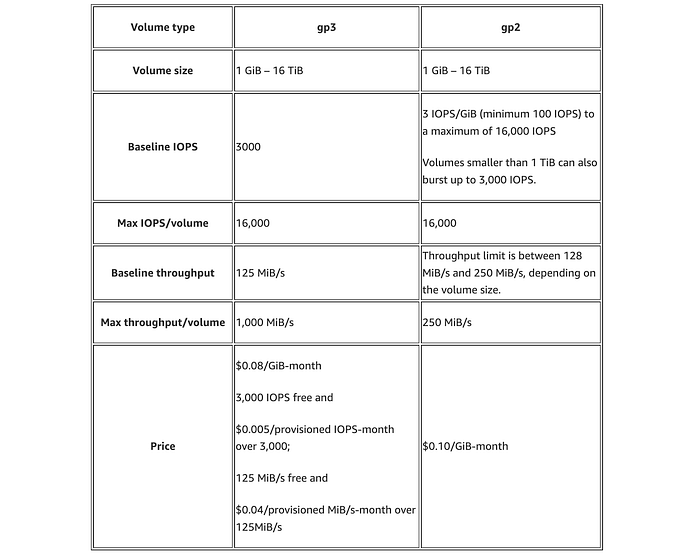
Comparison table between gp3 and gp2 EBS volume types
With the introduction of this new generation of general-purpose SSD-based EBS volumes, utilising gp2 is no longer economical or advantageous performance-wise, as gp2 volumes are more expensive and typically offer fewer baseline IOPS compared to gp3 volumes of the same size.
Although gp2 volumes begin to offer more IOPS than the baseline IOPS of gp3 for sizes exceeding 1 TiB, it remains more cost-effective to incur additional charges for matching the additional IOPS and throughput with gp3 than to opt for gp2 to gain the extra IOPS/throughput. In these cases, however, the amount of savings starts to decrease from the baseline of 20%, albeit still being advantageous.
If your EBS volume is smaller than 334 GiB, migrating from gp2 to gp3 will save you 20%, while delivering enormous gains in terms of performance.
For volumes larger than 334 GiB but smaller than 1 TiB, migrating to gp3 and paying for the additional throughput to match gp2’s 250 MiB/s would still save you money, while giving you better performance with those extra baseline IOPS. In this case, savings will range from 15% to 5%, depending on volume size.
For volumes larger than 1 TiB, migrating to gp3 and paying for the additional throughput and IOPS to match gp2’s 250 MiB/s and 3 IOPS per GiB would still save you money, with savings ranging from 15% to 7%.
In no cases using gp2 is better or cheaper than using gp3. That said, switching to gp3 is an obvious choice due to its cost-effectiveness and superior performance.
Additionally, the migration process has no disadvantages, as it can be completed without downtime and will not affect performance negatively. This is because the performance of the EBS volume during the modification is guaranteed to be at least equal to that of the original volume.
How to migrate all gp2 volumes to gp3?
A straightforward and smooth migration can be accomplished by running this simple Python script provided below. This script will automatically convert all of your gp2 volumes to gp3, in all regions, while matching their IOPS and throughput for volumes larger than 334 GiB.
By running this script, you will save costs on every volume migrated, up to 20%, while dramatically improving performance for smaller volumes, or at least matching the same performance levels for larger volumes.
This script will also calculate how much you saved from migrating your gp2 volumes to gp3, and output the effective savings amount.
import boto3
from botocore.exceptions import ClientError

def calculate_gp3_cost(size_gib, iops, throughput):
    # gp3 pricing
    storage_cost_per_gib = 0.08  # $0.08/GB-month
    iops_cost = 0.005  # $0.005 per IOPS over 3000 IOPS
    throughput_cost = 0.04  # $0.04 per MB/s of throughput above 125 MB/s

    storage_cost = size_gib * storage_cost_per_gib
    extra_iops_cost = (iops - 3000) * iops_cost if iops > 3000 else 0
    extra_throughput_cost = (throughput - 125) * throughput_cost if throughput > 125 else 0

    return storage_cost + extra_iops_cost + extra_throughput_cost

def calculate_gp2_cost(size_gib):
    # gp2 pricing
    storage_cost_per_gib = 0.10  # $0.10/GB-month
    return size_gib * storage_cost_per_gib

def migrate_volume(ec2_client, volume_id, size_gib, region_name):
    savings = 0
    try:
        if size_gib < 334:
            iops = 3000
            throughput = 125
        elif size_gib < 1024:
            iops = 3000
            throughput = 250
        else:
            iops = size_gib * 3
            throughput = 250

        gp2_cost = calculate_gp2_cost(size_gib)
        gp3_cost = calculate_gp3_cost(size_gib, iops, throughput)
        savings = gp2_cost - gp3_cost

        response = ec2_client.modify_volume(
            VolumeId=volume_id,
            VolumeType='gp3',
            Iops=iops,
            Throughput=throughput
        )
        print(f"Migrated volume {volume_id} of size {size_gib} GiB to gp3 in {region_name}. Savings: ${savings:.2f} per month.")
    except ClientError as e:
        print(f"An error occurred: {e}")
    return savings

def list_and_migrate_volumes_in_region(region_name):
    ec2_client = boto3.client('ec2', region_name=region_name)
    total_savings = 0
    try:
        volumes = ec2_client.describe_volumes(
            Filters=[\
                {'Name': 'volume-type', 'Values': ['gp2']}\
            ]
        )
        if not volumes['Volumes']:
            return total_savings  # Return early if no volumes to migrate

        for volume in volumes['Volumes']:
            volume_id = volume['VolumeId']
            size_gib = volume['Size']
            savings = migrate_volume(ec2_client, volume_id, size_gib, region_name)
            total_savings += savings
    except ClientError as e:
        print(f"An error occurred in {region_name}: {e}")
    return total_savings

def list_regions_and_migrate_volumes():
    ec2 = boto3.client('ec2')
    regions = [region['RegionName'] for region in ec2.describe_regions()['Regions']]
    grand_total_savings = 0
    volumes_found = False

    for region in regions:
        total_savings = list_and_migrate_volumes_in_region(region)
        grand_total_savings += total_savings
        if total_savings > 0:
            volumes_found = True
            print(f"Total savings in {region}: ${total_savings:.2f} per month.")

    if not volumes_found:
        print("No gp2 volumes to migrate.")
    else:
        print(f"Grand total savings from migrating all gp2 volumes to gp3: ${grand_total_savings:.2f} per month.")

if __name__ == "__main__":
    list_regions_and_migrate_volumes()
Prerequisites:
- Ensure you have Python3 installed, with the boto3 extension;
- Ensure you have AWS credentials with the necessary permissions to modify EBS volumes in all regions in the ~/.aws/credentials path; OR
- Alternatively, you can also export the AWS credentials as environment variables for a one-time run with the commands below:
export AWS_ACCESS_KEY_ID="your_access_key_id_here"
export AWS_SECRET_ACCESS_KEY="your_secret_access_key_here"
export AWS_DEFAULT_REGION="us-east-1"
To run this script, once confirmed that you meet all the prerequisites listed above, simply save it as a file (for example gp2togp3.py) and run the command below:
python3 gp2togp3.py
Example usage output:
❯ python3 gp2togp3.py
Migrated volume vol-0f554746c24525f01 of size 520 GiB to gp3 in eu-west-1. Savings: $5.40 per month.
Migrated volume vol-03123800cba75b18f of size 20 GiB to gp3 in eu-west-1. Savings: $0.40 per month.
Migrated volume vol-087a04f1d3d88bf07 of size 2520 GiB to gp3 in eu-west-1. Savings: $22.60 per month.
Migrated volume vol-06b09798a7b6f21d3 of size 4020 GiB to gp3 in eu-west-1. Savings: $30.10 per month.
Migrated volume vol-0b55386bde1279329 of size 4520 GiB to gp3 in eu-west-1. Savings: $32.60 per month.
Migrated volume vol-0f2935d2360fdd2ed of size 2020 GiB to gp3 in eu-west-1. Savings: $20.10 per month.
Migrated volume vol-0a686b3a9aebbbf8f of size 3020 GiB to gp3 in eu-west-1. Savings: $25.10 per month.
Migrated volume vol-0d2d709a825421233 of size 1020 GiB to gp3 in eu-west-1. Savings: $15.40 per month.
Migrated volume vol-00766065b8e2ccc14 of size 1520 GiB to gp3 in eu-west-1. Savings: $17.60 per month.
Migrated volume vol-07ff6098fc4a188f6 of size 3520 GiB to gp3 in eu-west-1. Savings: $27.60 per month.
Total savings in eu-west-1: $196.90 per month.
Migrated volume vol-0de6269b523834350 of size 1520 GiB to gp3 in us-east-1. Savings: $17.60 per month.
Migrated volume vol-05c8fffff1e48fdcb of size 3020 GiB to gp3 in us-east-1. Savings: $25.10 per month.
Migrated volume vol-0f5bd9886a18cfb22 of size 2020 GiB to gp3 in us-east-1. Savings: $20.10 per month.
Migrated volume vol-05981da5774928178 of size 4020 GiB to gp3 in us-east-1. Savings: $30.10 per month.
Migrated volume vol-0d788bce161c9978a of size 2520 GiB to gp3 in us-east-1. Savings: $22.60 per month.
Migrated volume vol-0a45ded9ba633b92a of size 520 GiB to gp3 in us-east-1. Savings: $5.40 per month.
Migrated volume vol-06d300164bf986c32 of size 20 GiB to gp3 in us-east-1. Savings: $0.40 per month.
Migrated volume vol-04a27bbad19828bbf of size 4520 GiB to gp3 in us-east-1. Savings: $32.60 per month.
Migrated volume vol-0e85c18b59e418b8c of size 1020 GiB to gp3 in us-east-1. Savings: $15.40 per month.
Migrated volume vol-0b0cafa0f49767f28 of size 3520 GiB to gp3 in us-east-1. Savings: $27.60 per month.
Total savings in us-east-1: $196.90 per month.
Grand total savings from migrating all gp2 volumes to gp3: $393.80 per month.
Path to further savings on gp3 migration
While this article focuses on a one-size-fits-all solution, you might be able to save even more by migrating to gp3, if you do not need those extra IOPS and throughput on volumes larger than 1 TiB.
In these cases, however, you would need to carefully analyse the usage of your application, to understand how many IOPS and how much throughput it needs, and modify the gp3 volumes to accommodate that.
When larger volumes do not need as many IOPS as 3 IOPS per GiB, you could end up saving more by simply not increasing the baseline IOPS, while the same goes for throughput.