

As part of the cloud advisory we provide to our customers at DoiT International , I occasionally come across extreme cases where customer attempts at saving costs actually lead to an increase in S3 storage costs. The post below explains how to make sure this doesn’t happen.

When storing files (objects) in an S3 bucket, the following storage classes are available: Standard( default), Infrequent Access (also called Standard-IA), Intelligent-Tiering, Glacier, and S3 Outposts.
The storage class is set when uploading, or at any later step. One of the common practices is to create a lifecycle rule in a bucket that define actions that you want Amazon S3 to take during an object’s lifetime (for example, change the storage class of the file from Standard to Infrequent Access after 30 days from the creation of the file).
Infrequent Access storage allows you to store files at a cheaper cost than a Standard class. The download speed, storage durability, and latency are the same as the Standard class, but, the cost of downloading the file is higher than Standard. As such, the appropriately-named Infrequent Access is suitable for storing files that are not accessed frequently.
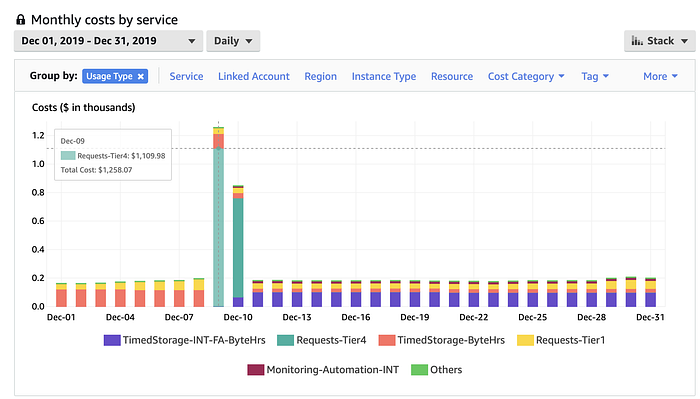
Lifecycle rule changing the files from Standard storage class to Intelligent tier. The transition cost is $2,000. After five months from the transition, the customer will pay less for storage.
Common S3 Cost Pitfalls
Two common issues can increase the storage cost of a bucket:
- Most people are unaware that switching from one storage class to another costs money. AWS charges $0.01 for every 1000 transitions from the Standard storage class to the Infrequent Access class.
- In some S3 storage classes, there is minimum file size. In the case of the Infrequent Access storage class, the minimum file size is 128Kb.
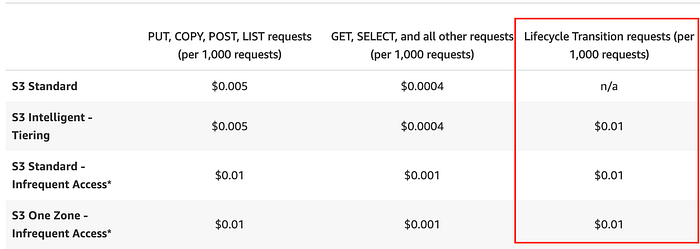
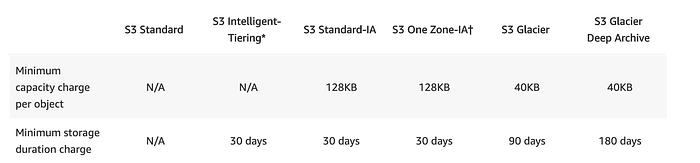
S3 Storage classes specifications
This issue can bring about situations where a customer with hundreds of millions of small files in an S3 bucket will have to pay a high one-time transition fee.
How many files do I have in my bucket?
There are two ways to check the number of files and the size of the bucket:
- At the file level — Using the S3 Inventory, you can create a report (generated on a daily basis) that shows the list of files in the bucket, file size, and file storage class.
- At the bucket Level — Using Cloudwatch metrics, you can see the number of files and the size of the bucket. These metrics are also available from the S3 console, under Management — > Metrics.
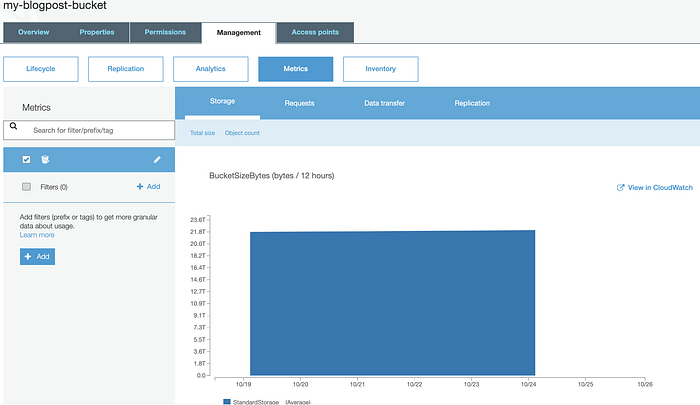
S3 bucket size
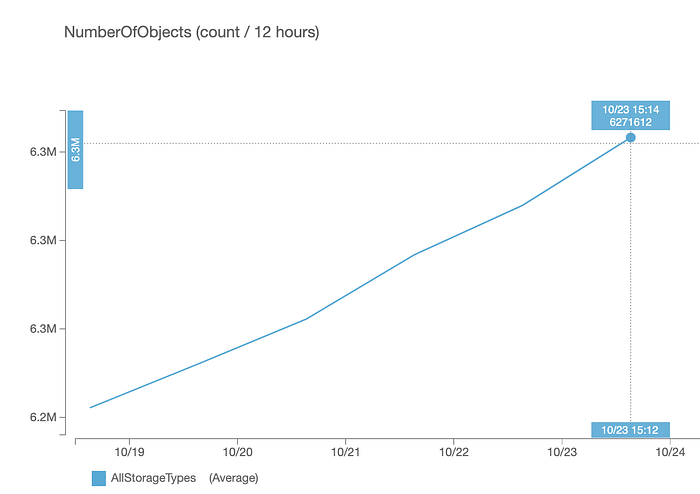
Number of files in S3 Bucket
When should I set a lifecycle rule?
Begin by calculating the (non-weighted) average file size by dividing the S3 Bucket size by the number of files.
For example, in the bucket, I used to take the screenshots displayed throughout this article the bucket size is 22.1Tb and there are 6.3 million files in the bucket resulting in an average file size of 3.42Mb.
Switching to Infrequent Access might result in a high one time paymentstorage costs.
Calculating the lifecycle transition cost and cost-effectiveness
If we change the storage class using the lifecycle rule to Infrequent Access for this 22.1Tb bucket, for a change of 6.3 million files we will pay a one-time transition fee of $63 (6,300,000 files grouped into 1,000 multiplied by $0.01), resulting in s a storage cost of $282.88 per month
From the calculations above it can be seen that transitioning between classes will lead to a reduction in costs starting from the first month.
In conclusion
AWS S3 offers a lot of storage classes that, when used right, can bring efficiency and cost savings.