

This tutorial shows you a full end-to-end example on how to integrate a Vault Certificate Authority (CA) with a multicluster Istio — useful when you want to issue certificates for workloads in the mesh.

Native Istio Vault CA integration is no longer supported since the Istio 1.3 release. However, it is finally possible to do this by integrating Istio with the cert-manager issuer for Vault and cert-manager Istio-CSR agent.
High-level solution design
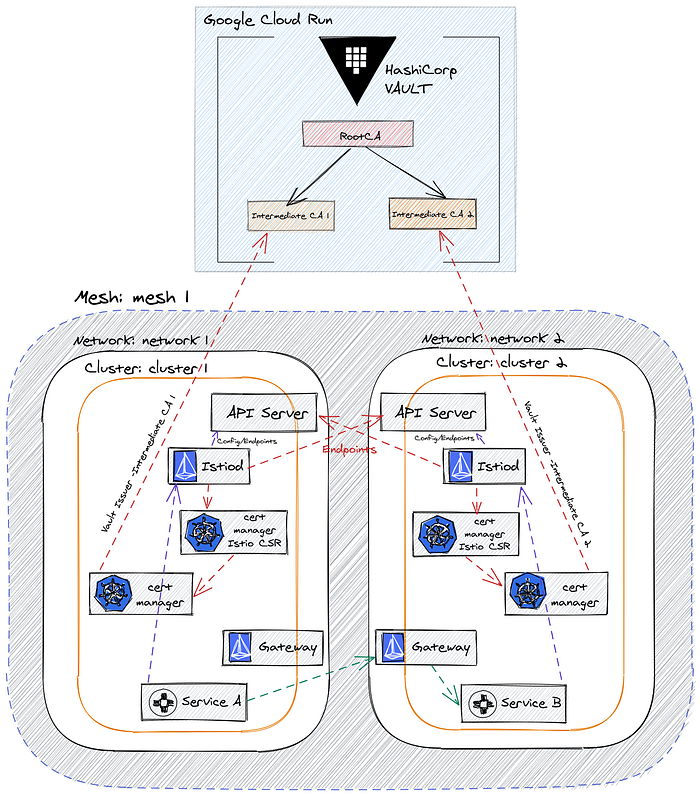
Setup steps:
Deploy Hashicorp Vault Cluster on Cloud Run
Create GKE Clusters
Connect GKE clusters with Vault Cluster on Cloud Run (External Vault)
Configure Vault PKI secrets engine
Deploy Cert Manager
Install Cert Manager istio-csr
Multicluster Istio installation
Deploy the HelloWorld application
Verifying Cross-Cluster Traffic & Workload Certificates
Tutorial Code
The step by step instructions, for this tutorial, can be found here:
References
- Implementation code — https://github.com/palimarium/istio-vault-ca
- Configure Vault as a Certificate Manager in Kubernetes- https://learn.hashicorp.com/tutorials/vault/kubernetes-cert-manager
- Cert-manager Istio CSR — https://github.com/cert-manager/istio-csr
Congratulations on completing this deep-dive implementation tutorial. You now have a secure Production-ready CA for provisioning certificates and keys for all your Istio workloads in the mesh.