
DoiT Cloud Intelligence™
Personalized Service Health: Early Warning System for disruptive events impacting your Google Cloud…

Photo by Karen Roach from Shutterstock
In the ever-evolving world of cloud computing, staying ahead of service disruptions is critical to maintain business continuity and ensure optimal performance.
Google Cloud's Personalized Service Health(PSH) is a valuable service that lets you identify Google Cloud service disruptions relevant to your projects so you can manage and respond to them efficiently. With PSH, you can proactively identify and address potential issues before they cause a significant impact on your operations.
Personalized Service Health
Personalized Service Health is a Google Cloud feature that filters relevant disruptive events based on your project's dependencies and usage patterns. This tailored approach ensures you receive only the information most pertinent to your environment, allowing you to focus on the events that matter most.
Key Benefits of Personalized Service Health
- Proactive Awareness: Gain timely insights into disruptive events before they affect your operations.
- Reduced Impact: Minimize downtime and potential business disruptions by taking proactive measures.
- Improved Communication: Keep your team informed about service disruptions and potential impacts.
- Enhanced Resilience: Strengthen your organization's resilience to service disruptions.
The following diagram illustrates how Personalized Service Health grants access to service health events. The data is collected from Google Cloud Service Health (CSH), and Personalized Service Health assesses the impact of all incidents on your project. If an incident's impact on your project is possible or confirmed, it will be available in the Personalized Service Health.

View Service Health Events
To receive events, enable the Service Health API. To view the events, assign the role roles/servicehealth.viewer to user accounts.
You can access service health events with the following:
- Service Health dashboard: Track emerging and active Google Cloud incidents relevant to your projects in Google Cloud Console.
- Service Health API: Pull service health event information per project or organization.
- Alerts: Get notified of events relevant to your projects. Alerts are based on logs in Cloud Logging.
- Logs: Export logs related to Google Cloud events
Currently, the console only supports events specific to a project. Employ the Service Health API for comprehensive visibility and control over events impacting your organization.
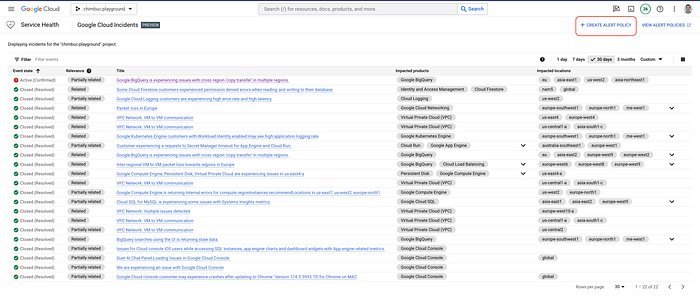
The below screenshots show the sample events specific to a GCP project.

Service Health Dashboard
Relevance in the event describes how an incident impacts your project. The relevance may change as the incident progresses. Relevance can have the following values:
- Impacted: The incident is verified to be impacting your project. Available for some Google Cloud products only.
- Related: The incident has a direct connection with your project and impacts a Google Cloud product in a location your project uses.
- Partially Related: The incident is associated with a Google Cloud product your project uses, but the incident may not be impacting your project. For example, the incident may be impacting a Google Cloud product your project uses, but in a location your project does not operate.
- Not Impacted: The incident is not impacting your project.
- Unknown: The impact on your project is not known at this point.
Click the title for more details about the event.
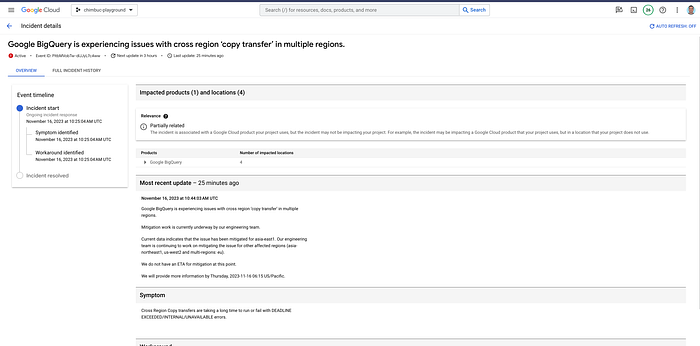
Sample Health event details
Set up alerts
Personalized Service Health integrates with Cloud Monitoring log alerts, enabling you to configure notifications for various critical conditions, including:
- New incident reports.
- Updates to existing incidents, like messages sent by Google Cloud Support.
- Creation or updates to incidents associated with specific Google Cloud products or locations, such as regions.
- Modifications to specific details within existing incidents, like changes in state and relevance.
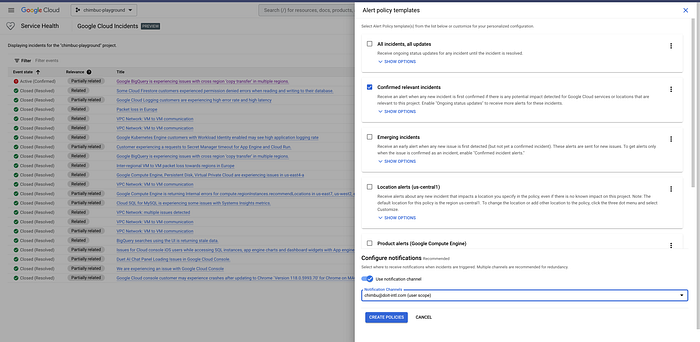
Goto Service Health dashboard and select Create Alert Policy.
Select the required policy template and notification channel for the alert.
Test the alert setup
To test the alert, you can send a sample test log via Cloud Logging in the Google Cloud console, which shows the previously configured alert logic.
- Go to the reference page for the entries:write method, which lets you write log entries to Cloud Logging. In the request body, change
[PROJECT_NUMBER]to your project. - Change any
jsonPayloadfields in the request body, depending on the alert condition you're testing and Click on Execute.

Sample log injection request
- Wait a few minutes, then verify that the alert has been fired.
In the Google Cloud console, navigate to Cloud Monitoring > Incidents and check if you received an alert on the notification channel used by the alerting policy.
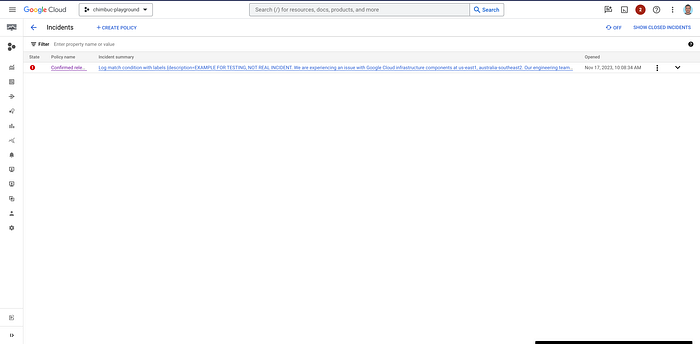
Sample Incident
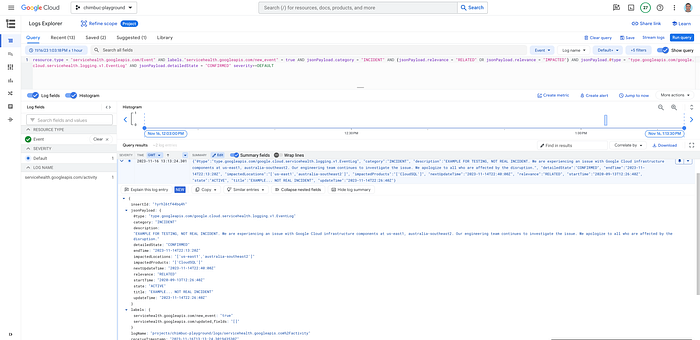
Sample logs in Cloud logging
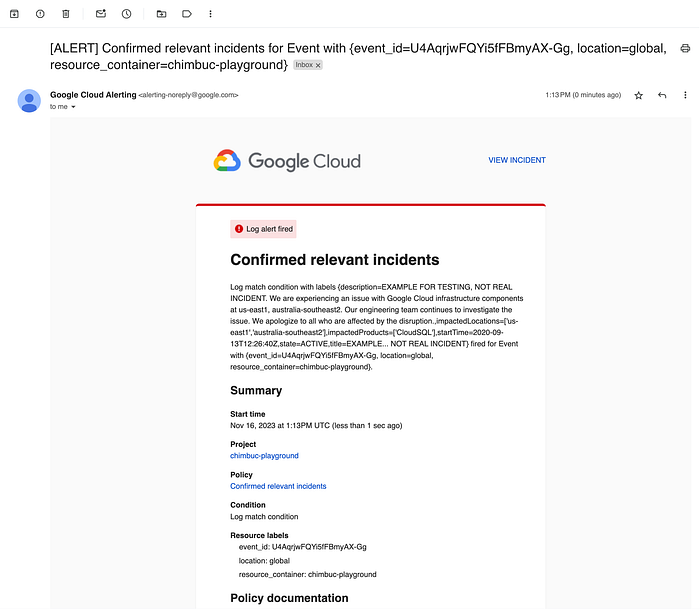
Sample Email Notification
In conclusion, Google Cloud's Personalized Service Health stands as a crucial early warning system in the face of disruptive events, empowering businesses to proactively mitigate risks, maintain operational continuity, and fortify their resilience against service interruptions within the ever-evolving landscape of cloud computing.
If you are a DoiT customer, you can use the out-of-the-box cloud incidents feature to monitor the availability and uptime of your infrastructure on Google Cloud and Amazon Web Services.