

Image from Molnia
When managing Amazon S3 buckets, accurate storage metrics are crucial for cost management and capacity planning. However, discrepancies in reported storage sizes can occur, leading to confusion and potential cost estimation errors. This article explores a real-world case for one of our customers where different AWS tools reported vastly different storage sizes for the same S3 bucket, and provides a solution to accurately calculate the true storage consumption.
One of our customers encountered a significant discrepancy while reviewing their S3 storage metrics for a specific bucket:
- S3 Metrics & CloudWatch: Reported over 220TB of storage
- AWS CLI & S3 Calculate total size option: Showed less than 8TB of storage
This 27-fold difference in reported storage size raised immediate concerns about data accuracy and potential cost implications.
Upon investigation, we found the following bucket settings:
- Storage Class: All objects were in S3 Standard storage
- Versioning: Not enabled on the bucket
- Lifecycle Rule: Configured to delete objects after 45 days
These settings initially didn’t explain the vast difference in reported storage sizes, prompting further investigation.
To confirm the discrepancy, we first checked the S3 bucket and CloudWatch metrics:
- S3 Console: Reviewed the bucket’s storage metrics
- CloudWatch: Examined the corresponding metrics for the bucket
Both sources consistently reported that the bucket was storing over 200TB of data.

S3 Bucket Metrics
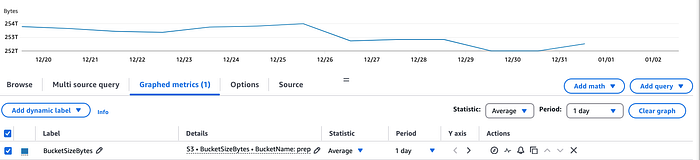
CloudWatch Metrics
To further investigate the discrepancy, we used two additional methods to measure the bucket’s storage:
- S3 Calculate Total Size feature in the S3 Console
- AWS CLI command for listing bucket contents
Using the S3 Calculate total size and AWS CLI command both showed the bucket had 7.5TB of storage with over 6 million objects.
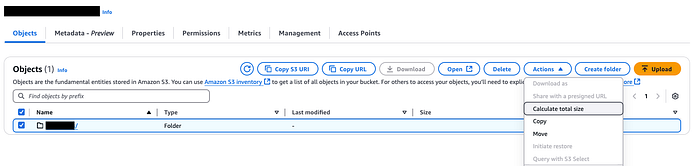
Using Calculate total size on S3 bucket.
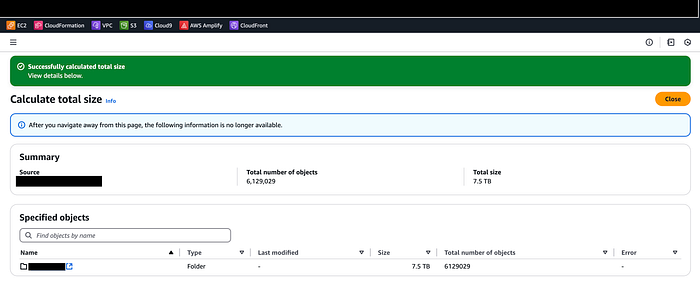
Output of S3 Calculate Total
AWS CLI command to calculate size of the bucket:
aws s3 ls — summarize — human-readable — recursive s3://
This CLI command lists all objects in the specified bucket & provides a summary of the total size.
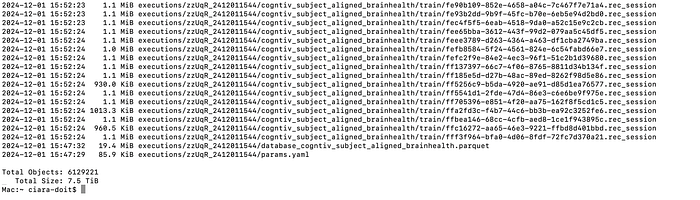
AWS CLI output
The stark contrast in reported storage sizes presented a perplexing mystery: How could the same bucket show such wildly different volumes of data? This discrepancy demanded further investigation, as it could significantly impact cost management and storage planning. To unravel this enigma, we took the following steps:
- Enabling S3 Storage Lens: We recommended that the customer enable Amazon S3 Storage Lens, a powerful cloud storage analytics feature. This tool provides organization-wide visibility into object storage usage and activity trends.
- Waiting for Data Collection: It’s important to note that it can take up to 24 hours for S3 Storage Lens to collect and publish metrics.
- Analyzing the Results: Once the data was available, we carefully examined the S3 Storage Lens dashboard. The insights provided by this tool proved invaluable in our investigation.

S3 Storage Lens showing total size of Incomplete Multipart Upload.
The S3 Storage Lens showed us the cause of the discrepancy was related to S3 Incomplete Multipart Uploads.
S3 Incomplete Multipart Uploads are parts of objects that were partially uploaded but never completed. Importantly, these incomplete uploads consume storage space and incur charges, despite not being visible in standard bucket listings.
The size of the Incomplete Multipart Uploads was over 200TB. The reason for the variance between the tools is because the “Calculate total size” operation in S3 console and AWS CLI does not take Incomplete Multipart Uploads into consideration.
By identifying this issue, we were able to explain the significant difference between the reported storage sizes and provide a path forward for optimizing the customer’s S3 storage usage.
To help the customer clean up the bucket we configured the S3 lifecycle rule ‘delete-incomplete-mpu-7-days’ to delete Incomplete Multipart Uploads.
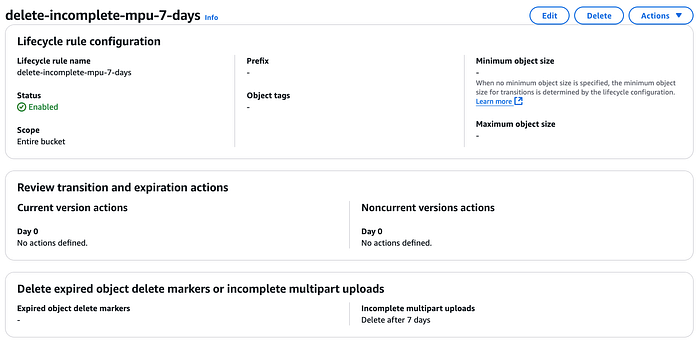
S3 Lifecycle Rule to delete Incomplete Multipart Uploads
After allowing the lifecycle rule ‘delete-incomplete-mpu-7-days’ to run for a few days and CloudWatch metrics to catchup, we checked back on the bucket metrics. We found that the lifecycle rule worked and remove all of the Incomplete Multipart Uploads. We then checked the storage metrics with the same tools and they were not reporting the same storage metric for the bucket.
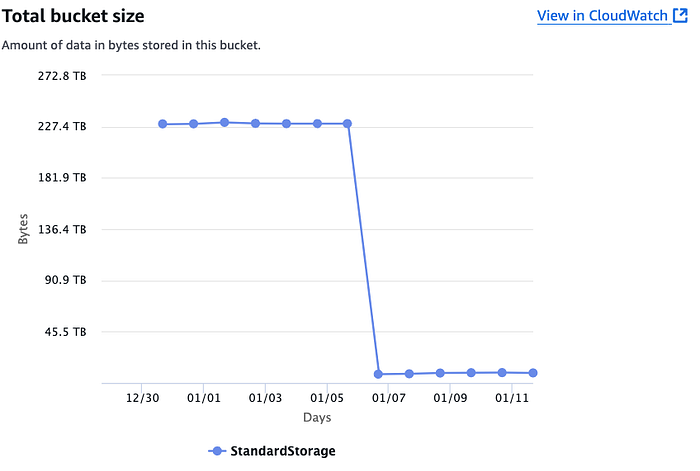
S3 bucket metrics after applying lifecycle rule
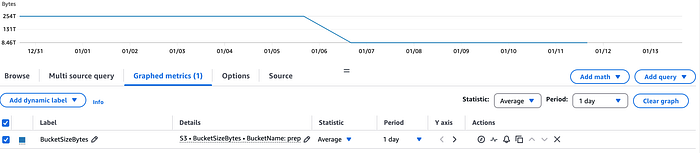
CloudWatch metrics after applying lifecycle rule
Using S3 Calculate total size after applying S3 lifecycle rule ‘delete-incomplete-mpu-7-days’.
Using Calculate total size on S3 bucket.
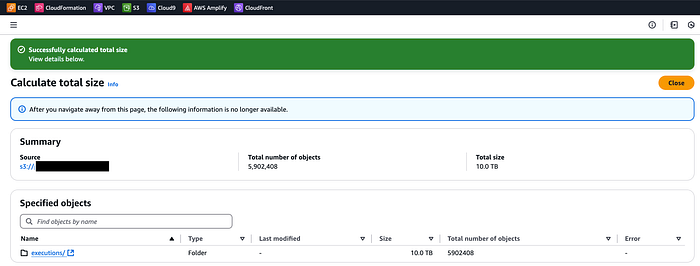
S3 Calculate total size after applying S3 lifecycle rule
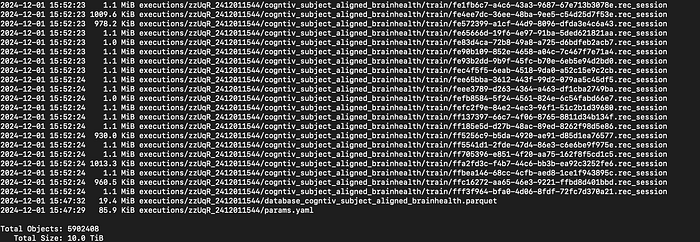
Script using AWS CLI to calcualte bucket size after applying S3 lifecycle rule
This case study illustrates just one example of the complex challenges that companies face when managing their AWS environments. By leveraging our expertise in AWS services and our ability to analyze and interpret cloud metrics, we uncovered the root cause of the storage size discrepancy and provide an effective solution. This not only resolved the immediate issue but also gave our client a deeper understanding of their S3 storage usage and costs.
At DoiT International, we specialize in helping companies navigate the intricacies of cloud environments, troubleshoot issues, and optimize their AWS infrastructure. Whether you’re facing similar storage metric discrepancies or other cloud-related challenges, our team of experts is ready to assist. Don’t let cloud complexities hinder your business operations. Contact DoiT today to discuss how we can help you maximize the efficiency and cost-effectiveness of your cloud environment, ensuring that you’re getting the most value from your AWS investment.