

If you have ever had to transfer millions of files or TBs of data to and from S3 buckets, then you are familiar with how long such AWS data transfer operations can take. What if I told you there is a way to speed up upload, download, and copy operations by 1 to 2 orders of magnitude, and doing so would be just as easy as running the AWS CLI?
Introducing: s5cmd

An accurate representation of the AWS CLI’s s3 API calls vs. s5cmd
s5cmd is an open-source CLI tool designed to mimic AWS CLI functionality against S3, but with improved performance due to being written in Go, a compiled language, versus the Python-based interpreted language backing the AWS CLI. A Go-backed SDK enables high throughput not only for individual files but also for large quantities of files due to Go’s built-in parallel processing capabilities that allow it to engage in many high-performance file transfers concurrently, again in contrast to Python’s Global Interpreter Lock-induced inability to utilize multiple cores efficiently.
The tool’s README on GitHub claims that, compared to the AWS CLI, it is up to 12X faster at downloads, but as will soon be shown in the benchmarking results below, given the right conditions, it will transfer data substantially faster.
Such transfer time performance advantages translate directly into EC2 compute time (and therefore money) saved. As you will soon see, not utilizing s5cmd leaves a lot of money on the table.
To compare s5cmd and aws s3 cp performance across various scenarios, I will benchmark the runtime for the following tool tasks on 4 TBs of data:
- Upload from EC2 to S3
- Download from S3 to EC2
- Copy between buckets in the same region
- Copy between buckets in different regions
The runtimes for the four tasks listed above will be captured for both tools running over four different types of 4 TB datasets:
- Very Large files (5 GBs, or 819 files)
- Large files (1 GBs, or 4,096 files)
- Medium files (32 MBs, or 131,072 files)
- Small files (256 KBs, or 16,777,216 files)
Additionally, the AWS CLI tool will always be run twice:
- Once with the AWS CLI left to its default configuration values
- A second time with the following config values updated to improve throughput on a high-performance EC2 instance:
max_concurrent_requests=64 (to match the 64-core VM) instead of 10
multipart_threshold=1GB instead of 8MB
multipart_chunksize=256MB instead of 8MB
Upload, download, and copy performance are tightly tied to variables such as object size, object quantity, concurrency enablement, and the prevention of excessive concurrency through high multipart upload file size thresholds. Thus, the following benchmarks account for these variables in order to demonstrate data transfer performance across several real-world usage scenarios.
Should you wish to reproduce the benchmarks in this article, please refer to the Git repo that pairs with this blog post. It makes an automated reproduction of the benchmarks as straightforward as possible.
A quick note before we start diving into runtime comparisons:
For all benchmark tests, a latest-generation c7gn.16xlarge machine was used, possessing 200 Gbps network throughput and 64 high-performance Graviton cores. Attached to it were 12x 1.1 GB gp3 EBS volumes in a RAID0 configuration, each with 16,000 IOPS and 1000 Mbps throughput. This setup helps ensure that resources such as network throughput, I/O throughput, and processing power are all minimal bottlenecks, allowing the capabilities of the tools to shine.
Upload from EC2 to S3
Shown below are the runtimes of s5cmd cp vs. aws s3 cp when uploading files from a high-powered EC2 instance to an S3 bucket in the same region.
Note that the y-axis is log-scaled in all of the following charts:
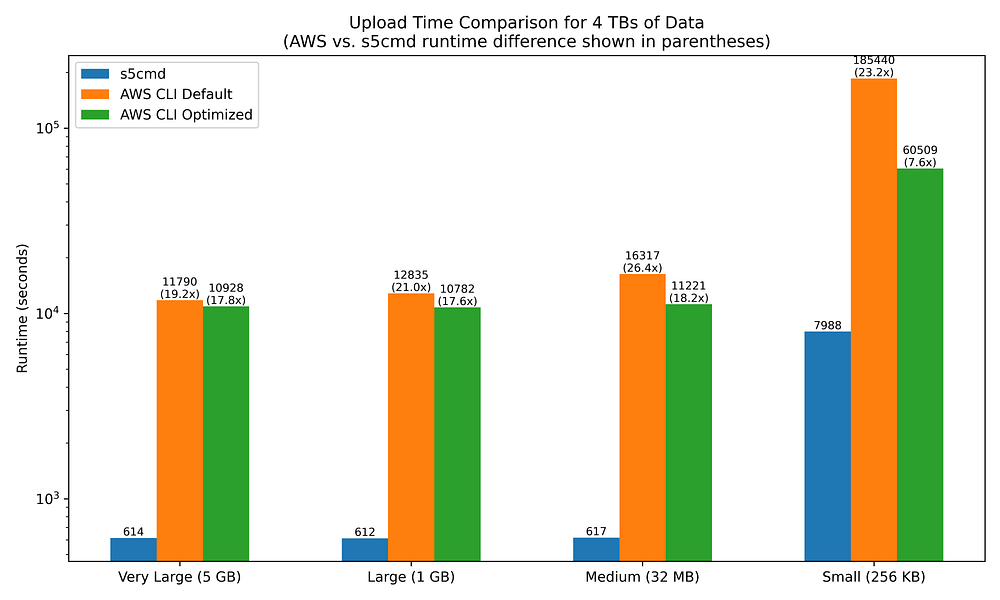
The chart makes it clear that s5cmd is substantially faster at uploading files than the AWS CLI tooling, regardless of the filesizes involved.
s5cmd is a staggering 19x to 26x faster at uploading to S3 than the AWS CLI when the latter is left to its default settings.
Changing the AWS CLI’s config values to better support parallelization only yields marginal improvements until you begin working with medium-to-small file sizes. Increasing the simultaneous file upload count from 10 to 64 does make a dent in the runtime disparity when working with 16 million small files, but even then, the AWS CLI remains 7.6X slower than s5cmd.
Download from S3 to EC2
Shown below are the runtimes of s5cmd cp vs. aws s3 cp when downloading files from an S3 bucket to a high-powered EC2 instance in the same region:
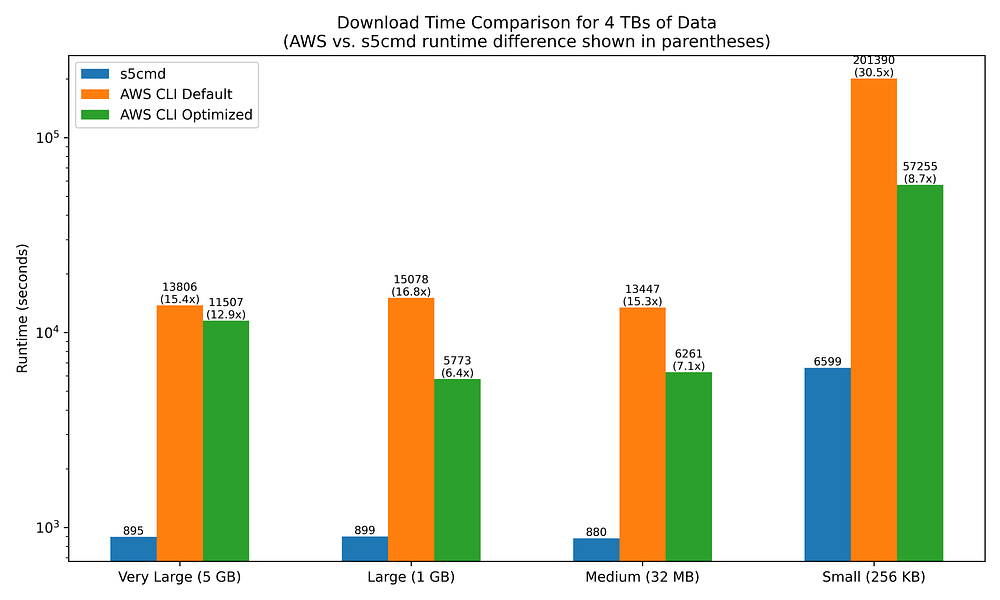
Similar to uploading to S3 from EC2, downloads from S3 to EC2 are significantly more performant with s5cmd than with the AWS CLI, although some interesting differences do exist.
Notably, s5cmd is not as performant when downloading as when uploading — except when the file sizes are small.
s5cmd is 15x to 17x faster at downloading than the AWS CLI when the latter is left to its default settings. This is slower than the 19x to 26x speedup observed when uploading to S3. However, when downloading small files,s5cmd performance improves further, running 30.5x faster.
This download performance disparity between small and non-small files does not exist when uploading to S3, yet small file sizes are clearly a significant factor when downloading from S3.
Tweaking the AWS CLI config values yields improvements in download runtimes that are notably faster transfers than their upload equivalents, narrowing the s5cmd improvement range to between 6.4x and 8.7x faster. The exception here is for very large file sizes, which see only minimal improvement in download time.
Same-region S3 bucket copy
Shown below are the runtimes of s5cmd cp vs. aws s3 cp when copying files between two S3 buckets in the same region:
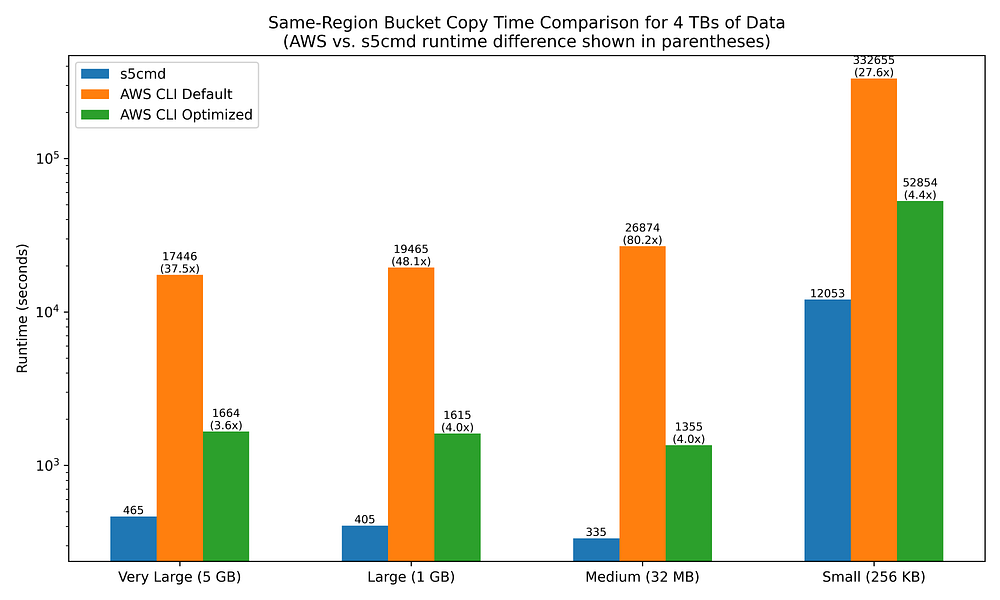
The benefits of using a compiled language SDK, as well as tuning CLI config values, begin to really shine as we look at bucket-to-bucket copies.
s5cmd copies between same-region buckets 27.6x to 80.2x faster than the AWS CLI when the latter is left to its defaults.
However, simply increasing the max_concurrent_requests value from 10 to 64 results in enormous improvements for aws s3 cp, narrowing s5cmd’s fold-improvement range from 3.6x to 5.0x.
Other-region S3 bucket copy
Shown below are the runtimes of s5cmd cp vs. aws s3 cp when copying files between two S3 buckets in different regions (us-east-1 to us-west-2):
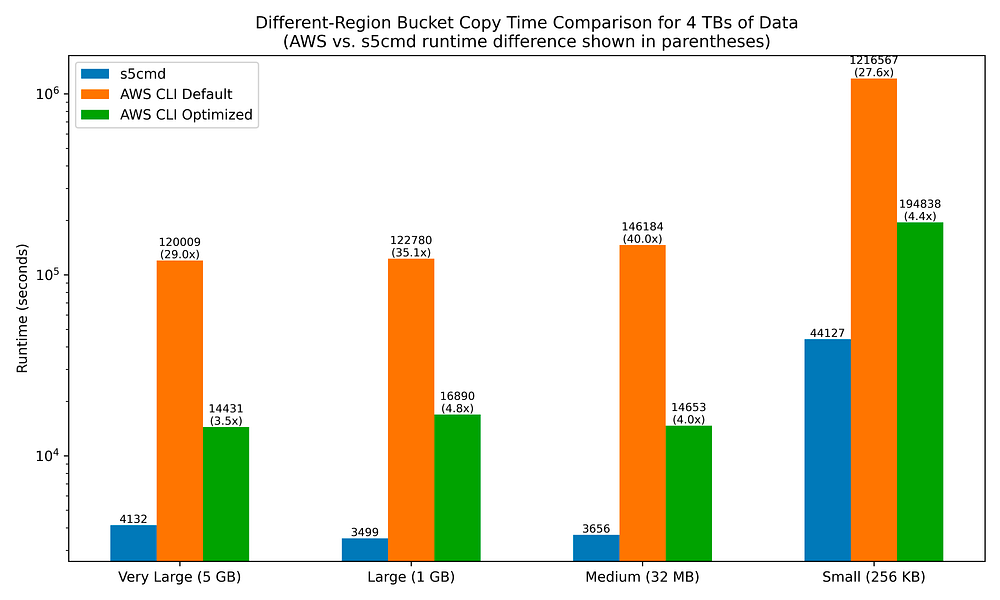
While cross-region bucket copy runtimes are much, much longer in all filesize scenarios for both s5cmd and aws s3 cp relative to same-region bucket copying, I find it interesting that the fold-improvements of s5cmd over aws s3 cp are quite similar to what was observed with same-region bucket copies.
s5cmd copies files across different-region buckets 27.6x to 40x faster than the AWS CLI when the latter is left to its defaults. Increasing max_concurrent_requests value from 10 to 64 yields the same large improvements in runtime for AWS CLI commands, narrowing s5cmd’s fold-improvement range from 3.5 to 4.8x.
Final Results
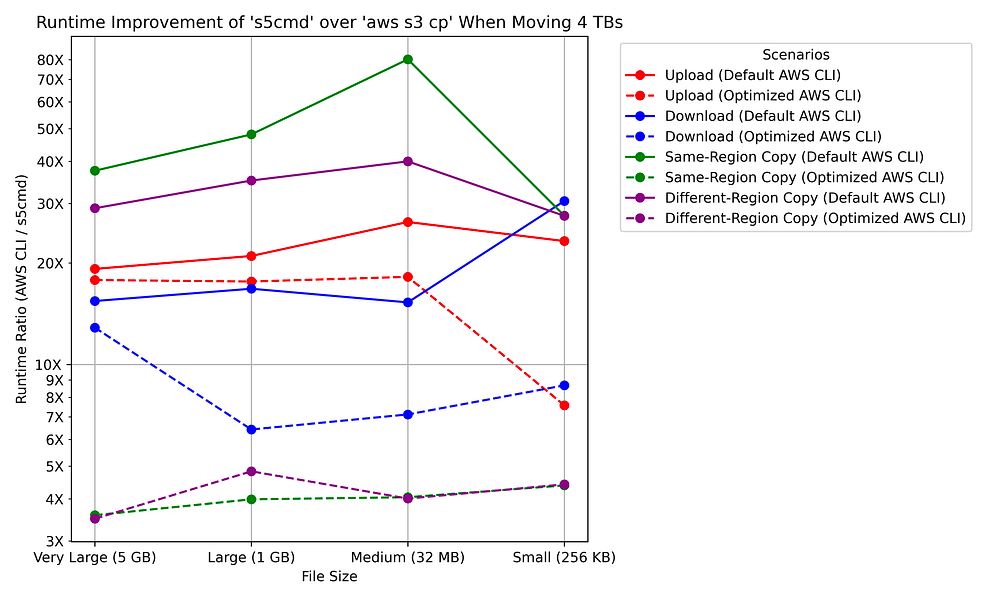
The line chart below summarizes the fold-improvement values for s5cmd over aws s3 cp runtimes:
Takeaway Message: Always Use s5cmd
Regardless of file sizes, the number of files you will be transferring, and the types of S3 operations you will use, s5cmd offers superior performance in every scenario.
The performance benefits of s5cmd largely originate from being written in a compiled language; however, the lack of smart or dynamically determined defaults for aws s3 cp also plays a significant role. Tweaking AWS CLI config values to improve parallelization and upload throughput will generally have only a marginal impact unless you are working with tiny files or copying files between two buckets, and even then, there is still a large performance gap with s5cmd. I would personally recommend only using s5cmd when engaging in data transfers unless you have very specific reasons you cannot do so. For example, your organization’s security rules may only allow for ‘official’ AWS-provided tooling to be installed.
If you can reduce the time to transfer data in and out of S3 buckets by 1 to 2 orders of magnitude, that will yield substantial savings on your cloud bill as your organization’s data utilization scales. With that in mind, as far as I can tell, there is no benefit to preferring usage of the AWS CLI for data transfers other than wishing to remain solely within the realm of AWS-maintained tooling.
Do you still have questions about utilizing the recommendations I’ve provided to enable GCP or AWS data warehousing success within your organization?
Reach out to us at DoiT International. Staffed exclusively with senior engineering talent, we specialize in providing advanced cloud consulting architectural design and debugging advice.