

Introduction
On February 22, 2024, Amazon Web Services (AWS) announced the ability to share Systems Manager Parameter Store parameters across accounts.
This is a new feature for Parameter Store, but AWS Secrets Manager has always supported cross-account secrets. Now that Parameter Store parameters can be shared, should you use Parameter Store instead of Secrets Manager to store and share secrets?
This article covers the differences between Secrets Manager and Parameter Store and walks through the steps needed to create and share a secret parameter across AWS accounts.
Secrets Manager vs. Encrypted Parameters
Secrets Manager features and limitations
- Secrets are automatically encrypted with KMS keys
- Secrets can be automatically rotated
- Maximum secret size of 64KB
- Secrets can be created with the web management console, CLI, CloudFormation, Terraform, etc.
- Secrets can be automatically replicated across regions
- Supports up to 10,000
GetSecretValuerequests per second - Accessible from l arge set of AWS services as well as third-party services such as Hashicorp Vault
- Costs: $0.40 per secret per month; $0.05 per 10,000 API calls
- Secrets can be shared by modifying the secret’s resource policy
Parameter Store features and limitations
- Parameters can be encrypted with KMS keys when using the
SecureStringparameter type - Automatic rotation is not supported
- Maximum advanced parameter size of 8KB
SecureStringparameters can’t be created with CloudFormation, but can be created using the web management console, CLI, Terraform, etc.- Parameters are regional, with no automatic replication
- Supports up to 10,000
GetParameterrequests per second (40 by default) - Accessible from a smaller list of AWS services
- Costs: $0.05 per shared parameter per month; $0.05 per 10,000 API calls
- Parameters can be shared via Resource Access Manager (RAM)
Both Secrets Manager and Parameter Store also work with doitintl/secrets-init — an open source tool that simplifies how Secrets Management services integrate with workloads running on Kubernetes clusters. We’ve got a blog post with more information here.
Which to choose?
Secrets Manager is still the first service you should consider when storing secrets. It’s been designed from the start for that purpose, has broad support across services, and includes features such as automatic rotation and larger secret size than Parameter Store parameters.
However, you might still consider Parameter Store to share secrets if:
- You’re managing a massive number of secrets and the cost savings would be significant ($0.05 vs. $0.40 per secret per month)
- You already have secret parameters in Parameter Store and don’t need the additional features Secrets Manager provides
Creating and sharing an encrypted secret parameter
The Parameter Store documentation includes a walkthrough of creating and sharing a parameter. Creating and sharing a SecureString parameter is a similar process, but the KMS key used to encrypt the parameter must also be shared.
1. Create a key in KMS
First, create a symmetric KMS key in AWS which will be used to encrypt the parameter. The full documentation for this process is documented by AWS here.
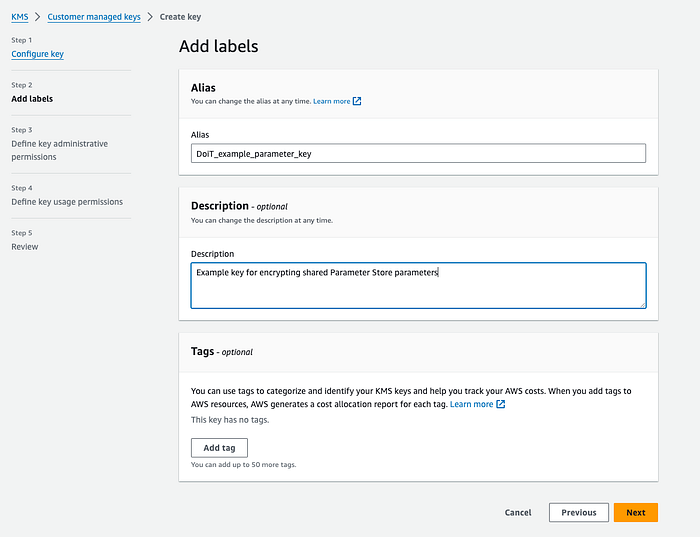
A screenshot from the KMS key creation process. Creating an alias is optional but recommended.
In the policy for this key, include a condition that allows the key to be used by the other accounts. If you’d like to share this key and parameter within your entire AWS organization, you can use a Condition in the policy as explained in this AWS re:Post article.

A screenshot of the final review screen from the KMS key creation process
2. Create an Advanced parameter in Parameter Store
Once the KMS key has been created, create the parameter in Parameter Store as documented by AWS here.
Choose the Advanced parameter tier, the SecureString type, and select the KMS key you created earlier.
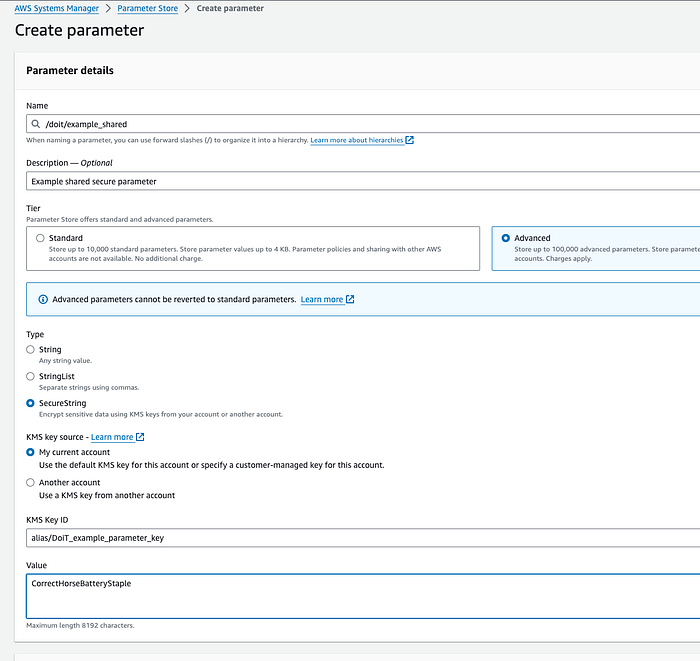
Only Advanced parameters can be stored! If you accidentally choose a standard parameter, it’s ok; you can change it afterward.
3. Share the parameter using Resource Access Manager (RAM)
Once the parameter has been created, open Resource Access Manager and create a new Resource Share for the parameter, as documented by AWS here.
Use the AWSRAMDefaultPermissionsSSMParameterReadOnly policy during the Associate managed permissions step, and specify any accounts that should be allowed access to the parameter (or your entire AWS organization if preferred) in the Grant access to principals step.
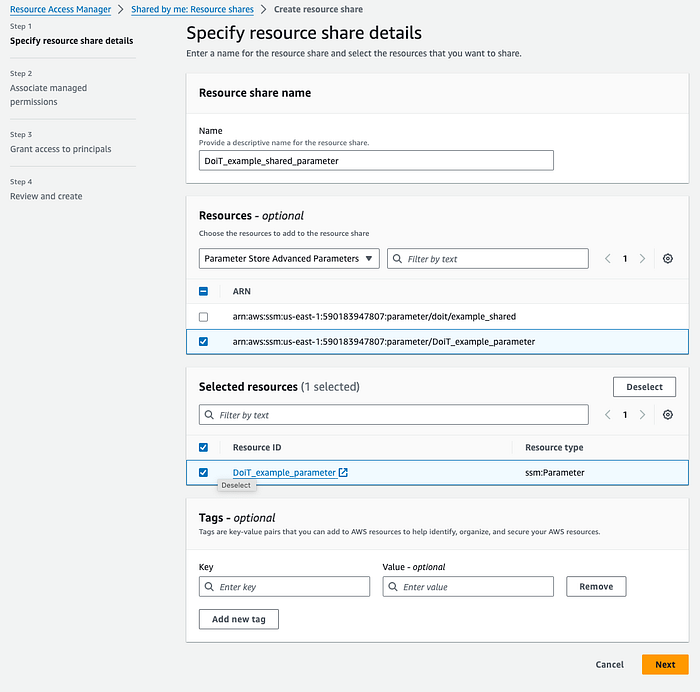
Note that the tags associated with the resource share here won’t change the tags of the parameter itself

The AWSRAMDefaultPermissionsSSMParameterReadOnly permission is sufficient if read-only access is desired
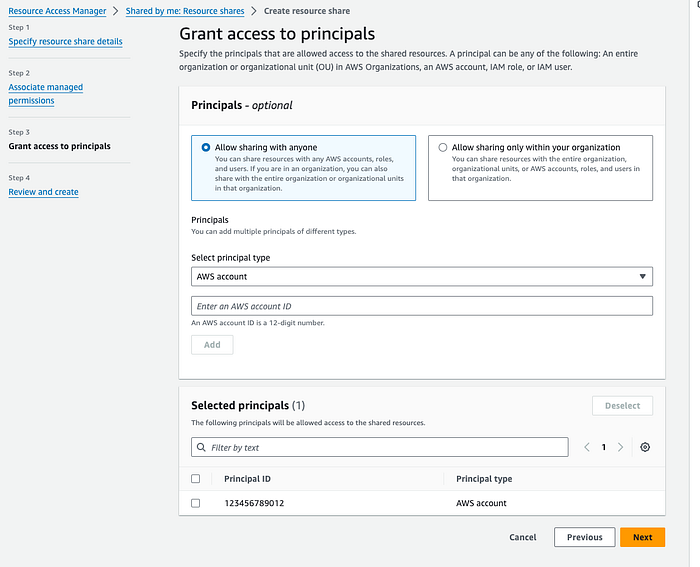
In this example, only the account ID 123456789012 will have access to the shared parameter. Don’t add the account where the parameter exists already.

The final step is simply a review screen
4. Accept the resource share
Once the resource share has been created, the external accounts may have to accept the invitation.
If the shared accounts are in your AWS organization, and resource sharing within the organization is enabled, this happens automatically.
For accounts that aren’t in your organization, or if resource sharing within the organization is not enabled, the resource share will have to be accepted by each account.
5. Verify that you can access the shared parameter
Once the parameter has been created and successfully shared, it’s time to test it!
A quick way to test access to the parameter from an external account is to use the AWS CLI (from a local terminal or with AWS CloudShell):
aws ssm get-parameter --name <full ARN of the parameter> --with-decryption
Below is an example output showing the decrypted parameter value:

If you’d rather not show the secret parameter value, you can skip the with-decryption flag
References
- https://github.com/doitintl/secrets-init
- https://www.doit.com/kubernetes-and-secrets-management-in-cloud/
- https://aws.amazon.com/about-aws/whats-new/2024/02/aws-systems-manager-parameter-store-cross-account-sharing/
- https://docs.aws.amazon.com/secretsmanager/latest/userguide/intro.html
- https://docs.aws.amazon.com/secretsmanager/latest/userguide/reference_limits.html
- https://docs.aws.amazon.com/secretsmanager/latest/userguide/integrating.html
- https://developer.hashicorp.com/hcp/docs/vault-secrets/integrations/aws-secrets-manager
- https://aws.amazon.com/secrets-manager/pricing/
- https://docs.aws.amazon.com/secretsmanager/latest/userguide/auth-and-access_examples_cross.html
- https://docs.aws.amazon.com/general/latest/gr/ssm.html
- https://docs.aws.amazon.com/systems-manager/latest/APIReference/API_PutParameter.html#systemsmanager-PutParameter-request-Type
- https://docs.aws.amazon.com/systems-manager/latest/userguide/systems-manager-parameter-store.html
- https://aws.amazon.com/systems-manager/pricing/#Parameter_Store
- https://docs.aws.amazon.com/ram/latest/userguide/shareable.html
- https://docs.aws.amazon.com/systems-manager/latest/userguide/parameter-store-shared-parameters.html
- https://docs.aws.amazon.com/kms/latest/developerguide/create-keys.html#create-symmetric-cmk
- https://repost.aws/knowledge-center/kms-key-organization-account
- https://docs.aws.amazon.com/systems-manager/latest/userguide/parameter-create-console.html
- https://docs.aws.amazon.com/ram/latest/userguide/working-with-sharing-create.html
- https://docs.aws.amazon.com/ram/latest/userguide/getting-started-sharing.html#getting-started-sharing-orgs
- https://docs.aws.amazon.com/ram/latest/userguide/working-with-shared-invitations.html
- https://docs.aws.amazon.com/cloudshell/latest/userguide/welcome.html
- https://gist.github.com/enigmango/0e2332bfc0b3cbbf234a7c5968020eaf
The ability to share Parameter Store parameters is a great feature addition, especially when sharing non-secret parameters from a central account across an AWS organization. To manage secrets, however, Secrets Manager should be the first choice.
Code sample
Want to try this using Infrastructure-as-Code? This GitHub gist includes example Terraform code to create a shared encrypted parameter across your AWS Organization.
More information
At DoiT International, we provide expertise and support for Secrets Manager, Parameter Store, and other cloud services. If you’d like to learn more about consulting with DoiT, visit https://www.doit.com/services/.