
DoiT Cloud Intelligence™
The Best of Both: Autopilot mode workloads in GKE Standard

Modern cloud infrastructures aim to balance flexibility, control, and operational overhead. With Kubernetes, many organizations want fine-grained control over nodes, networking, storage, etc., but managing and maintaining that infrastructure can become burdensome.
Google Kubernetes Engine (GKE) addresses this via two modes:
- Standard mode: Youcan manage node pools, upgrade schedules, OS images, etc.
- Autopilot mode: Google manages much of the infrastructure, including autoscaling, upgrades, and security configurations
But what if you need the granular control of Standard mode for some workloads and the hands-off, managed experience of Autopilot mode for others, all within the same cluster?
GKE now supports this hybrid model through Autopilot ComputeClasses in Standard clusters, allowing you to run Autopilot-managed workloads inside a Standard cluster.
Challenges with Standard and Autopilot Clusters
Here are some of the issues organizations face with purely Standard or purely Autopilot clusters, and why neither mode alone always suffices.
- Operational Overhead in Standard Clusters: You have full control, but you also take on the responsibility for scaling, maintenance, and security, which can be a heavy lift for smaller teams.
- Loss of Flexibility in Autopilot Clusters: While Autopilot gives you more managed operations, it also imposes constraints: minimum resource requests, specific OS images, less control over node configuration, etc.
- Cost & Billing Concerns: In a Standard cluster, you pay for the virtual machines (VMs) that make up your node pools, regardless of whether your workloads are using all of the available resources. If not managed carefully, this can lead to overprovisioning and wasted costs.
Because of these, many organizations have been stuck choosing between full Standard mode (flexible, but more maintenance) or full Autopilot mode (less maintenance, but less control / more constraints). Neither option is ideal in many mixed-workload scenarios.
The Solution: Autopilot ComputeClasses in Standard Clusters
GKE’s “ Autopilot ComputeClasses in Standard Clusters” mechanism leverages ComputeClasses (a Kubernetes custom resource that defines a list of node configurations, like machine types or feature settings) to enable this hybrid model, which provides a new level of flexibility and offers several key benefits.
The Autopilot mode in Standard is built on a new, container-optimised compute platform foundation, engineered for minimal latency and maximum performance. The new container-optimised compute offers up to 7x faster pod scheduling times, significantly improving application response times for workloads configured to use the Autopilot ComputeClasses.
Key benefits also include:
- Run specific workloads in Autopilot mode, fully managed by Google.
- Retain manual control over workloads and infrastructure that don’t use Autopilot mode, such as manually created node pools.
- Set an Autopilot ComputeClass as the default for your cluster or namespace, ensuring workloads inherit Autopilot benefits unless specified otherwise.
Requirements and Limitations
Does the above sound exciting? Review the requirements and limitations before enabling Autopilot workloads within a Standard cluster.
- Autopilot nodes have strict features and security rules. Standard workloads may be rejected if they don’t meet these requirements, so review node settings to ensure compatibility.
- The cluster must be registered to the Rapid release channel and running version 1.33.1-gke.1107000 or later.
- Rapid release introduces features and new kubernetes versions faster, but can also include breaking changes. Review and fix any API or other changes before upgrading the cluster.
- At least one node pool in the cluster must have no node taints to run standard system pods.
- The cluster must be VPC-native, with Shielded GKE Nodes enabled by default.
Built-in Autopilot ComputeClasses
GKE automatically configures the autopilot and autopilot-spot ComputeClasses custom resources once the cluster is upgraded to a supported version.
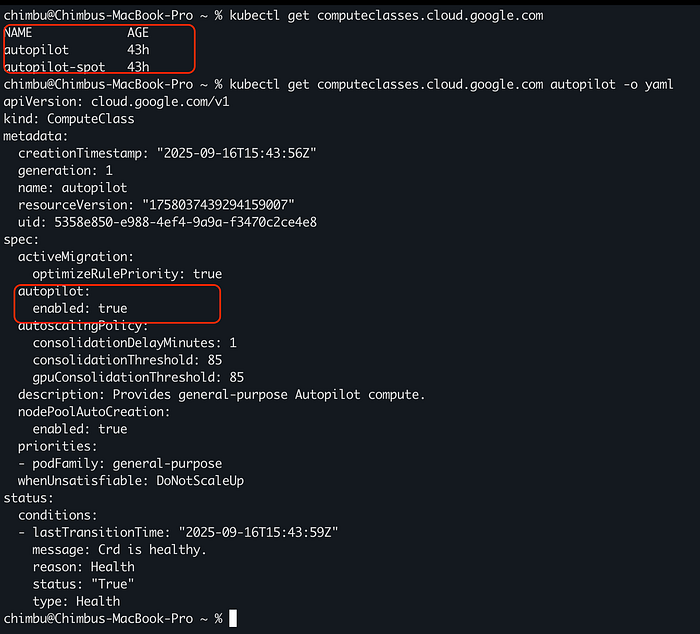
Sample autopilot computeclasses
To select an Autopilot ComputeClass in a workload, use a node selector for the cloud.google.com/compute-class label.
#Sample workload that uses built-in autopilot ComputeClass
---
apiVersion: apps/v1
kind: Deployment
metadata:
  name: helloweb
  labels:
    app: hello
spec:
  selector:
    matchLabels:
      app: hello
  template:
    metadata:
      labels:
        app: hello
    spec:
      nodeSelector:
        # Replace COMPUTE_CLASS with the name of the compute class to use.
        cloud.google.com/compute-class: COMPUTE_CLASS
      containers:
      - name: hello-app
        image: us-docker.pkg.dev/google-samples/containers/gke/hello-app:1.0
        ports:
        - containerPort: 8080
        resources:
          requests:
            cpu: "250m"
            memory: "4Gi"

The container resources are automatically adjusted to meet autopilot requirements and are scheduled on container-optimized compute platform nodes.
Custom ComputeClasses
If built-in ComputeClasses don’t meet your requirements, you can create custom Autopilot ComputeClasses tailored to specific workloads. This is especially useful for workloads requiring GPUs or certain machine families.
If you are already using Custom ComputeClass, to update the existing ComputeClass resources in the cluster to use Autopilot mode, you must recreate that ComputeClass with an updated specification. For more information, see Enable Autopilot for an existing custom ComputeClass.
#sample custom ComputeClass with autopilot mode enabled
---
apiVersion: cloud.google.com/v1
kind: ComputeClass
metadata:
  name: autopilot-n2-class
spec:
  autopilot:
    enabled: true
  priorities:
  - machineFamily: n2
    spot: true
    minCores: 64
  - machineFamily: n2
    spot: true
  - machineFamily: n2
    spot: false
  activeMigration:
    optimizeRulePriority: true
  whenUnsatisfiable: DoNotScaleUp
You can’t use the
podFamilypriority rule in your own ComputeClasses. This rule is available only in built-in Autopilot ComputeClasses.
You can use the custom ComputeClasses with autopilot mode enabled to set a default compute class at the GKE cluster level or namespace level. The default class you configure applies to any Pod in that cluster or namespace that doesn’t specify a different compute class. When you deploy a Pod that doesn’t specify a compute class, GKE applies default compute classes in the following order:
- If the namespace has a default compute class, GKE modifies the Pod specification to select that compute class.
- If not, the default cluster setting applies if it is configured, and GKE doesn’t modify the Pod.
For more details, refer to the link.
The ability to run Autopilot mode workloads inside Standard clusters gives organizations the best of both: reduced management overhead for certain workloads, while still maintaining flexibility and control where needed.
If you are evaluating this for a proof of concept or planning deployments, DoiT can help. Our team of 100+ experts specializes in tailored cloud solutions, ready to guide you through the process and optimize your infrastructure for compliance and future demands.
Let’s discuss what makes the most sense for your company during this policy enforcement phase, ensuring your cloud infrastructure is robust, compliant, and optimized for success. Contact us today.