
How to avoid an unplanned upgrade outage
Migrating your business systems to the cloud can offer numerous benefits. One key advantage when using a managed service is eliminating the need to maintain the service on existing infrastructure with existing technical resources and established operational processes. You can benefit from a managed service's larger collective knowledge and experience in return for a managed fee. There are many upsides to using a database management service, including security, resource allocation, and feature integration.
This article will discuss a feature available on several cloud provider services that, on the surface, can appear to be an easy win for routine maintenance. However, it comes at a cost that could devastate your business, resulting in a critical outage and an unprepared disaster scenario where the technical resources and skills from a previous self-hosted implementation are no longer available.
The feature is automatic minor version updates.
Why are product upgrades important?
Every organization will have different processes and controls built on the many years of experience, products, and internal tools unique to its business operations. These may be very robust, adequate, or fragile processes. Using a managed service may give a sense of stability and improved operational capacity; however, it does not eliminate the required testing component. The cloud, managed services, automation, IaC, and frameworks will not eliminate the need for adequate process management.
The database is one critical component in all businesses. It is not the only vital component; however, the absence of a working database in many organizations is a liability with a massive impact on business operating capability.
All products include feature and syntax deprecations, end-of-life notifications, and security patches over time. These changes require continued maintenance of the infrastructure that serves your applications. Product updates come in the form of minor upgrades and major updates. Treat both types of upgrades as equal when it comes to business risk.
An untested minor upgrade can bring down your production system.
The managed service default upgrade method
Many services from multiple cloud providers provide tools and automation to handle repetitive and mundane tasks, including minor version upgrades.
The following is an example using AWS RDS. When you create a new database via the AWS Console, you are presented with several dozen configuration options but not all. Select Additional Configuration at the bottom of the page to see all possible setup options.

You need to scroll down to the bottom of this additional page to find the Maintenance section, where “Enable auto minor version upgrade” is enabled by default.

The concerns with this managed service approach
There are several fundamental issues with using this default setting:
- Minor upgrades are applied in the weekly maintenance window at AWS’s discretion. This may not occur automatically during the next maintenance window, and it may take several weeks for this to occur.
- AWS does not distinguish between a test environment and a production environment. If you have multiple environments set to upgrade automatically, they could all happen in that week or only some.
- AWS does not honor long-term support (LTS) releases over minor version upgrades. The AWS RDS documentation even states “We recommend that you don’t set the AutoMinorVersionUpgrade parameter to true for LTS versions. Doing so could lead to your DB cluster being upgraded to a non-LTS version”
- When a minor upgrade occurs, AWS RDS does not create a recovery point to enable you to roll back in case of any subsequent issues. While you can use the restore database to a point-in-time capability, this will not revert the currently running upgraded version of the database to the version when you restore it.
- Maintenance windows are typically planned at low usage times for your system and generally coincide with minimal available technical resources. The maintenance window execution time of an unplanned upgrade will likely increase the additional outage time.
Minor versions are not automatically applied at the next maintenance window.
A minor version upgrade is as important as a new internal product release. When most of your technical resources are unavailable, would you automatically deploy a new untested internal product release to production?
The best practice for minor version upgrades
This is very simple: Test and verify.
While “Enable auto minor version upgrade” is a nice feature that reduces dependency on regular maintenance, it breeds ignorance about controlling the execution and recovery options. The database is often a critical component of a technology stack. It requires constant monitoring, management, and ongoing maintenance, as you would provide for any other critical system component.
The rollout of a new minor version to any environment should follow a controlled and documented process. This would include progressing through different environments toward production, e.g., dev, test, stage, and prod. An upgrade should be run with automation and monitored by a human, even when there are hundreds or thousands of database servers. Upgrades should be run when resources are available online, including operation resources that manage infrastructure and engineering resources that can be prepared should any unsuspecting or untested operation cause an incident.
The individual steps of the upgrade process are organization-specific. This process should always include a “pre” upgrade snapshot. Generally, releases of production versions should only occur after a sufficient time, e.g., week(s), after this has been released and verified in other environments.
A production database should never be a newer version than any database used in a release testing cycle.
It is not advisable to operate your database with the oldest point release. This will place a minor version upgrade as a critical path item, and AWS does not provide a schedule for deprecation and removal. Generally, you would also not operate with the most current point release. The community may have yet to see any issues introduced in the latest release, and there may be limited online resources for help with triage.
As a best practice, you should roll out each point release at a business-appropriate time and not combine multiple minor versions during any upgrade. A rollout to the latest version may be required due to a known bug fixed in a new version, so you have no choice but to test, verify, and upgrade outside of a known and documented business policy.
In summary, you should ALWAYS be proactive.
Identifying minor version upgrades
Within the last few months, AWS has introduced a new feature that exposes AWS recommendations via the AWS CLI and Console. Historically, determining the availability of new versions required a more complicated process, including reviewing Release Notes, tracking new versions becoming available, or monitoring events of other environments that may have this feature enabled.
You can now obtain this information by using the describe-db-recommendations command. NOTE: This became available in the CLI version 2.15.3. You need to read the line-by-line changelog to spot this recent update. If you do not upgrade your CLI frequently, you will require a newer version to use this command.
describe-db-recommendations output
$ aws rds describe-db-recommendations
{
"RecommendationId": "",
"TypeId": "config_recommendation::old_minor_version",
"Severity": "informational",
"ResourceArn": "arn:aws:rds:region:123456789:cluster:mydb",
"Status": "active",
"Detection": "**[resource-name]** is not running the latest minor DB engine version",
"Recommendation": "Upgrade to latest engine version",
"Description": "Your database resources aren't running the latest minor DB engine version. The latest minor version contains the latest security fixes and other improvements.",
"RecommendedActions": [\
{\
"ActionId": "",\
"Operation": "modifyDbCluster",\
"Parameters": [\
{\
"Key": "EngineVersion",\
"Value": "8.0.mysql_aurora.3.04.2"\
},\
{\
"Key": "DBClusterIdentifier",\
"Value": "mydb"\
}\
],\
"ApplyModes": [\
"immediately",\
"next-maintenance-window"\
],\
"Status": "ready",\
"ContextAttributes": [\
{\
"Key": "Recommended value",\
"Value": "8.0.mysql_aurora.3.04.2"\
},\
{\
"Key": "Current engine version",\
"Value": "8.0.mysql_aurora.3.04.1"\
}\
]\
}\
```\
### AWS console output\
Using the AWS Console with the RDS service, you will see Recommendations highlighted on the left-side menu. For example:\
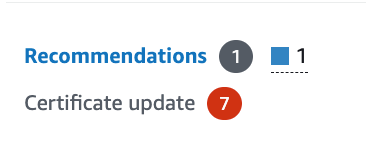\
### **RDS recommendations list**\
From the list of recommendations, you will see the server's list with the recommendation “is not running the latest monitor DB engine version.”\
\
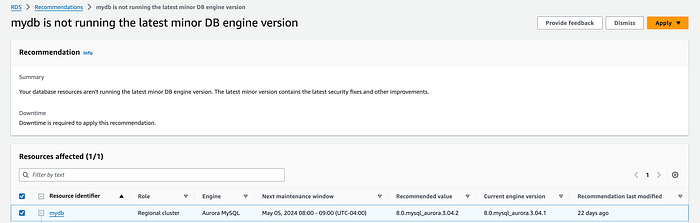
### More information on a specific recommendation\
You can also obtain more details of the recommendation to examine the full configuration of the resource and its references to applicable documentation.\
\
Final remarks\
Combining this knowledge with a regularly scheduled job to capture and share these notifications will enable you to prepare for a recommended minor version upgrade. Additional validation and prepared recovery steps that suit your business requirements and resources will greatly increase the confidence thatthere will be no production impact during minor version upgrades.\