

Google Cloud has fundamentally redesigned how spend-based CUDs work, shifting from a credit-based model to direct discounted pricing, while also expanding coverage to include memory-optimized VMs, HPC, and Cloud Run. As of yesterday, every customer is migrated on the new system. Here’s what it means for your cloud costs and FinOps dashboards.

The old billing puzzle model
Ever found yourself calculating CUD savings by juggling on-demand costs, commitment fees, and credit offsets? That’s how Google’s legacy spend-based CUD system worked. You’d commit to, say, $100/hour of on-demand spend, pay a $54/hour commitment fee (at a 46% discount), then receive a -$100 credit that offset your usage charges. The math worked out, but explaining it to customers or your finance dep was a nightmare.
The new multiprice model cuts through this complexity. Instead of credits, Google now applies your discount directly to SKU prices through what is called “consumption models.” You commit to your actual discounted spend ($54/hour), pay that amount, and your usage shows up at the discounted rate. No separate credits, no mental gymnastics.
The change fundamentally alters how CUD data appears in BigQuery exports too, requiring updates to any homegrown FinOps dashboards or cost allocation systems you’ve built. We’ve been through the same with DoiT.
The technical breakdown
The migration introduces three major shifts that customers need to understand;
First, the commitment math is inverted. Previously, you committed based on on-demand equivalent spend. Now you commit to your actual discounted hourly cost. A commitment that covered $185 of on-demand usage at 46% discount used to be described as a “$185/hour commitment.” Under the new model, that same commitment is described as a “$100/hour commitment” which is the amount you actually pay. The CUD Recommendations tool has also been updated accordingly. If you have automation scripts that calculate commitment amounts, they’ll need a revision.
Second, the BigQuery schema gains new fields. The most significant addition is the consumption_model struct, containing an id and description field. When usage is covered by a 3-year Compute Flexible CUD, the description reads "Compute Flexible CUDs 3 Year" instead of appearing as a separate credit line. Google has also added price.list_price, price.effective_price_default, and cost_at_list_consumption_model fields to help differentiate between on-demand and discounted pricing in your queries.
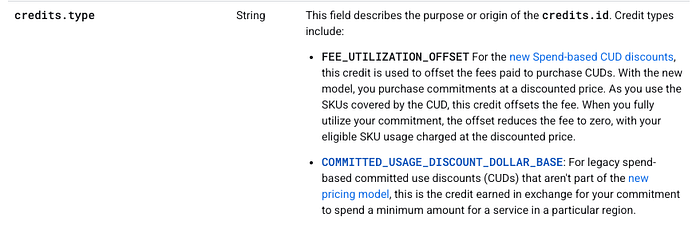
Third, fee SKUs are restructured. New CUD fee SKUs are priced at $1/hour with an offsetting credit type called FEE_UTILIZATION_OFFSET. When your CUD is fully utilized, the fee and offset cancel out to zero. When underutilized, you'll see the unused portion as a charge. This creates two rows per CUD in your billing data—one for covered usage at discounted rates, one for any overage at on-demand rates.
FEE_UTILIZATION_OFFSET
Expanded coverage brings real savings opportunities
Compute Flexible CUDs now cover workloads that previously required separate commitment types or had no discount path at all.
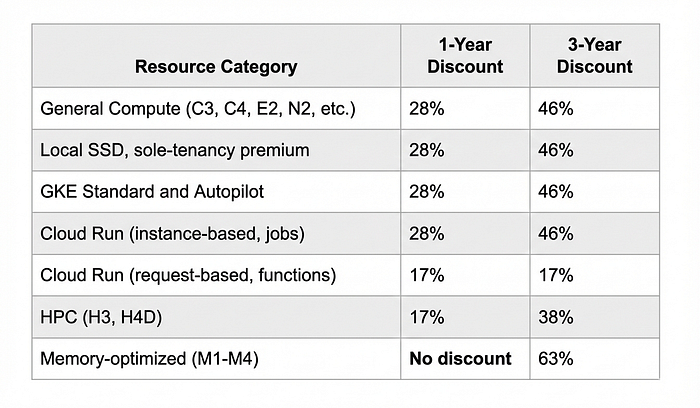
Memory-optimized VMs finally get Flex CUD coverage. The M1, M2, M3, and M4 machine families can now be covered by Compute Flexible CUDs, but only for 3-year terms at a 63% discount. There’s an important gotcha here: 1-year commitments provide zero discount for memory-optimized VMs. Your spend will burn down unutilized commitment without any savings benefit. If you’re running memory-intensive workloads like SAP HANA or large in-memory databases, this makes 3-year commitments significantly more attractive.
HPC families join the party. The H3 and new H4D compute-optimized families are now Flex CUD eligible at 17% for 1-year and 38% for 3-year terms. The H4D, currently in preview, features 5th-gen AMD EPYC Turin processors with 192 cores, up to 1,488 GB memory, and 200 Gbps RDMA-enabled networking. That’s serious iron for serious compute workloads.
Cloud Run gets comprehensive coverage. Request-based billing for Cloud Run services (including Cloud Run functions, formerly known as Cloud Functions) now qualifies for Compute Flexible CUDs at 17% for both 1-year and 3-year terms. Instance-based billing, jobs, and worker pools continue receiving 28%/46% discounts. If you’re running serverless workloads at scale, this could meaningfully impact your unit economics.
The following table summarizes the new spend-based discount structure:
Your savings look different
After migrating, your FinOps dashboard’s “Savings” column will show dramatically lower numbers. If it previously showed -$10.00, it might now show -$4.50. This triggers alarm bells until you understand what’s happening.
The old model showed a gross credit that offset your entire on-demand cost. The new model shows your actual net savings; thedifference between what you would have paid at on-demand rates and what you actually paid at the discounted rate. Your final bill amount and true savings are identical in both cases. Only the presentation changed.
None of these changes impact your actual discount rates. A 3-year Compute Flexible CUD still saves you 46% on general compute. A 1-year still saves 28%. The dollars coming out of your pocket are exactly the same before and after migration. Google has changed how savings are displayed, not how they’re calculated. Made this clear.
This will also require communication with CFOs and stakeholders who’ve grown accustomed to seeing large credit numbers. When they ask why CUD credits dropped by 55%, you’ll need to explain that they’re now seeing actual savings rather than accounting offsets.
The questions I keep hearing
Will my commitment amount increase if I don’t opt in?
No. When Google auto-migrates you, they convert your existing commitments to equivalent values under the new model. If you had a $185/hour commitment (expressed as on-demand equivalent), it becomes a $100/hour commitment (your actual discounted spend). Same coverage, same cost, different labeling. Your wallet stays exactly the same; the reporting changes.
Will my existing CUDs cover less after migration?
No and in fact, the opposite. All existing CUDs will cover at least what they used to, and many will cover more SKUs thanks to the expanded eligibility. If you have Compute Flexible CUDs today, they’ll automatically start covering newly-eligible workloads like Cloud Run request-based billing, H3/H4D instances, and memory-optimized VMs. This means better utilization of commitments you’ve already purchased, without any action required on your part.
So what’s actually changing?
Display and data structure. Your discount percentages stay the same. Your commitment costs stay the same. Your coverage either stays the same or improves. The changes are:
- How commitment amounts are expressed
- How savings appear in billing exports
- Which SKUs are eligible for coverage.
That’s it.
Resource-based CUDs remain unchanged
It’s worth emphasizing what this migration doesn’t affect. Resource-based committed use discounts where you commit to specific vCPU, memory, GPU, or Local SSD quantities in a particular region and project — continue operating exactly as before. These remain ideal for predictable, steady-state workloads with consistent resource requirements.
The key differences persist:
- Resource-based CUDs are project and region-specific (though you can enable sharing across a billing account).
- Spend-based Flex CUDs automatically apply across all eligible usage in a billing account.
Resource-based commitments offer slightly higher discount rates for general compute (up to 55% for 3-year vs 46% for Flex) but require more accurate capacity planning.
What I always recommend for most organizations, is that the optimal strategy should combine both: resource-based CUDs for your baseline, predictable workloads, and Flex CUDs for variable or distributed usage that’s harder to pin down by region and machine type.
The new multiprice CUD model represents Google Cloud’s most significant billing change in years. The expanded coverage and cleaner data model are great improvements. Now, your job is ensuring your internal systems are ready to take advantage of them — if you’d like us here at DoiT to help, lets talk.