

When setting up an Amazon Aurora cluster, many factors must be considered, and one of the most important is the cluster’s storage configuration. The choice between Standard and I/O-Optimized modes is crucial but often overlooked.
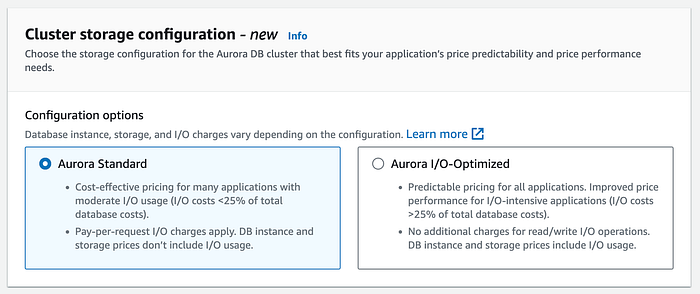
Choosing between the Aurora Standard or I/O-Optimized mode
But what makes this choice so important?
This configuration plays a significant role in determining how your cluster will be billed. By selecting the right mode, you could save up to 40%, especially for I/O-intensive workloads.
This post will explore the key differences between Aurora modes, their cost implications, and strategies for maximizing your AWS Aurora investment.
Amazon Aurora Costs: Understanding the Basics
Before choosing the best mode for your needs, it’s essential to understand how Amazon Aurora is billed. The main components include:
- Compute: Charges depend on the instance type and size within the cluster.
- Storage: Costs are based on the storage allocated to the cluster.
- I/O Operations: Billing includes the volume of read and write operations across all instances.
These are not the only factors; others include data transfer, backups, and other features we can enable. However, these additional considerations are not essential to determining the best Aurora mode to select.
Compute
Amazon Aurora’s pricing varies depending on the mode you choose. Regarding compute costs, the Aurora I/O-Optimized mode is about 30% more expensive than the Standard mode — a notable difference, but this is just one part of the equation.
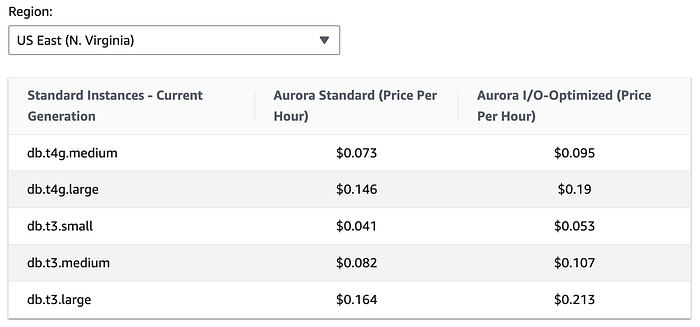
Amazon Aurora. Pricing by database instances
Storage
In terms of storage, the Aurora I/O-Optimized mode is 125% more expensive than the Standard mode. This might initially make the Standard mode seem like a more cost-effective choice, particularly for large storage needs. However, there are additional factors to consider.
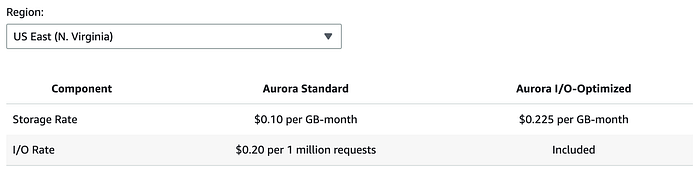
Amazon Aurora. Pricing by database storage and I/Os
I/O Operations
At first glance, Aurora Standard may seem significantly cheaper than the I/O-Optimized mode. So, what makes I/O-Optimized so appealing?
The key advantage is that the I/O-Optimized mode includes I/O operations in its pricing. This can be a game-changer for I/O-intensive applications.
Choosing the Right Mode for Your Aurora Cluster
According to AWS: If your I/O spend exceeds 25% of your total Aurora database spend, you can save up to 40% on costs for I/O-intensive workloads with Aurora I/O-Optimized.
Easy to say, but not so easy to calculate on the fly. First, you need to determine the I/O costs for your Aurora cluster and then tally up the total Aurora database spend. And don’t forget: an Aurora cluster can have multiple instances, whether provisioned or Serverless. So, it’s not as simple as it sounds.
Now, imagine managing a fleet of 100 Aurora clusters across various AWS regions and having to perform these checks manually on a regular basis. It would be an endless, time-consuming task.
Here’s a recommended approach for handling this situation:
Creating a new Aurora cluster
When setting up a new Aurora cluster, the optimal mode to choose will depend on the expected IOPS (input/output operations per second) your database will handle. You can consider IOPS in terms of the volume of queries.
For development environments or workloads with infrequent usage, it’s recommended to start with Aurora Standard mode. However, for production environments or workloads with consistently high query volumes, Aurora I/O-Optimized mode may be a more cost-effective choice.
After running the cluster for a few weeks and collecting sufficient metric data, it would be recommended to re-evaluate the situation to determine whether the Standard or I/O-Optimized mode would be more cost-effective.
Evaluating an existing Aurora cluster
To assess an existing Aurora cluster, I suggest using a Python script that handles the heavy lifting. This script automatically compares the costs of Standard and I/O-Optimized modes, giving you clear insights into your current spend and helping you choose the most cost-effective option.
https://gist.github.com/polius/5760117924b55d73f11434143596fd10
Here’s an example of the output.
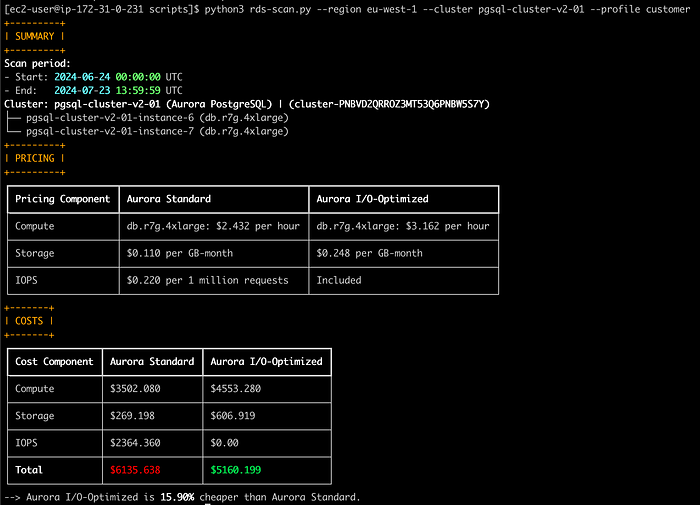
rds-scan.py — Execution output
Remember, you can switch to Aurora I/O-Optimized once every 30 days and switch back to Aurora Standard at any time. This transition is seamless and does not incur any downtime, whether moving from Standard to I/O-Optimized or vice versa.
One last thing to consider is that Aurora's Parallel query feature isn’t supported with the Aurora I/O-Optimized DB cluster storage configuration. So, if your database heavily relies on this feature, you will have to evaluate what would be better.
Our mission at DoiT
This is just one example of the numerous checks we conduct at DoiT to ensure our customers’ cloud infrastructures are robust, compliant, and optimized for success.
With over 180 senior cloud experts specializing in customized cloud solutions, our team is ready to help ensure your infrastructure meets the highest performance and compliance standards.