

CUDs for BigQuery and Composer finally arrived — Am I going to save money?
Intro
Google recently announced Committed Use Discounts (CUDs) for BigQuery and Cloud Composer, offering potential savings for consistent usage. Google promises up to 20% savings for a 3-year commitment and 10% for a 1-year commitment. However, the actual savings depend on consistently meeting your hourly committed spend baseline.
While you can find most details in the official documentation (like here [1] and here [2]), I wanted to provide some additional context:
These CUDs are spend-based, meaning you commit to spending a specific amount of money per hour on eligible SKUs. They are purchased via your billing account and the discounts can be shared across projects within the same region. Importantly, CUDs are region-specific, so you need to purchase them individually for each region where you want the discount.
Google states, that CUDs apply across all BigQuery PAYG SKUs[3]. However, this only includes:
- BigQuery Editions consumption models (all Editions!)
- Composer 3 SKUs for compute (nice!!)
- BigQuery Data Governance (formerly known as Dataplex)
However, there are notable exclusions: BigQuery storage costs and on-demand analysis query pricing are not covered by these CUDs. This is a key limitation to keep in mind.
Regarding the inclusions, the addition of Composer CUDs is a welcome and long-awaited feature for many users. For BigQuery Data Governance, its inclusion is interesting, especially since Google only recently moved these SKUs under the BigQuery umbrella; time will tell how impactful these CUDs will be for those specific services.
To determine if these new BigQuery/Composer CUDs are right for you, consider these points:
- Are you using BigQuery Editions in combination with Cloud Composer (version 2 or 3) or BigQuery Data Governance? While BigQuery Slot commitment alone might be cheaper, if you have consistent usage across a combination of these eligible services, you will see additional savings from these new spend-based CUDs.
- Do you have stable workloads for these services? For example, is your Composer environment running 24/7, and do you have queries consistently running throughout the day?
- Do you already have other slot commitments for BigQuery reservations [4] in place? It appears these new spend-based CUDs for Editions/Composer/Governance cannot be stacked with existing slot reservation commitments.
Finding your stable workload baseline
Finding your stable workload baseline is not as easy as you might think, as you need to determine the hourly spend for all eligible SKUs.
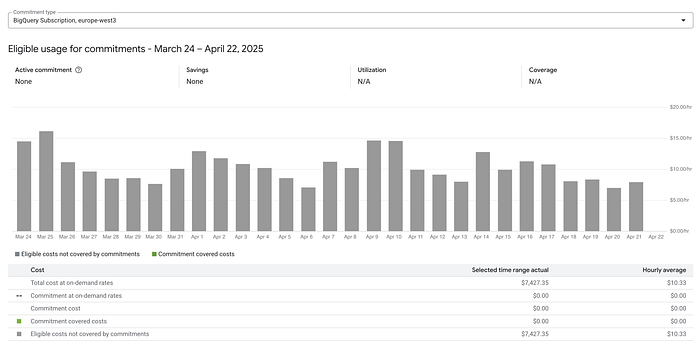
First, you can head to “Committed use discounts analysis” under your Billing Account settings to see eligible usage, that can be covered by CUDs.
Second, if you have a detailed BQ export set up, you can use this query.
WITH base as (
  SELECT *
  FROM `project.dataset.billing_export*`
  WHERE 1=1
  AND TIMESTAMP_TRUNC(export_time, DAY) = TIMESTAMP("2025-04-20")
  AND sku_group_description like "%PAYG%"
  AND service_description = "BigQuery Reservation API"
)

SELECT
  usage_start_time,
  sku_group_description,
  sku_description,
  location.region,
  SUM(cost)
FROM base
GROUP BY ALL
If you are a DoiT customer, we added a report for you: Its called BigQuery CUD eligible analysis spend. Do not hesitate to log a support request with us in case you want to have a chat with one of our BigQuery SMEs.
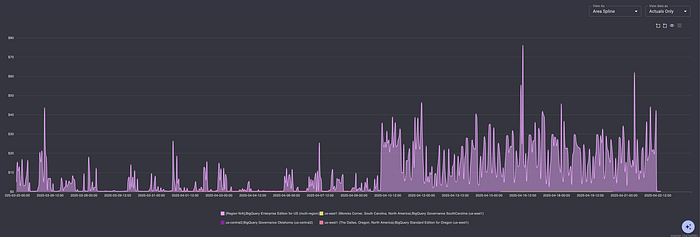
DoiT DCI report: BigQuery CUD eligible analysis spend.
In general, you are getting a better deal with making a BigQuery Slot commitment. However, if you are running Cloud Composer 3 or BigQuery Data Governance services, BigQuery CUDs are a good deal.
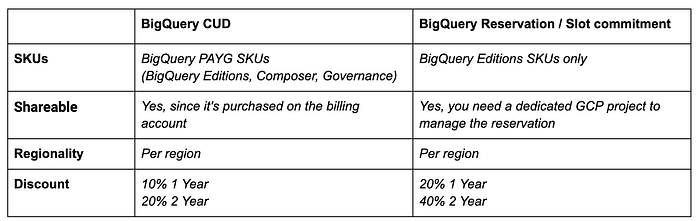
Comparison: CUDs vs Slot commitment
Example
Let’s take the simple following real-world scenario:

Cost per eligible SKUs grouped by region
Based on this example, purchasing CUDs for us-east1 or us-central might not be beneficial, as the hourly spend for eligible SKUs is below $1. However, in the US multi-region, this customer could save 10% (up to 500$ per day; 230 baseline spend * 24 hours * 0.1) by buying a CUD. The catch here is that they are already committed to a 1-year BigQuery slot reservation, which is saving them 20% per slot hour. In this particular case, adding a spend-based commit would not make sense.
In general, we often recommend considering a mix of 1-year and 3-year CUDs to avoid putting all your eggs in one basket. Additionally, you might choose to cover only 60–75% of your eligible spend with CUDs, which leaves some flexibility for future cost optimization efforts or changes in usage patterns.
TLDR;
While CUDs certainly make sense for ‘always-on’ services like VMs and even Cloud SQL, they might not align perfectly with typical BigQuery usage patterns. BigQuery workloads are often more spiky and can scale down to zero when not in use — which is, in fact, one of the main advantages of a cloud data warehouse.
However, when you include Cloud Composer and BigQuery Data Governance usage in the calculation, the picture changes. These services are more likely to run consistently, perhaps 24/7, consuming compute resources (like slots or DCUs) throughout the day.
If you like what we do, check our services page https://doit.com/services
[1] https://cloud.google.com/bigquery/docs/bigquery-cud
[2] https://cloud.google.com/docs/cuds-spend-based#purchasing