

Recently, one of our clients encountered an issue where the resource tags they assigned to their Amazon Elastic Container Service (ECS) service were not being passed on to the ECS tasks. These tags were crucial for the client as they were using them to monitor and manage costs associated with a specific project.
In AWS, Cost Allocation Tags are key for tracking costs. They come in two types: AWS-generated tags, automatically applied to resources, and user-defined tags, created and applied by you. These user-defined tags provide flexibility for organizing resources.
In this article, I will delve into the root cause of this issue, explaining why user-defined tags behave differently from ECS managed tags. I will also guide you on how to navigate this challenge and ensure your cost allocation strategy remains effective.
Additionally I’ll show you how we enhanced the clients cost tracking by utilizing the robust FinOps tools offered by DoiT.
The Issue — ECS Resource Tagging
For better management of your Amazon ECS resources, you have the option to attach your own metadata to each resource through the use of tags. Each tag is composed of a key and an optional value.
Our client had created an ECS cluster and associated it with a service. The service was specifically configured with the user-defined tag WebProject:CostTracking.
ECS Service user-defined tag
However, we noticed an issue — the service tag was not being passed on to the tasks that the service initiated. When we checked the ECS console, it was clear that the tasks launched by the service were only receiving the ECS managed tags, not the user-defined ones from the service.
When you use Amazon ECS-managed tags, ECS automatically tags all newly launched tasks with the cluster information.
ECS Task with no user-defined tag
Using the AWS CLI describe-servicescommand we verified the tags from the service were not being propagated.
$ aws ecs describe-services — services nginx-service — cluster web-cluster — region us-east-1 — query ‘services[*].propagateTags’ — output text
By looking into the CloudTrail logs for the CreateService event we were able to see that the parameter to propagate the tags from service to tasks is not set.
CloudTrail log showing service tag not propagating
When you call the CreateService API, you specify parameters such as the task definition, desired count of tasks, service name, and optionally, details about load balancing, service discovery, and more.
The --propagate-tags parameter specifies whether to propagate the tags from the task definition or service to the task. If no value is specified, the tags aren’t propagated. The default is NONE. Tags can only be propagated to the task during task creation.
From the CloudTrail log we can see that when the ECS service was created the default was not changed. As a result when the service created the tasks, its tags did not propagate to them.
By default when you create an ECS service from the console the default option is not to propagate the service tags to the task.
ECS Service default behaviour is to not propagate tags
When you’re setting up the service, if you want the tags from the service to be applied to the tasks as well, you need to select this option from the drop-down menu. Specifically, you’ll be choosing the option for tag propagation from the service.
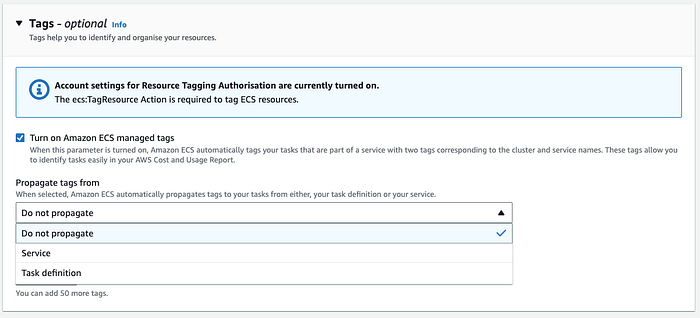
Tagging option during service creation
How to Fix
In order to propagate the service’s user-defined tags to tasks, a new deployment is required. However, this action must be performed from the AWS CLI, not the AWS Console.
The reason for this is that the UpdateServiceCLI command allows you to specify the — propagate-tags parameter. This parameter is not available in the AWS Console, which is why we need to use the CLI for this operation.
The following command was used to update service to force a new deployment so tags would propagate from the service to the tasks.
$ aws ecs update-service — cluster <CLUSTER_NAME> — service <SERVICE_NAME> — force-new-deployment — propagate-tags SERVICE
Checking the CloudTrail log for the UpdateService event we could see the propagateTags paramemter was now set to SERVICE
CloudTrail log showing service update to propagate tag to tasks
This could be further verified by running the describe-services CLI command on the service
Checking the newly deployed task we can see the ECS-managed tag & user-define tag have all been propagated to the task.
ECS tasks with ECS-managed & user-define tags.
DoiT FinOPs Tools
Once we had resolved the clients tagging issue we then focused on helping them with improving their cost tracking. In today’s cloud-centric world, managing and optimizing cloud operations can be a daunting task. That’s where DoiT comes in, providing a suite of valuable FinOps tools designed to streamline and enhance your cloud management processes.
Reports
One of the key features we offer is the DoiT Cloud Analytics Reports, a powerful tool that provides a clear visualization of your cloud spend.
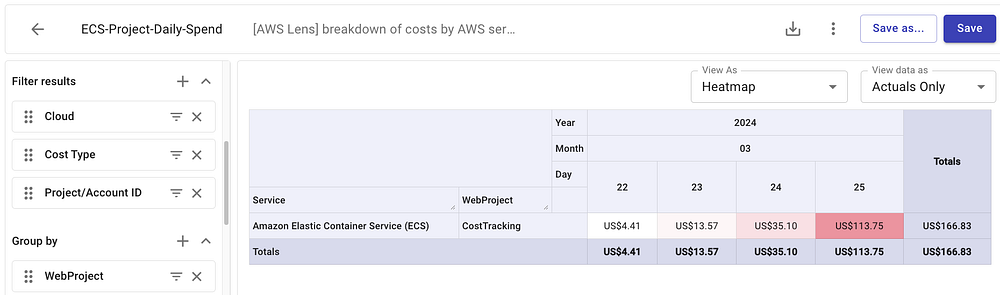
This report filters AWS costs by ECS resources, leveraging the user-defined tag WebProject:CostTracking for precise and accurate cost tracking.
This level of detail allows our clients to gain a deeper understanding of their cloud spend, enabling them to make informed decisions and optimise their cloud operations effectively.
Alerts
At DoiT, we understand the importance of proactive cost management in cloud operations. That’s why we helped this client with setting up billing alerts to help them keep a close eye on their ECS spend.
We created an Alert from the DoiT console that would monitor the daily spend of their ECS costs. We defined the condition if ECS spend was greater than €5 per day the client would be notified via email.
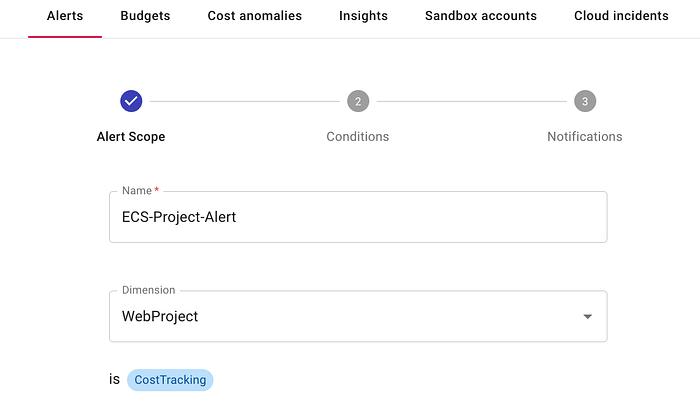
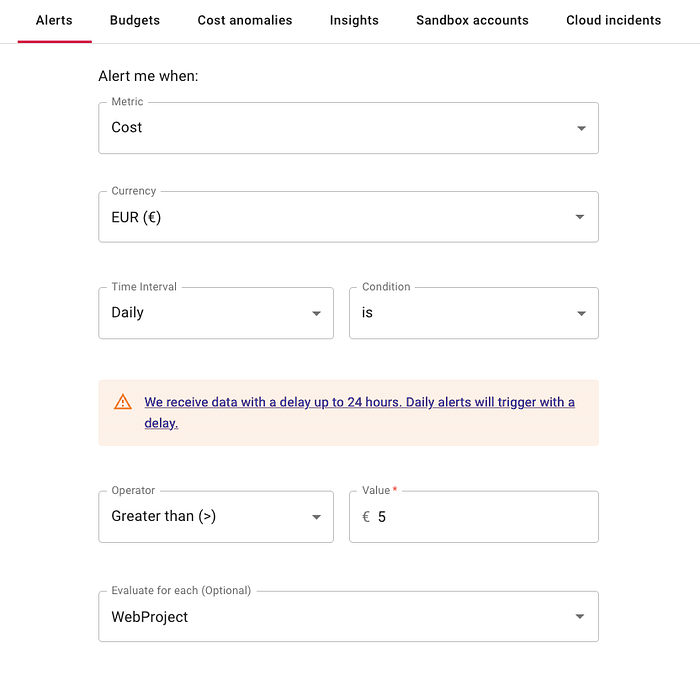
The alerts is designed to notify our client via email once their daily ECS spend hits a predefined threshold.
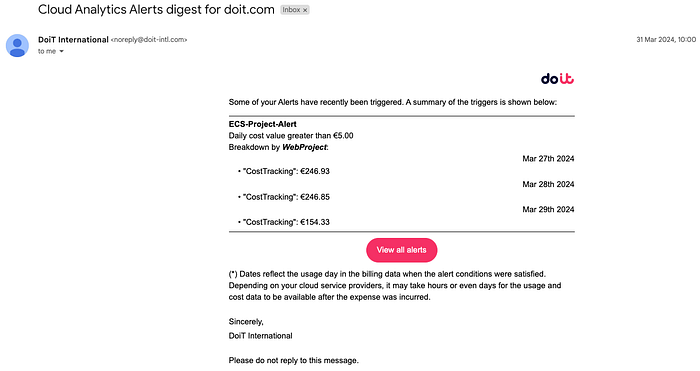
Email notification triggered by Alert
This setup allows our client to monitor their cloud costs effectively and take timely action if the costs are trending higher than expected.
This is just one of the many ways we’re committed to helping our clients optimise their cloud operations and get the most value from their cloud investments.
If you’re interested in learning more about how DoiT can help manage your cloud resources, or if you’d like to explore our FinOps products and services, feel free to get in touch.