

Problem Statement:
Many organizations are eager to leverage the benefits of Vertex AI due to its robust features and integration with the Google Cloud ecosystem, not just create an endpoint on a VM and deploy the model there for predictions. However, the cost implications pose a considerable obstacle, prompting the need for a more efficient and cost-effective solution.
The crux of the problem lies in the fact that the cost associated with deploying models on Vertex AI is time-dependent, irrespective of the actual utilization of resources as described in the pricing documentation:
AI Platform Prediction serves predictions from your model by running a number of virtual machines (“nodes”).
You are charged for the time that each node runs for your model, including:
1. When the node is processing an online prediction request.
2. When the node is in a ready state for serving online predictions.
The cost of one node running for one hour is a node hour. A node hour represents the time a virtual machine spends running your prediction job or waiting in an active state (an endpoint with one or more models deployed) to handle prediction or explanation requests.
When online predictions are scheduled only at specific intervals during the day or week, the inability to scale down to zero during idle periods becomes a significant concern. This challenge is further intensified when GPU-based models are used, as the associated costs can escalate rapidly.
The Customer’s Dilemma:
In our scenario, a customer intends to use the Vertex AI service for online predictions of the Stable Diffusion foundation model (requiring GPU) during regular working hours and days — specifically, five days a week from 7 AM to 7 PM.
Instead of 720 node hours, the customer would like to pay for the actual utilization, which is only 240 node hours (30%).
Proposed Solution:
To address this issue, we’ll use the Cloud Run jobs :
Cloud Run jobs enable developers to execute long, run-to-completion scripts — all on a serverless platform!
If your code performs work and then stops (a script is a good example), you can use a Cloud Run job to run your code. You can execute a job from the command line using the gcloud CLI or schedule a recurring job.
Our pragmatic approach involves three main steps
- Deploy the model to a Vertex AI online prediction endpoint
- Generate CloudRun jobs for both deploying and un-deploying the model on Vertex AI Prediction Endpoints
- Create jobs scheduling
Model deployment to a prediction endpoint
I utilized the Vertex AI Model Garden to browse and select a pre-trained model suitable for the customer’s needs. The stable-diffusion-2–1 model appears to meet the specified requirements. By choosing the ‘Deploy’ option in the console, the model artifact is uploaded to the Vertex AI Model Registry and subsequently deployed to an online prediction endpoint.
Afterward, I successfully tested the model and undeployed the model manually.

Model version details in Model Garden
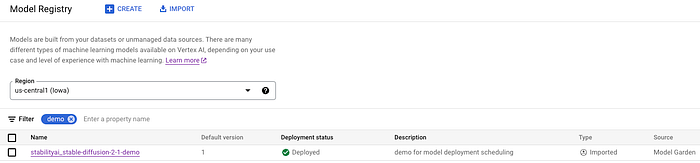
The model was imported to the Model Registry
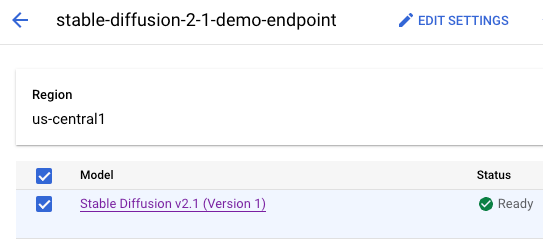
The model container is deployed on the online prediction endpoint
Leveraging Cloud Run for coordinating Model Deployment and un-deployment
To finely control the deployment and un-deployment of our machine learning model on Vertex AI endpoints, we rely on CloudRun Job.
The Job serves the purpose of deploying or un-deploying. It Jobies on a shell script containing the relevant gcloud commands for model deployment and un-deployment on the prediction endpoint.
Create the CloudRun Jobs:
To create the CloudRun jobs, we perform the following steps:
- Specify the model parameters to ensure they match the values configured during the initial deployment of the model on the endpoint:
MODEL_NAME,MACHINE_TYPE,ACCELERATOR_TYPE,ENDPOINT_NAME
These parameters should be replaced according to your usage.
2. Create the CloudRun Jobs for model deployment and undeploy on Vertex AI endpoints. The job creation is done by using gcloud run jobs with the option of deploying from source (-source), which builds the container, uploads it to the Artifact Registry, and deploys the jobs to Cloud Run.
3. Create a scheduler trigger to execute the jobs according to the configuration using gcloud for the job schedule. This feature enables users to define precise schedules, ensuring resource activity aligns with specific intervals for online predictions during the day and week.
The vertex-ai-mng-deploy GitHub repository can be used to generate both DEPLOY and UNDEPLOYjobs for the model on the Vertex AI endpoint. The repository includes the following:
1. CreateCloudRunJobs.sh for Cloud Run job creation
2. MngModelDeploy.sh for model deploy/undeploy on the Vertex AI endpoint
3. A docker file to create a container includes theMngModelDeploy.shscript.
This is the CreateCloudRunJobs.sh:
#!/bin/bash -xv

#A number that will be used for the id of the model deployment
ENDPOINT_NAME="stabilityai_stable-diffusion-endpoint"
MODEL_NAME="stable-diffusion-2-1"
MACHINE_TYPE="g2-standard-8"
ACCELERATOR_TYPE="nvidia-l4"

PROJECT=$(gcloud config get-value project)
PROJECT_NUMBER=$(gcloud projects describe "$PROJECT" --format="value(projectNumber)")
REGION=us-central1
DEPLOY_JOB_NAME=deploy-model-$MODEL_NAME
UNDEPLOY_JOB_NAME=undeploy-model-$MODEL_NAME
TIME_ZONE='UTC'
DEPLOY_SCHEDULE="0 7 * * *"
UN_DEPLOY_SCHEDULE="0 19 * * *"

#create a job for model deploy
gcloud run jobs deploy $DEPLOY_JOB_NAME --region=$REGION --source vertex-ai-mng-deploy \
      --task-timeout=1800 --command "./MngModelDeploy.sh" \
      --args DEPLOY,$ENDPOINT_NAME,$MODEL_NAME,$MACHINE_TYPE,$ACCELERATOR_TYPE \
      --set-env-vars RUN_DEBUG=true,REGION=$REGION

#describe the job created
gcloud run jobs --region=$REGION describe $DEPLOY_JOB_NAME

#create a job for model undeploy
gcloud run jobs deploy $UNDEPLOY_JOB_NAME --region=$REGION --source vertex-ai-mng-deploy \
      --task-timeout=180 --command "./MngModelDeploy.sh" \
      --args UNDEPLOY,$ENDPOINT_NAME,$MODEL_NAME --set-env-vars RUN_DEBUG=true,REGION=$REGION

#describe the job created
gcloud run jobs --region=$REGION describe $UNDEPLOY_JOB_NAME
Jobs Scheduling:
CloudRun Jobs scheduler trigger is crucial in scheduling these deployment and un-deployment processes on the Vertex AI endpoint. This feature enables users to define precise schedules, ensuring resource activity aligns with specific intervals for online predictions during the day or week.
The last part of the CreateCloudRunJobs.shscript contains the scheduling jobs creation (using Cloud Scheduler):
#create a schedule for deploy
gcloud scheduler jobs create http scheduler-$DEPLOY_JOB_NAME \
  --location $REGION \
  --schedule="$DEPLOY_SCHEDULE" --time-zone=$TIME_ZONE \
  --uri="https://$REGION-run.googleapis.com/apis/run.googleapis.com/v1/namespaces/$PROJECT/jobs/$DEPLOY_JOB_NAME:run" \
  --http-method POST \
  --oauth-service-account-email "$PROJECT_NUMBER"[email protected]

#create a schedule for undeploy
gcloud scheduler jobs create http scheduler-$DEPLOY_JOB_NAME \
  --location $REGION \
  --schedule="$UN_DEPLOY_SCHEDULE" --time-zone=$TIME_ZONE \
  --uri="https://$REGION-run.googleapis.com/apis/run.googleapis.com/v1/namespaces/$PROJECT/jobs/$DEPLOY_JOB_NAME:run" \
  --http-method POST \
  --oauth-service-account-email "$PROJECT_NUMBER"[email protected]
Model deployment and unemployment:
The MngModelDeploy.sh script is executed by the Job and according to the input argument ACTION,determines the Job’s functionality, specifying whether the task is to deploy or undeploy the model:
Model deploy Job and command:
nadav@cloudshell:~$ gcloud run jobs describe deploy-model-stable-diffusion-2-1 --region=us-central1
✔ Job deploy-model-stable-diffusion-2-1 in region us-central1
Executed 6 times
Last executed 2024-01-30T08:06:22.875396Z with execution deploy-model-stable-diffusion-2-1-sr7kk
Image:           us-central1-docker.pkg.dev/nadav/cloud-run-source-deploy/deploy-model-stable-diffusion-2-1@sha256:328c1117422af347be0906b0e4d27211ca764559e2405e8832d30d2f55158974
Tasks:           1
Command:         ./MngModelDeploy.sh
Args:            DEPLOY stabilityai_stable-diffusion-endpoint stable-diffusion-2-1 g2-standard-8 nvidia-l4
Memory:          512Mi
CPU:             1000m
Task Timeout:    30m
Max Retries:     3
Parallelism:     No limit
Service account: [email protected]
Env vars:
  REGION         us-central1
  RUN_DEBUG      true
if [ "$ACTION" == "DEPLOY" ]; then
 # Model deploy (takes time)
 MODEL_ID=$(gcloud ai models list --region=$REGION \
 --filter="DISPLAY_NAME:$MODEL_NAME" --format="value(MODEL_ID)")

  echo "Deploying model..."
  gcloud ai endpoints deploy-model "$ENDPOINT_ID" --region=$REGION \
  --model="$MODEL_ID" --display-name="$MODEL_NAME"\
  --machine-type="$MACHINE_TYPE" --accelerator=count=1,type="$ACCELERATOR_TYPE"
fi
Model undeploy Job and command:
nadav@cloudshell$ gcloud run jobs describe undeploy-model-stable-diffusion-2-1 --region=us-central1
✔ Job undeploy-model-stable-diffusion-2-1 in region us-central1
Executed 6 times
Last executed 2024-01-30T08:04:57.205233Z with execution undeploy-model-stable-diffusion-2-1-kgrrc
Image:           us-central1-docker.pkg.dev/nadav/cloud-run-source-deploy/undeploy-model-stable-diffusion-2-1@sha256:b1a8de6919205191feab7e4bed5d98fba9b40ecc9cb6cdae5a5fda550a54f612
Tasks:           1
Command:         ./MngModelDeploy.sh
Args:            UNDEPLOY stabilityai_stable-diffusion-endpoint stable-diffusion-2-1
Memory:          512Mi
CPU:             1000m
Task Timeout:    3m
Max Retries:     3
Parallelism:     No limit
Service account: [email protected]
Env vars:
  REGION         us-central1
  RUN_DEBUG      true
if [ "$ACTION" == "UNDEPLOY" ]; then
  echo "Un-deploying model..."
  DEPLOY_MODEL_ID=$(gcloud ai endpoints describe "$ENDPOINT_ID" --region=$REGION \
   --format=json | \
  jq --arg ml_name "$MODEL_NAME" \
  -r '.deployedModels[] | select(.displayName == $ml_name).id')

  gcloud ai endpoints undeploy-model "$ENDPOINT_ID" --region=$REGION \
  --deployed-model-id="$DEPLOY_MODEL_ID"
fi
Conclusion:
In conclusion, the proposed solution of utilizing Vertex AI and leveraging CloudRun for deployment and scheduling offers a practical and effective way to prevent unnecessary resource consumption during idle periods, leading to substantial cost savings.
By addressing the specific challenges related to time-based cost structures, organizations can unlock the full potential of Vertex AI while maintaining financial efficiency.