

A data-backed comparison featuring performance benchmarks, pricing breakpoints, and architectural trade-offs.
Generated by Gemini
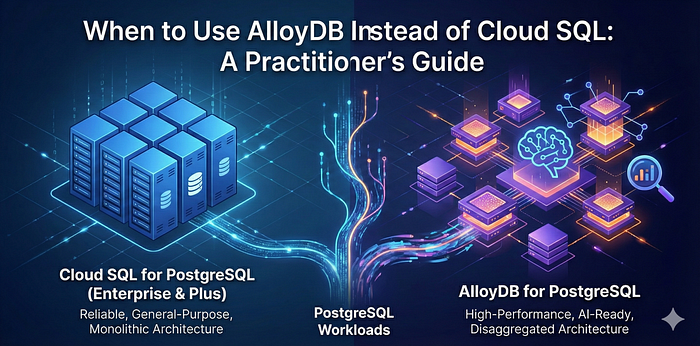
Google Cloud now offers multiple managed PostgreSQL options, each tailored for specific performance, availability, cost, and AI-readiness requirements. What used to be a simple binary choice between standard Cloud SQL and AlloyDB has evolved with the introduction of Cloud SQL Enterprise and Cloud SQL Enterprise Plus editions.
While this expanded portfolio offers better solutions for specific needs, it also adds complexity to the decision-making process. By the end of this article, you’ll understand exactly which PostgreSQL service fits your performance, cost, and AI strategy.
🤔 What is AlloyDB?
AlloyDB for PostgreSQL is Google Cloud’s next-generation, PostgreSQL-compatible database service, purpose-built for high-performance, mission-critical workloads. Featuring a cloud-native architecture, it separates compute and storage, enabling each to scale independently. AlloyDB further stands out with AlloyDB AI for advanced vector search and a native columnar engine that accelerates analytical queries directly on transactional data.
Essential Extensions & Compatibility
A frequent question from architects is whether AlloyDB is compatible with the standard PostgreSQL ecosystem. AlloyDB offers full PostgreSQL compatibility, supporting major open-source extensions and introducing powerful native features:
- Standard Extensions: Fully supports
PostGIS(geospatial),pg_cron(job scheduling),pgaudit(compliance logging), andpg_stat_statements(monitoring). - AlloyDB-Specific Extensions:
\*google_columnar_engine: Automatically accelerates analytical queries (HTAP — Hybrid Transactional and Analytical Processing).
\* vector: An optimized version of pgvector for faster AI similarity search.
\* alloydb_ai: Native integration with Vertex AI for calling ML models directly from SQL.
Compared to traditional PostgreSQL deployments, AlloyDB delivers significantly higher throughput, lower latency, and faster analytical performance, while remaining fully managed and PostgreSQL compatible.
🧐 Cloud SQL Editions Explained
Before comparing all options, it’s important to understand the Cloud SQL editions:
- Cloud SQL Enterprise: The foundational managed PostgreSQL tier designed for general-purpose and business-critical workloads. Supports up to 96 vCPUs and 624 GB RAM with 99.95% availability SLA.
- Cloud SQL Enterprise Plus: Built for higher-scale and higher-availability needs, with performance-optimized machine types supporting up to 128 vCPUs and 864 GB RAM. Key enhancements include:
- Near-zero downtime maintenance: <1 second connectivity loss during maintenance.
- Data Cache: Delivers up to 4x improved read performance
- Enhanced Performance: Up to 2x write latency improvement.
- Superior Availability: 99.99% SLA (inclusive of maintenance) with eligibility for up to 100% financial credit.
Both editions feature a traditional PostgreSQL architecture, making them the ideal choice for “lift-and-shift” migrations where you need managed PostgreSQL without refactoring your application.
📊 Cloud SQL Enterprise vs Enterprise Plus vs AlloyDB
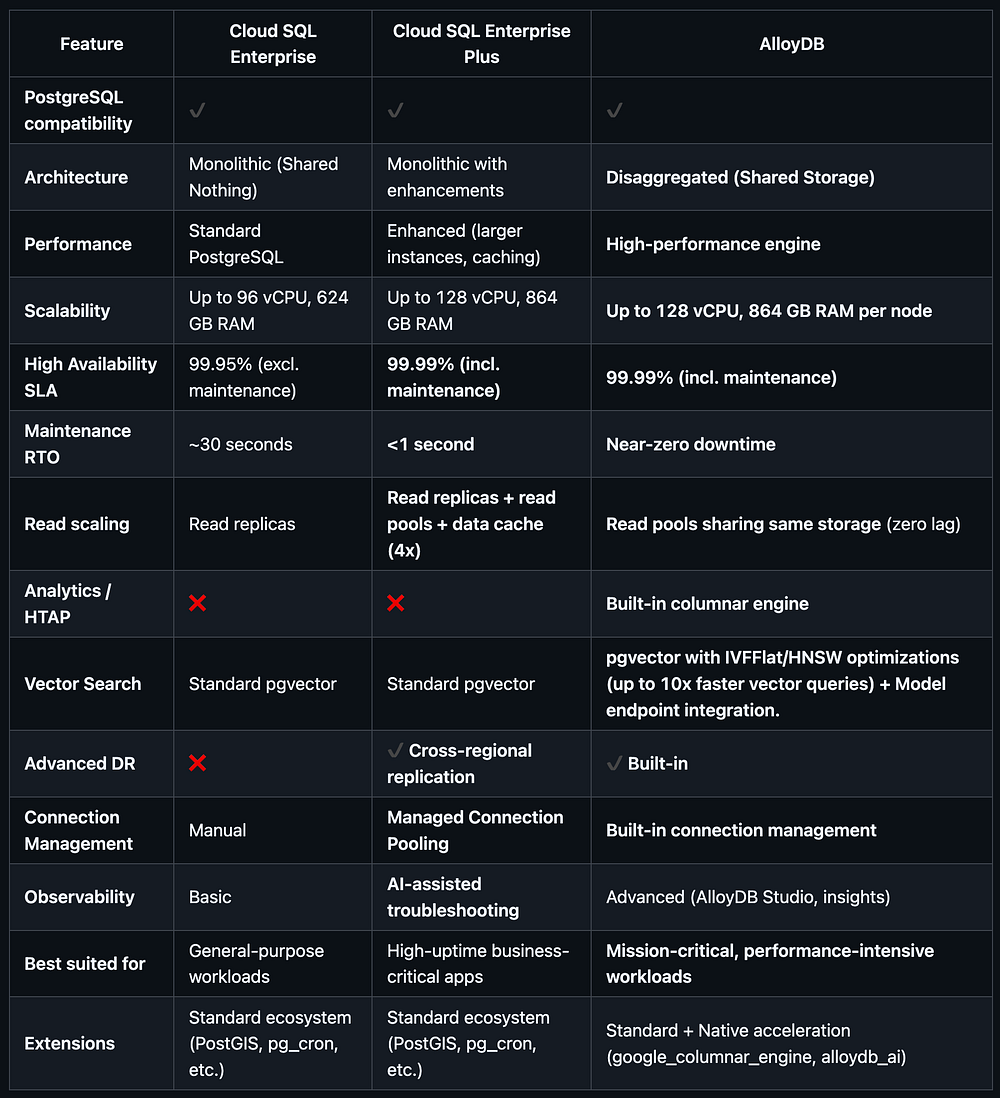
Table: Cloud SQL Enterprise vs Enterprise Plus vs AlloyDB ( View raw data)
🏋️♂️ Performance Benchmarks
To provide concrete performance insights, I conducted comprehensive benchmarks ² across all three PostgreSQL offerings using identical 4-vCPU, 32GB RAM configurations.
The testing methodology utilized a dual approach:
- Standardized Baselines: Using
pgbenchto measure raw transactional throughput (TPS) and latency. - Real-World Simulation: A custom e-commerce workload involving 100,000 transactions, 10,000 users, and 1,000 products to model complex application patterns.
OLTP (Transactional) Performance
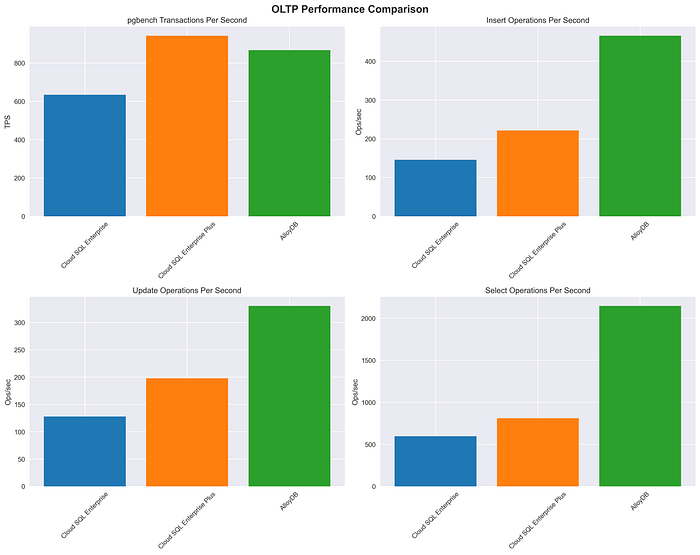
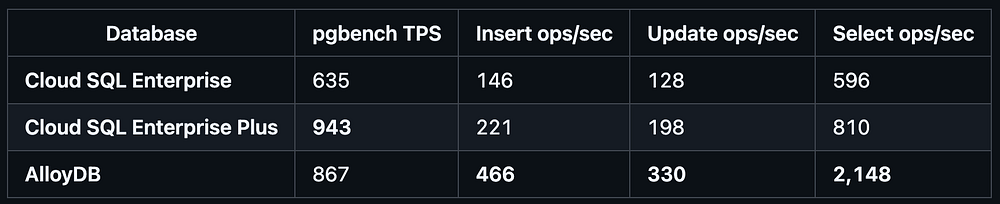
Table: OLTP (Transactional) Performance ( View raw data)
Key findings:
- Cloud SQL Enterprise Plus delivers the highest overall transactional throughput (48% faster than Enterprise)
- AlloyDB excels at SELECT operations with 2.7x better performance than Enterprise Plus
- Performance gaps are significant enough to impact application scalability
Note: AlloyDB’s disaggregated architecture incurs a slight network overhead for transaction management. In smaller instances (4 vCPU), the raw CPU power of the monolithic Cloud SQL Enterprise Plus edges it out. However, AlloyDB’s superior scalability typically reverses this trend on larger instances (16+ vCPUs).
OLAP (Analytical) Performance


Table: OLAP (Analytical) Performance ( View raw data)
Key findings:
- Cloud SQL Enterprise Plus shows 42% faster complex aggregations than Enterprise
- AlloyDB’s columnar engine provides the fastest simple analytical queries
- Enterprise Plus delivers the most consistent analytical performance across query types
Mixed Workload (HTAP) Performance
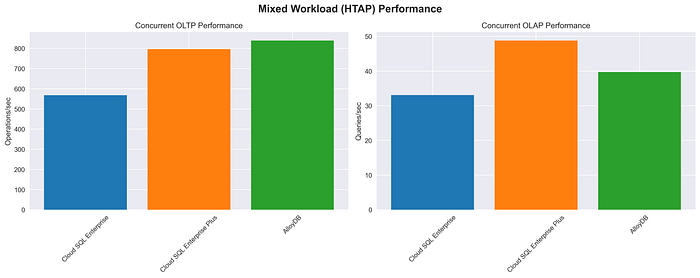
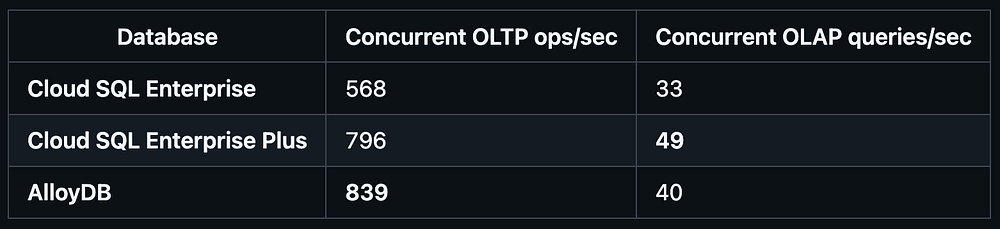
Table: Mixed Workload (HTAP) Performance ( View raw data)
Key findings:
- AlloyDB handles mixed workloads best with 48% higher OLTP performance than Enterprise
- Enterprise Plus excels at concurrent analytical queries
- Both advanced options significantly outperform Enterprise in mixed scenarios
📋 Quick Decision Guide
Based on the performance benchmarks above, here’s a quick reference for choosing the right PostgreSQL service:
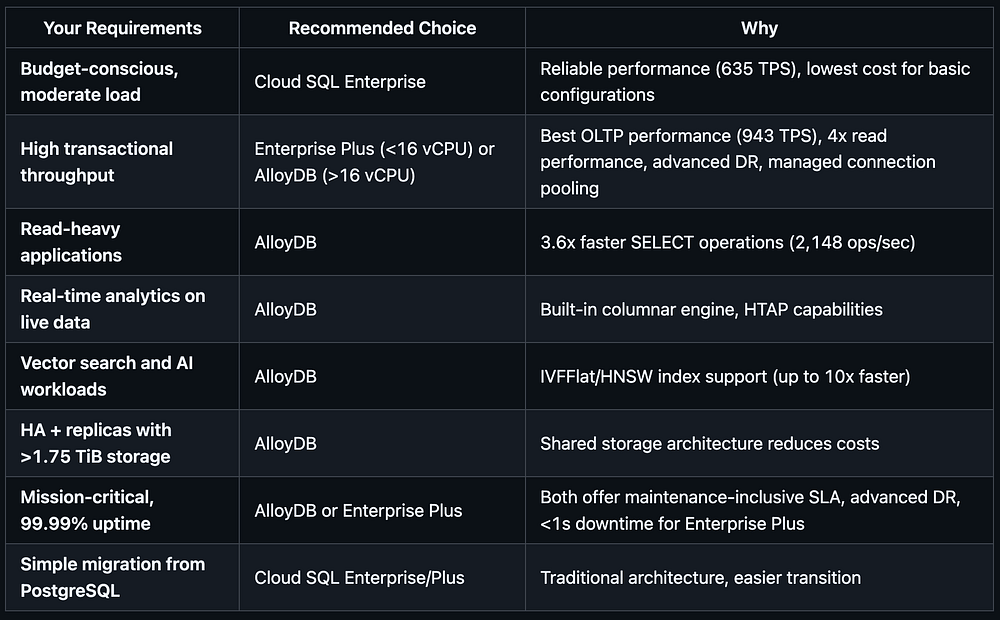
Table: Quick Decision Guide ( View raw data)
❓ When to Use AlloyDB
AlloyDB is not a replacement for all PostgreSQL workloads. It is best suited for scenarios where performance, availability, and scale are primary concerns. For deeper insights into each scenario, here are the detailed use cases:
1. High-Performance Transactional Workloads
AlloyDB excels at workloads that demand consistently high throughput and low latency. My benchmarks show AlloyDB delivering 867 TPS with exceptional SELECT performance (2,148 ops/sec), making it ideal for:
- Large-scale e-commerce platforms with heavy read traffic
- Financial services and payment processing systems requiring fast data retrieval
- Gaming platforms with real-time state and leaderboard updates
Performance insight: While Cloud SQL Enterprise Plus achieved higher overall TPS (943), AlloyDB’s 3.6x faster SELECT operations make it superior for read-heavy transactional workloads.
2. Hybrid Transactional and Analytical Processing (HTAP)
AlloyDB enables transactional and analytical queries to run on the same data without offloading to a separate analytics system. My benchmarks show AlloyDB handling mixed workloads with 839 concurrent OLTP ops/sec, making it ideal for:
- Real-time fraud detection requiring immediate analysis of transaction patterns
- Operational dashboards on live production data
- Embedded analytics in SaaS platforms
Performance insight: AlloyDB demonstrated the best mixed workload performance, handling 48% more concurrent OLTP operations than Cloud SQL Enterprise while maintaining strong analytical query performance.
Important design consideration: When using AlloyDB for analytical workloads, teams need to think differently than with traditional row-based RDBMS systems. The columnar engine is optimized for scanning specific columns rather than full rows. As a result:
- Analytical queries typically do not rely on indexes in the traditional sense
- Queries perform best when they select specific columns rather than
SELECT *. - Schemas and queries should be designed with column-level access patterns in mind
Embracing this mindset is crucial for unlocking the full potential of AlloyDB’s analytical capabilities.
3. Mission-Critical Applications with High Availability
AlloyDB provides a 99.99% SLA, including maintenance, fast failover, and minimal operational overhead. Cloud SQL Enterprise Plus also offers 99.99% SLA with sub-second maintenance downtime. Both are well-suited for:
- Healthcare systems requiring continuous availability
- Trading and financial platforms
- Global ERP and core business systems
Performance insight: Enterprise Plus delivers <1 second maintenance downtime compared to ~30 seconds for Enterprise, while AlloyDB offers near-zero downtime for all operations.
4. AI/ML and Data-Intensive Workloads
AlloyDB integrates well with Google Cloud’s AI and data ecosystem and supports high-performance access patterns for:
- Personalization and recommendation engines
- IoT and telemetry ingestion
- AI-driven applications that require fast access to fresh operational data
5. Vector Search and AI Applications
AlloyDB provides optimized vector search capabilities that significantly outperform standard PostgreSQL implementations. With pgvector optimizations including IVFFlat and HNSW algorithms, AlloyDB delivers up to 10x faster vector queries compared to standard pgvector implementations. This makes it ideal for:
- Semantic search applications requiring fast similarity matching
- Recommendation systems using embedding-based filtering
- RAG (Retrieval-Augmented Generation) applications needing rapid vector lookups
- AI-powered chatbots with large knowledge bases
Performance advantage: AlloyDB’s model endpoint integration allows direct embedding generation within the database, eliminating the need for external API calls and reducing latency for AI workloads.
6. Cost Efficiency at Scale
At scale, AlloyDB can be cost-effective, especially for high-availability and read-heavy workloads. In Cloud SQL Enterprise and Enterprise Plus, HA configurations and read replicas each require separate storage, increasing total storage costs (Primary + Standby + Replica). AlloyDB, by contrast, charges for storage only once, as HA nodes and read pools share the same underlying storage layer.
Cost comparison for identical 4-vCPU configurations with HA + 1 read replica (3 total instances) at 1.75 TiB storage:
- Cloud SQL Enterprise: $2,066/month
- Cloud SQL Enterprise Plus: $2,141/month
- AlloyDB: $2,064/month
The storage advantage: When you need high availability plus read replicas (3 total instances), AlloyDB becomes increasingly cost-effective as your storage grows beyond 1.75 TiB ¹. This is because Cloud SQL stores three full copies of the data (primary + HA + replica), while AlloyDB stores one shared copy across all nodes.
Bottom line: AlloyDB’s superior performance comes at a cost premium for smaller deployments, but achieves cost parity with Enterprise as storage scales beyond 1.75 TiB, making it increasingly attractive for data-intensive applications.
🧾 Conclusion
Google Cloud now offers three strong managed PostgreSQL paths, each serving a distinct purpose:
- Cloud SQL Enterprise for reliable, general-purpose workloads (635 TPS baseline performance)
- Cloud SQL Enterprise Plus for higher-scale applications requiring enhanced availability and performance (943 TPS with 42% faster analytics)
- AlloyDB for mission-critical systems demanding maximum performance, scalability, and built-in analytics (867 TPS with 3.6x faster SELECT operations)
Key insight: AlloyDB becomes more cost-effective as storage increases. With 1.75 TiB of storage and an HA plus read replica setup, AlloyDB and Cloud SQL Enterprise have nearly identical monthly costs ($2,064 vs $2,066). For smaller storage volumes, however, Cloud SQL Enterprise remains the better value because AlloyDB’s compute costs are higher.
Performance-based recommendations:
- Choose Enterprise Plus for pure OLTP workloads requiring maximum transactional throughput
- Choose AlloyDB for read-heavy applications, mixed HTAP workloads, or when SELECT performance is critical
- Choose Enterprise for cost-sensitive applications with moderate performance requirements
There is no single right answer, only the right choice for your workload. If you’re evaluating these options and need guidance on performance, cost, or architectural considerations, the experts at DoiT can help you make a confident, data-driven decision. Connect with us to craft the ideal PostgreSQL strategy for your cloud journey.
References
¹ Storage Cost Calculation: Based on Google Cloud Pricing Calculator (December 2025), Cloud SQL storage costs $0.17/GiB/month per instance. For the HA + 1 read replica configuration, you need 3× storage allocation (primary + HA + replica) plus backup storage (approx. $0.08/GiB/month) for the primary instance only. AlloyDB storage costs $0.30/GiB/month + $0.10/GiB backup = $0.40/GiB total, but uses shared storage across all nodes.
Breakpoint analysis:
- Cloud SQL (3 instances): (3 × $0.17) + $0.08 = $0.59/GiB effective rate
- AlloyDB (shared): $0.40/GiB total rate
- AlloyDB’s storage is always more cost-effective, but total cost parity occurs around 1.75 TiB, where storage savings offset AlloyDB’s higher compute costs.
Pricing Calculator Links:
² Performance Test Methodology: Complete test suite and methodology available at: https://github.com/aamir814/gcp-postgres-benchmarks. Tests include OLTP (pgbench + custom transactions), OLAP (complex analytical queries), and mixed HTAP workloads across identical infrastructure configurations.