

Picutre by dennizn from Shutterstock
A customer of ours recently encountered a problem with their S3 bucket during the process of transferring objects from Standard storage to Glacier Deep Archive. Despite moving the objects to Glacier Deep Archive the objects were still showing up in Standard storage.
I investigated the customers S3 bucket and found that sure enough the Standard storage had not reduced from its original size of 4.9TB. This can be seen in the image below which is taken from the storage metric for the customers S3 bucket.
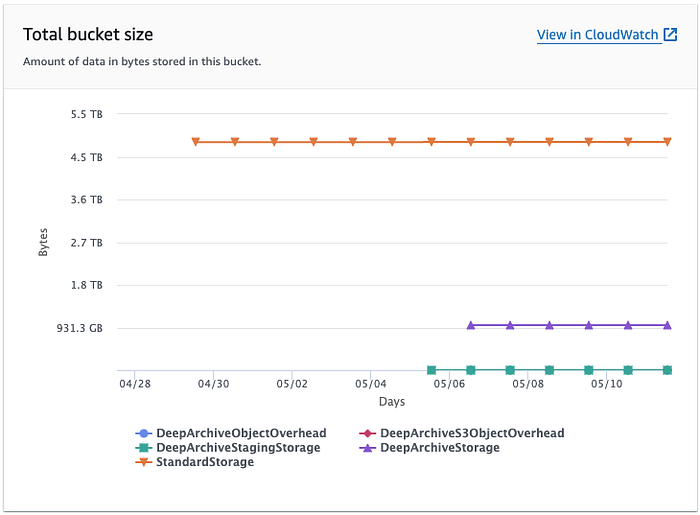
S3 Metric Total Bucket Size
From the S3 Metric Total Bucket Size we can see Standard Storage had 4.9TB. The orange line in the image represents the Standard storage. The customer had initiated the transfer of objects to Glacier Deep Archive on 6th May, but by the 10th May metric still didn’t reflect this change.
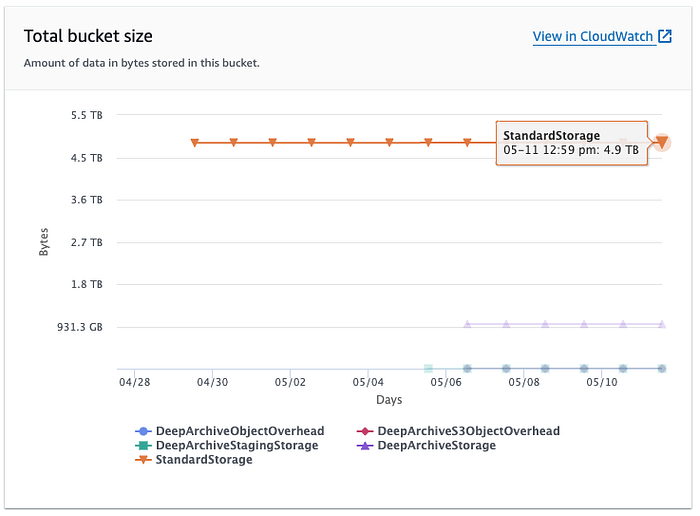
S3 Metric for Standard Storage
When I opened the Total Bucket Size metric in CloudWatch I noticed a variance between the S3 metrics and CloudWatch metrics. The S3 metric showed Standard storage at 4.9TB for the bucket, but CloudWatch metric showed the bucket contains 5.3TB of Standard storage.
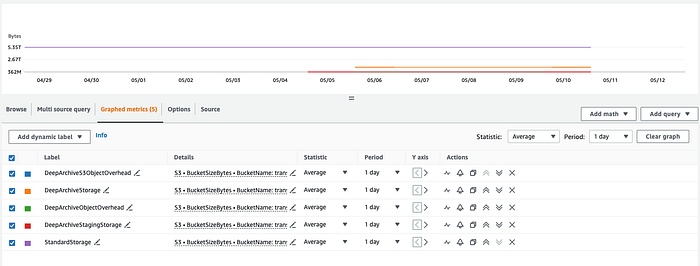
CloudWatch metrics for the buckets by storage class

Breakdown of metrics per storage class
From my investigation I discovered two problems with the customer’s transition of objects between storage classes:
(1) S3 Standard Storage metric had not reduced after objects were moved to a different storage class.
(2) S3 metric & CloudWatch metric were showing a significant variance between the total Standard storage.
Solving the Problems
Digging into the details of how our customer transferred the objects from Standard to Glacier Deep Archived, I found that they had performed this operation manually from the S3 console. Opening the object in the console they had selected Action, Edit actions Edit storage class.
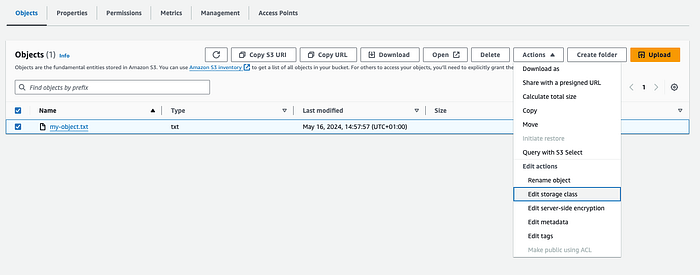
Manually changing the objects storage class
Changing the objects storage class via the console will simply create a copy of the object and it will retain the existing one as a previous version (if you have version enabled on the bucket).
When you edit the objects storage class via the console, it doesn’t change the class but instead creates a new file in the selected storage class.
Since the bucket has versioning enabled, there are now two versions of the file: one in Glacier Deep Archive (the current version) and one in Standard (the non-current version). This is the reason why there was no decrease in the size of Standard storage.
Lifecycle Rule
When looking into the variance between the S3 & CloudWatch metric for the Standard class I found that S3 metrics shown on the bucket page only shows the combined size of the current files in the S3 bucket, whereas CloudWatch shows not only current files but non-current and failed multipart uploads.
As the customer had manually edited the objects storage class this had led to a new copy of the object being placed in Glacier Deep Archive as the current version and the object in Standard storage becoming the non-current version.
As our client did not require the non-current version in Standard storage I recommended they create a lifecycle rule to clean up the bucket and remove the non-current versions from Standard.
Our customer implemented the following Lifecycle rule. The rule is saying two days after an object becomes non-current (i.e., it’s replaced by a newer version), all non-current versions of that object are permanently deleted.
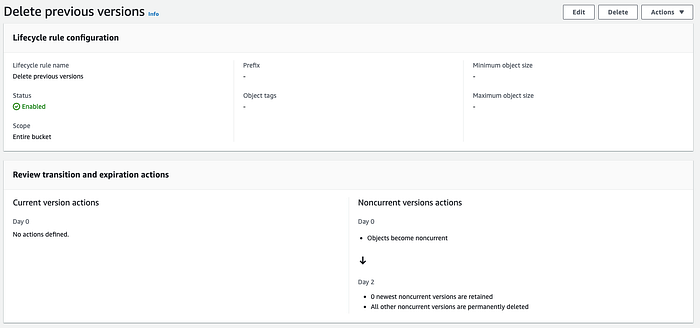
Lifecycle rule to delete non-current version
**The Result**
Upon implementing the Lifecycle rule on 14th May, we observed that S3 began to automatically remove the non-current versions.

0Standard storage decreased after implementing the Lifecycle rule
The lifecycle rule significantly reduced the S3 bucket storage, shrinking it from 4.9TB to 1.3TB. This resulted in savings for the customer on their S3 bucket costs and also enhanced the performance of the S3 bucket.
This straightforward action not only saved the customer on storage fees but also optimised bucket performance. In the graph below we can see how the customers S3 costs rose when they performed the manual transition of objects to Glacier Deep Archived on the 6th May and the drop in storage costs after implementing the life cycle rule on the 14th May. This chart is provided by DoiT Cloud Navigator— Cloud Analytics.
Take Aways
This case highlights the need for S3 Lifecycle rules for effective S3 bucket management and storage class transitions. The customer’s manual change led to unnecessary duplication in Glacier Deep Archive and Standard. This could have been avoided with Lifecycle rules.
Additionally, using S3 and CloudWatch metrics is key for understanding your S3 bucket contents, aiding in cost management and performance optimisation.
Get In Touch
If you have any questions about S3 optimisation or need help reviewing your AWS architecture, don’t hesitate to reach out to us at DoiT International. Our team of experts is always ready and happy to assist you.