

If you are building billing integrations for FinOps or CloudOps, I have bad news: the data you just fetched from that SaaS API is probably wrong.
Not because of a bug, but because of how cloud billing works. Usage metering is often eventually consistent. Credits are applied late. SKUs are re-rated days after the fact. If your integration triggers once, fetches yesterday’s data, and moves on, your FinOps dashboard is drifting further from reality every single day.
In this post, I’ll walk you through building a billing integration that actually survives in the real world.
We’ll look at a GitHub Billing integration pattern we built using CloudFlow, a low-code data orchestration engine. We will solve the hardest problem in billing ingestion: handling retroactive data updates without creating a duplication nightmare.

The Stack: A Quick Primer
Before we dive into the code, here is the context of the tooling we are using. You might not be familiar with these components, but the architectural patterns apply to any robust data pipeline.
- CloudFlow : This is the engine running our logic. It’s a low-code platform designed to build sophisticated billing and operational workflows without managing infrastructure.
- DataHub : This is our destination. It is the unified data repository within DoiT Cloud Intelligence™, where normalized billing data from AWS, Azure, GCP, and custom sources (like Databricks, Snowflake, DataDog, etc.) lives side-by-side for analysis.
Our goal is simple: Get GitHub billing data into a FinOps DataHub so we can analyze it alongside our other cloud and SaaS spend.
**CloudFlow Implicit Vectorization**
CloudFlow handles iteration differently from standard DAG orchestrators. It utilizes implicit vectorization: if a step outputs an array (e.g., a list of dates), the engine automatically fans out subsequent nodes without requiring explicit “for-each” or “map” control structures.
This allows the pipeline to dynamically scale concurrency based on the payload size, processing T[] inputs as parallel execution threads, while maintaining a linear and readable visual graph.
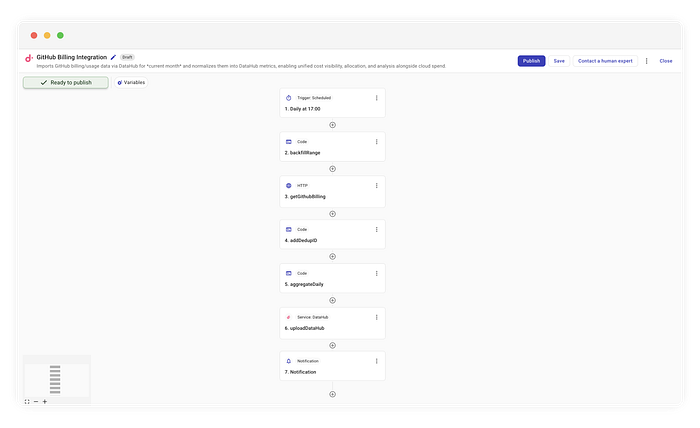
That’s all you need to integrate GitHub with your FinOps stack.
Additionally, the engine supports stateful suspension for governance. While this billing integration runs unattended, operations with side effects (like resource termination) often require Human-in-the-Loop (HITL) validation.
CloudFlow can pause the execution context at specific “Approval” nodes, persisting the state until an asynchronous signal, such as a webhook from Slack or an email click, resumes the pipeline.
The Problem: The “Immutable” Lie
Most developers build billing pipelines like this:
- Wake up at 01:00 UTC.
- Query the API for
date = yesterday. - Save the result to the data warehouse.
This assumes billing data is immutable once written. It isn’t.
SaaS providers frequently update billing records for the current month. A usage spike from the 12th might not be fully reconciled until the 15th. If you only fetched the 12th’s data on the 13th, you missed the update.
To fix this, we need a Re-polling Window Strategy. Instead of fetching “yesterday,” we fetch “Month-to-Date” (MTD) every single day.
The Architecture
We are going to build a flow that runs daily but re-processes the entire current month every time. This ensures that if GitHub updated the cost for the 1st of the month on the 20th, we catch it.
Complete flow implementing GitHub billing integration
Here is the high-level logic we will implement in CloudFlow:
- Schedule: Run daily at 10 am ET.
- Window Calculation: Determine the range (Day 1 to Current Day).
- Fetch (Fan-out): Query the API for every day in that window.
- Deduplication (Crucial): Generate deterministic IDs to prevent duplicates.
- Ingest: Upsert the detailed data into DataHub.
- Notify: Aggregate totals separately for a human-readable summary.
Let’s build this step-by-step.
Step 1: The Rolling Window (The “Backfill”)
We start with a standard cron trigger running daily at 17:04. But rather than passing yesterday to our API step, we use a custom code step called backfillRange.
This step generates an array of days representing the entire month so far.

Extract number of days to process
// Simplified logic from the 'backfillRange' step
const now = new Date();
const startDay = 1;
const endDay = now.getUTCDate();

// Generate an array [1, 2, ..., endDay]
const days = Array.from({ length: endDay }, (_, i) => startDay + i);
return days;
Why this matters: By returning an array, CloudFlow automatically “fans out”. The subsequent steps will run once per day in this array. On the 30th of the month, this flow runs 30 times, refreshing the entire billing history for that period.
The Output Schema To ensure downstream nodes can validate and autocomplete your data, you define an Output Schema. This schema strictly models the JSON value your node returns (e.g., an array of strings or a specific object), intentionally ignoring CloudFlow’s internal execution wrappers or metadata. By defining the shape recursively , matching your top-level object or array exactly , you create a type-safe contract that guarantees the rest of the pipeline receives exactly what it expects.
Step 2: Parametrized API Calls
Next, we use a standard HTTP connector to hit the GitHub endpoint:
GET https://api.github.com/organizations/{org}/settings/billing/usage

Calling the GitHub Billing API
We dynamically inject the day from our previous step into the query parameters:
year:{CurrentYear}month:{CurrentMonth}day:{backfillRange.message}(The current item from our loop)
This allows us to respect GitHub’s API structure while maintaining the flexibility of our rolling window.
Step 3: The Idempotency Key (The “Secret Sauce”)
Here is where most integrations fail.
If you fetch the data for “Jan 1st” thirty times over the course of the month, you cannot just append it to your database. You will end up with 30x the cost. You need an Upsert strategy (Update if exists, Insert if new).
To do this reliably, you need a deterministic ID — a “fingerprint” for every billing line item. We add a code step called addDedupID.

Creating hashes for deduplication
We look at the raw data and hash the immutable fields to create this ID.
// Logic inside 'addDedupID'
const { createHash } = require("crypto");

function computeUsageItemId(usageItem) {
  // Extract only string fields that define the resource (product, SKU, unit type, etc.)
  const stringFields = extractStringFields(usageItem);

  // Create a SHA256 hash
  return createHash("sha256")
    .update(canonicalStringify(stringFields))
    .digest("hex"); // [cite: 144, 145]
}
By calculating a hash based on the resource attributes (e.g., sku, product, unitType), we ensure that even if we fetch the same record 100 times, the ID is always identical. DataHub uses this ID to overwrite the previous entry, effectively capturing any updates without duplicating the row10.
Step 4: Ingestion vs. Notification
This is where the power of CloudFlow shines: branching logic for different audiences.
For the Machine (DataHub):
We send the granular, line-item data (with our generated IDs) directly to the uploadDataHub step. This ensures our analytics platform has the highest fidelity data possible for drilling down into costs by repository or SKU.
For the Human (Notifications):
We don’t want to spam our Ops channels with thousands of JSON lines. Parallel to the upload, we run an aggregateDaily. This code iterates through the items and sums the netAmount to create a clean summary.
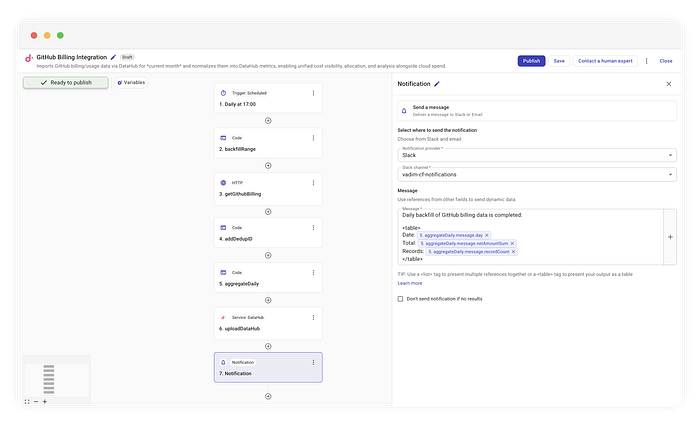
Example Slack notification
While our example uses Slack, the beauty of this flow is that the notification destination is completely agnostic. You can route this summary to whatever tool your team uses:
- Email: For a formal daily audit log.
- Amazon SNS: To trigger downstream Lambda functions.
- Microsoft Teams: Using a webhook connector.
- Generic HTTP: To POST the summary to any internal dashboard.
In our case, we simply format the aggregated data into a readable table and fire it off.
Daily backfill of GitHub billing data completed:

| Date       | Total   | Records |
|------------|---------|---------|
| 2023-10-01 | $45.20  | 120     |
| 2023-10-02 | $48.10  | 135     |
This separation of concerns, granular data for the warehouse, aggregated data for the humans , keeps both your FinOps and DevOps teams happy.
The Payoff — **_Automated Governance & Chargeback._**
Ingesting this data into DataHub enables downstream FinOps workflows that raw APIs cannot support. First, the dataset is automatically monitored by Anomaly Detection algorithms. If a CI/CD pipeline misconfiguration causes a compute spike, the system identifies the deviation from the historical baseline and generates an alert. Second, the data becomes available for Cost Allocation.
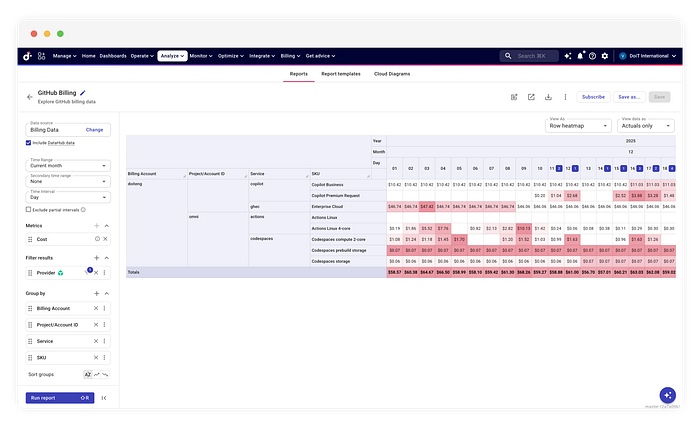
Building billing integrations is less about the API connection and more about the data lifecycle. Tools like CloudFlow allow us to model this lifecycle visually, solving complex problems like retroactive updates without writing a bespoke ETL engine from scratch.
By implementing a “Backfill by Default” pattern, you stop fighting with your finance team about why the numbers don’t match, and start trusting your data again.
This workflow was built using CloudFlow, part of the DoiT Cloud Intelligence ™ portfolio.